OneDrive reporting no internet while other Android apps work doesn't always mean your Wi-Fi is down. Compare cellular data, then update and restart OneDrive; its sign-in connection can fail even when web browsing works.
In an older confirmed case, the owner had switched off trusted certificates. Check that route only if certificate settings were changed, rather than enabling unfamiliar items or clearing your phone's credentials.
In this guide
1. Compare Wi-Fi with cellular data
Open a fresh page in your browser, then try OneDrive again. A page already on screen may be cached, so load something new. If other apps can't reach new content either, start with the phone's network connection.
Turn Wi-Fi off temporarily and try OneDrive using cellular data, if available on your plan. Check whether the app reaches the sign-in screen or your file list. Then turn Wi-Fi back on to compare the same action.
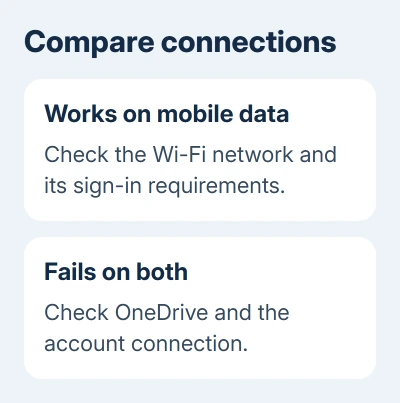
If cellular data works but one Wi-Fi network doesn't, focus on that network. A school, workplace or hotel may require a sign-in page or restrict connections. Ask its administrator about OneDrive access before resetting the app.
If OneDrive fails on both connections while other apps work, continue with the app and sign-in checks. Failure on both connections points away from a fault limited to your home router. The app and sign-in checks can help narrow it down.
For a connection warning that specifically mentions a mobile hotspot, compare the VPN and upload permissions before changing trust settings.
The original owner reported the error on home Wi-Fi and elsewhere while browsing and email still worked. Their eventual fix involved the phone's trust settings, not replacing the wireless router.
2. Update and restart OneDrive before clearing anything
Open Google Play Store, search for Microsoft OneDrive, and tap Update if it's offered. After the update finishes, restart the phone and try opening your files again.
Check the exact point where the error appears. An error before sign-in needs different checks from an empty file list after sign-in or an upload waiting for Wi-Fi. Record the wording so the next check matches what your app is doing.
Microsoft's Android troubleshooting page lists an internet-access check. Some features depend on Wi-Fi or cellular-data settings.
If only camera backup is waiting, check that feature's network choices in OneDrive settings. That setting controls uploads. Changing it won't fix a no-internet message that stops you signing in.
I'd check the app update before touching certificates. It takes fewer changes, and certificate controls affect the phone's secure connections beyond OneDrive.
If your phone can no longer install the current OneDrive app, note its Android version. The old report used Android 5.0.2 and OneDrive 4.12; those were the versions involved in that case, not the requirements for a current phone.
3. Review trust settings only after a known change
Trusted certificates help the phone decide which secure connections it can trust. Turning off a certificate used by a service can break that connection even though other apps continue working.
On the older Android phone in the confirmed report, the path was Settings > Security > Trusted Credentials. An owner restored checkboxes they'd previously cleared and reported that OneDrive worked again.
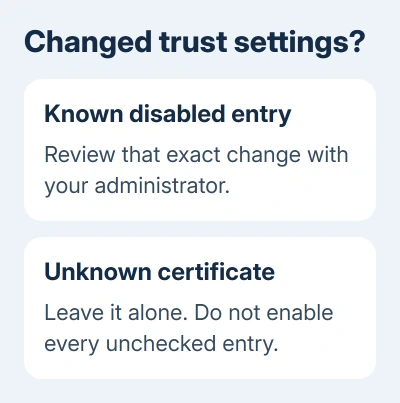
The owner was undoing a change they'd made. The report didn't name the certificates, so it can't tell you which entries your phone or organization's network needs.
On a current Pixel, credential controls are under Settings > Security & privacy > More security settings > Encryption & credentials. Other Android makers use different labels; search Settings for credentials if that path isn't present.
Review a known certificate change with your device or network administrator. Leave unfamiliar entries alone, including unchecked ones, and don't add downloaded certificates or clear credentials to try to fix this error.
For a managed work phone, ask IT whether a required certificate or sign-in setting is missing. They can provide the approved setup. If you don't know what changed, give them the connection results from step 1.
The Android certificate controls include removal commands that can remove certificates your network needs. The owner restored disabled entries; they didn't clear credentials.
4. Use app recovery when trust settings weren't changed
Return to the app's own recovery steps if certificate settings haven't changed. Before clearing app data or uninstalling, check whether you have pending uploads or offline files without another saved copy.
Open Android Settings > Apps > OneDrive and tap Force stop. Open Storage or Storage & cache, then use Clear data and Clear cache. Uninstall OneDrive and reinstall it through Google Play.
Clearing app data removes the local app setup and requires signing in again. Have the account password and your usual verification method ready. Don't use a data reset to work around an account you can't sign back into.
After reinstalling through Google Play, use the original account to open one existing cloud file. If the file list loads, test the upload or camera-backup action separately rather than assuming every feature has resumed.
In the old forum thread, clearing Play Store data and checking WebView hadn't fixed the owner's problem. Play Store cleanup wasn't what got OneDrive working for them.
If the phone's entire connection fails, use the appropriate hotspot connection checks when you're using another phone's hotspot. If the same files fail on a computer too, check OneDrive syncing.
Send support the connection comparison
Contact OneDrive support using an available in-app Help or feedback control. For an organizational account, give IT the sign-in error and ask whether your phone has the network setup it needs.
Provide the phone model, Android and OneDrive versions, the exact error and whether Wi-Fi and cellular data give different results. Mention any VPN, managed certificate or security setting changed shortly before the error began.
The Short Version
Compare Wi-Fi with cellular data, then update and restart OneDrive. Restore only known certificate changes with appropriate advice. If trust settings weren't changed, use the app's recovery route and send support the connection results.
Checked November 16, 2026.