Outlook contacts can become read-only after a Google Workspace migration even when your folder permissions show full access. Make urgent edits through webmail, then have your administrator check the migrated folder's stored flags.
A service fix stopped new migrations from creating this fault, but didn't repair folders already affected. Shared folders also need the right edit permissions. Check which folder is locked before asking IT to apply the migration repair.
In this guide
1. Check whether the whole Contacts folder is locked
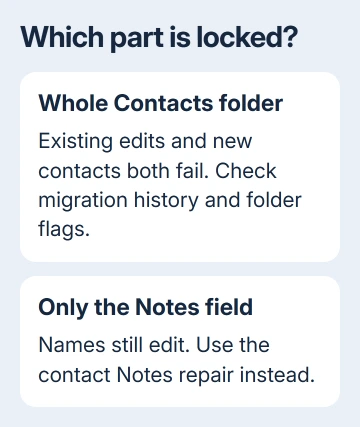
Open People in classic Outlook and select the affected folder. Open one of your personal contacts, change a small detail and try Save & Close. Then try creating a new contact in that same folder.
If both actions fail with a read-only or permission message, the folder itself needs attention. If only the Notes box in older contacts is locked, use the separate contact Notes repair.
An entry in your company directory isn't the same as a contact you've saved. A directory search doesn't give you permission to rewrite someone's company details. Check an entry in your own mailbox's Contacts folder.
For a folder someone else shared with you, ask the owner whether your permission allows edits. The migration repair later in this article applies to an affected mailbox folder, rather than every read-only address book Outlook can display.
Write down the complete error and the folder name. A screenshot of the message helps IT distinguish a folder lock from a single damaged contact. If your own root Contacts folder rejects new entries too, continue with the web comparison.
2. Save urgent changes in the mailbox's web People page
Sign in to your organization's Outlook webmail with the affected work account. Open People, select the same personal contact and choose Edit contact. Change the needed detail and save it, then reopen the entry to check the saved value.
An owner with this migration fault confirmed on Microsoft's forum that online editing worked. The desktop root Contacts folder remained locked, but they could add, edit and delete online. A new subfolder also allowed changes.
Use webmail for urgent edits. Moving the address book into a new folder changes its location, but leaves the original folder locked. Connected apps won't necessarily use that new folder automatically.
Check the account name before changing a contact online. Locally stored Outlook contacts won't appear on a different mailbox's web People page. This check only helps when both apps are showing the same saved contact.
If web editing also fails, tell IT that result. It changes the next step: they need to check mailbox ownership and permissions, rather than assuming the desktop migration fault explains everything.
3. Match the folder to the documented migration fault
Ask your administrator whether the mailbox was migrated from G Suite, now called Google Workspace. This migration fault left the Contacts folder marked ReadOnly in the settings stored with the folder.
Microsoft's migration issue notice identifies service version 15.20.2132.000 as the fix for new migrations. That is a historical service version, not an Outlook update to install now.
The service fix didn't remove the read-only setting from folders already affected. Your organization can have the service update and still need IT to repair a folder from an old migration.
The original owner tried safe mode, an Office repair and the recovery tool without restoring editing. Their other Microsoft 365 account worked, and multiple Outlook versions in the organization had the same locked-folder behavior.
I'd check that migration history before spending another hour reinstalling Office. Those failed attempts don't rule out every desktop fault, but they explain why a normal repair isn't the first answer for this particular pattern.
4. Have IT repair the affected folder property
The folder repair procedure uses MFCMAPI, a tool that can change mailbox properties directly. Ask your mailbox administrator to handle it after confirming which mailbox and folder need repair.
Have IT preserve the contacts and record the original property value before changing mailbox data. The repair targets that Contacts folder only. Keep unrelated folders and the address book intact.
The published procedure starts MFCMAPI and opens Tools > Options. It enables Use the MDB_ONLINE flag when calling Open MsgStore and Use the MAPI_NO_CACHE flag when calling OpenEntry to work with the online mailbox.
Next, IT selects Session > Logon, chooses the affected mailbox profile and opens the appropriate Microsoft Exchange Message Store. The folder path is Root Container > Top of Information Store > Contacts.
In the right-hand properties list, the property to open is PR_EXTENDED_FOLDER_FLAGS. The documented binary value is 010400001000. IT sets that value and selects OK. Another property's similar name isn't a substitute.
These details matter because the ordinary folder Permissions tab isn't the property being repaired. That tab can show full access while the migration flag still blocks contact changes in desktop Outlook.
5. Confirm editing and escalate the remaining failure
Once IT finishes the repair, start Outlook again and select that original Contacts folder. Edit an existing contact, save it and reopen it. Create one new contact there as well, to check that both actions now work.
If editing returns, check any devices that use those contacts through their normal sync route. An iPhone missing an otherwise editable contact needs the Outlook contact-sync settings checked separately.
If the folder still refuses changes, send IT the exact error, affected account, migration history and web-editing result. Include File > Office Account > About Outlook details and whether another mailbox works on the same computer.
Have your Microsoft 365 admin report the migrated Contacts folder to support if the property repair leaves it locked. Include the failed edit and new-contact checks so support can examine the remaining folder fault.
The Short Version
A migrated folder can stay read-only even when you have full permissions. Use web People for urgent edits and ask IT to repair its stored flag. Check shared-folder rights or a locked Notes field separately.
Checked November 17, 2026.
 If you have any business, I can build it online