Removing Activation Lock on an Apple Watch requires the Apple Account linked to it. The usual way is to unpair the watch from the owner's iPhone.
Without that phone, the owner can erase and remove the watch through Find Devices on iCloud.com. Resetting the watch alone doesn't remove the account lock.
In this guide
Choose the route for the account that owns the watch
Check which account setup asks for. If it's yours, use that Apple Account to remove the lock. If it belongs to a previous owner, they need to release that watch from their account before pairing can finish.
A forgotten watch passcode is a different problem. Erasing the watch can clear its local passcode, but the Apple Account requirement remains. Repeating the same reset won't change the account attached to Activation Lock.
The Apple Watch lock controls explain the everyday passcode lock. Use the account-removal steps here when setup specifically asks for the account associated with the watch.
For a watch you own and can still access beside its paired iPhone, use the next section. For a watch you've sold, sent away, or bought secondhand, the remote-removal section is the important one.
Unpair it from the owner's iPhone
Keep the watch and its paired iPhone near each other. On the iPhone, open Watch, choose My Watch, then select All Watches. Find the correct watch entry and tap its information button.
Choose Unpair Apple Watch, then confirm Unpair [watch name]. Check the name before confirming if several watches are listed. Unpairing erases the selected watch and removes its link to the phone and account.
For a cellular model being sold or given away, choose Remove Cellular Plan when offered. Removing a plan from the watch and canceling its billing are separate jobs; contact the carrier if the subscription also needs cancellation.
When prompted, enter the linked account's password and its sign-in address or phone number, then confirm. Signing in to that account allows unpairing to remove Activation Lock.
Apple's watch-specific removal instructions recommend this route before service, sale, or giving the watch away. The account password matters even if you already know the watch's screen passcode.
Wait for the unpairing and erase process to finish before handing over the device. For a move to another phone, follow the watch-transfer procedure so your backup and pairing steps stay in order.
Remove the watch remotely without the paired iPhone
The linked account owner can do this from a browser. Open icloud.com/find, sign in using the account linked with that watch, and find the watch in All Devices.
Select the watch's name, then choose Erase. Continue with Next, entering the account password again if requested. A phone number can be added if wanted; continue through Next and confirm Erase.
After the watch has been erased, choose the Remove button shown for it, then Continue. If the account has AppleCare+ Theft and Loss coverage that applies, choose Deactivate & Remove when that confirmation appears.
Don't stop at Erase. The separate removal step is what releases the device from the account for another person's setup. A watch can have no personal contents left and still request the previous account during pairing.
If the erase request is waiting because the watch isn't reachable, read its status rather than starting the process again. Follow the account-removal instructions for an offline device when that is the situation shown.
For an offline device in Find Devices, those instructions use Remove This Device. Follow the buttons shown for your watch's current state. The erase steps for a watch and the offline removal steps use different screens.
Once removal finishes, try pairing the watch with the intended iPhone. You'll know the handover worked when setup continues without asking for the former owner's Apple Account password.
Ask the previous owner to release a used watch
Send the seller the remote-removal steps and ask them to remove this particular watch from Find Devices. They can do that from their own account without giving you their password or signing in on your phone.
Explain that the watch is already erased if that is what you see. That detail matters because another factory reset isn't the missing step. The seller needs to complete the account removal.
After they confirm it is removed, begin pairing again. If setup still asks for their account, send them the exact message and ask them to verify that they selected the right watch.
Seeing the language-selection screen on an erased watch doesn't tell you whether the account lock is gone. Try pairing it and check whether setup still asks for the former account.
If the seller can't or won't release it, request your refund or return from that seller or the marketplace handling the sale. I'd settle that before paying for a repair, because a working display and battery won't solve an account lock.
Recover your own account before resetting again
If the requested account is yours but you can't remember its password, use the account-recovery link in the Activation Lock support instructions. Start with an email address or phone number you normally use for Apple services.
Complete the password reset or account recovery before returning to the watch-removal steps. If account recovery takes time, wait for it to finish. Another erase won't let you skip signing in with the linked account.
If the watch belongs to a business or school, contact its IT team or manager. They need to handle the organization's account or device-management arrangement rather than having you try unrelated personal accounts.
Keep the message visible or write down its wording. Support needs to know whether you're stuck at the watch passcode, Apple Account password, or verification code. Each prompt is a different part of setup.
Use purchase evidence when account removal isn't possible
The Activation Lock support request is the next route when you need help and have proof-of-purchase documentation. Gather that documentation before starting the request.
Include the watch's serial number and the account-lock message with your support details. Follow the request's instructions for the purchase records it needs. Don't assume a conversation with a marketplace seller will be accepted instead.
If a secondhand purchase lacks usable ownership records and the linked owner is unavailable, pursue the seller's return process. Support will review the ownership records, but it can't promise to release every locked used watch.
The Short Version
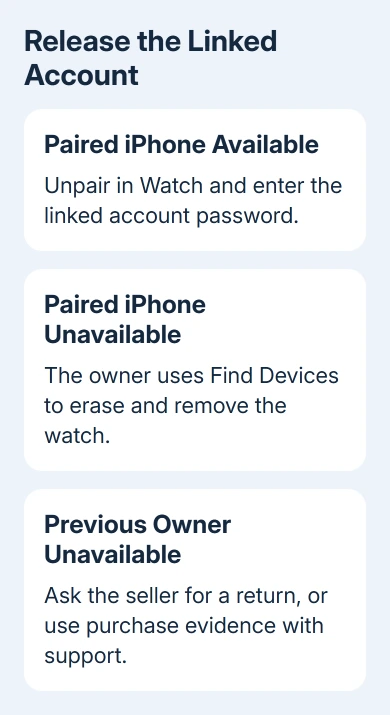
Unpair through the owner's iPhone, or finish remote removal in Find Devices. A used watch needs the seller's help. For your own locked watch with purchase evidence, start an Activation Lock support request.
Checked November 12, 2026.