The Android setup notification points to unfinished Google setup, even when the phone works. Open the reminder and work through the remaining screens. On a Galaxy, finishing Samsung setup alone can leave Google's setup waiting.
Owners on the Samsung forum confirmed that finishing Google setup stopped the repeated popup. A setup reminder, an Android Setup crash and a software-update notice need different actions. Read the message before changing app settings.
In this guide
1. Open the reminder and finish its remaining choices
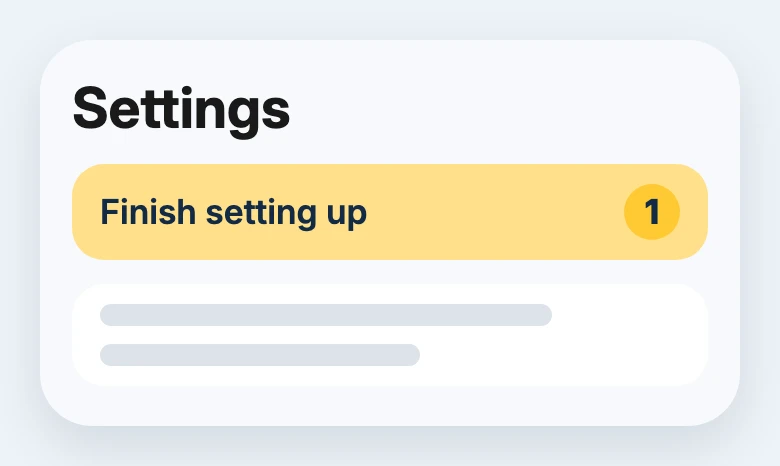
Open the notification shade with a downward swipe, then tap the setup reminder. Its wording can include Finish setting up your device, Finish setting up your Pixel or a setup-in-progress message containing your phone's name.
Follow the remaining screens until setup finishes. Read the transfer, account and feature choices. If you don't want an optional item, choose the skip option offered on that screen so setup can continue.
Don't select a data-copy option just to remove a message while the transfer decision is still pending. Keep the old phone available until you've checked important contacts, photos and messages on the new one.
When setup finishes, check the notification shade again. The reminder should stop returning as you use your phone. If setup is still unfinished, swiping the reminder away only hides that notice for now.
If tapping the notification doesn't open setup, open Settings and look for Finish setting up near the top. Google's Android transfer troubleshooting instructions give both routes, while noting that availability depends on the manufacturer.
If the setup process opens but repeatedly stops on a particular screen, note that screen and its message. Check whether it is waiting for a transfer, an account choice or an actual error before proceeding.
2. On a Galaxy, complete Google setup as well as Samsung setup
A Samsung phone can have Google account and transfer steps alongside Samsung's own setup. The Home Screen can be usable while either setup process is still unfinished. Use the returning notification to open the unfinished part.
One owner initially thought the reminder belonged to Samsung setup. They later said it was the Google setup side. Another owner continued with that setup after reading the explanation and confirmed the popup stopped.
Finish the offered setup before considering a wipe. The report didn't mention a hidden switch or show that Android Setup had to be disabled. I'd complete those choices before changing a system app's storage or permissions.
If setup asks whether to copy from another phone, decide whether you still need that transfer. Choose the option that fits your situation, rather than repeatedly backing out at the same choice and expecting the reminder to disappear.
Return to your normal apps and watch for the notice. If it returns, record its wording and which setup page opens. Support can then check that stage instead of treating this as a general notification problem.
3. Use the Pixel route that matches the phone's generation
Earlier Pixel phones
On an older Pixel, a notification can say Pixel setup isn't done, with Finish setup available. During the first few days, the top of Settings can also offer Finish setup. Open that entry to continue the initial flow.
Pixel 9 and later
On Pixel 9 and later, Android Switch can continue a transfer after initial setup. A Finish setting up your Pixel notification can still appear. Missing the first transfer opportunity doesn't always mean starting over.
To transfer data later, open Settings and look for Back up or copy data > Copy data > Start. Some newer layouts place Android Switch under Accounts and backup. Use Settings search if your version shows a different arrangement.
Choose the source phone and missing data, then follow the transfer prompts. Further copies must come from the device used for the initial transfer. Choosing a different source phone can require a reset, which isn't a notification fix.
If a cable transfer repeatedly fails, try a cable that supports data, not just charging. Keep both phones powered and follow any connection prompt on the old phone. Finish the transfer summary so you know what actually arrived.
For contacts specifically, the Android-to-Android contacts guide covers checking the Google account and copied contacts. A completed setup screen doesn't mean every contact was stored in that account originally.
4. Separate unfinished setup from an error or update alert
Android Setup keeps stopping means the setup app is crashing. If tapping the reminder leads to that error and returns you to the same point, use the Android Setup crash checks rather than trying to hide the reminder.
A notice named Google Play system update, System update or Software update belongs to an updater. It isn't a reminder to finish setting up a new phone. Open its own update screen and read what remains.
An account-verification screen after a reset isn't an optional reminder either. Sign in with the account requested to confirm ownership. Turning off notification permission won't bypass that requirement.
If the actual data-copy process has been stuck for hours, restart the phone and retry the setup flow as the transfer guidance recommends. Record any error first so the restart doesn't leave you guessing which stage failed.
Check the transfer result afterward. A phone can reach the Home Screen with only part of the old device's data copied. If something is missing, you'll still need to recover it even if the reminder has gone.
Ask the phone maker about a reminder that keeps returning
If setup reaches its final screen but the same notification returns, give the phone maker its wording, model, Android version and the screen it opens. Say whether this followed a factory reset or a move from another phone.
Use Pixel Phone Help for an unfinished Pixel setup or transfer. For a Galaxy, tell Samsung support that both the Google flow and Samsung's steps are complete. Include a cropped picture with account details hidden.
Ask support to check which part of setup is unfinished before trying another reset. Resetting removes your local data and restarts setup. If the phone works, check what's unfinished before wiping it to remove a reminder.
The Short Version
Open the setup reminder and finish the process it launches. Galaxy phones may still need Google setup after Samsung setup. Use the matching Pixel transfer route, and treat a crash or update alert as a separate fault.
Checked November 27, 2026.
 If you have any business, I can build it online