

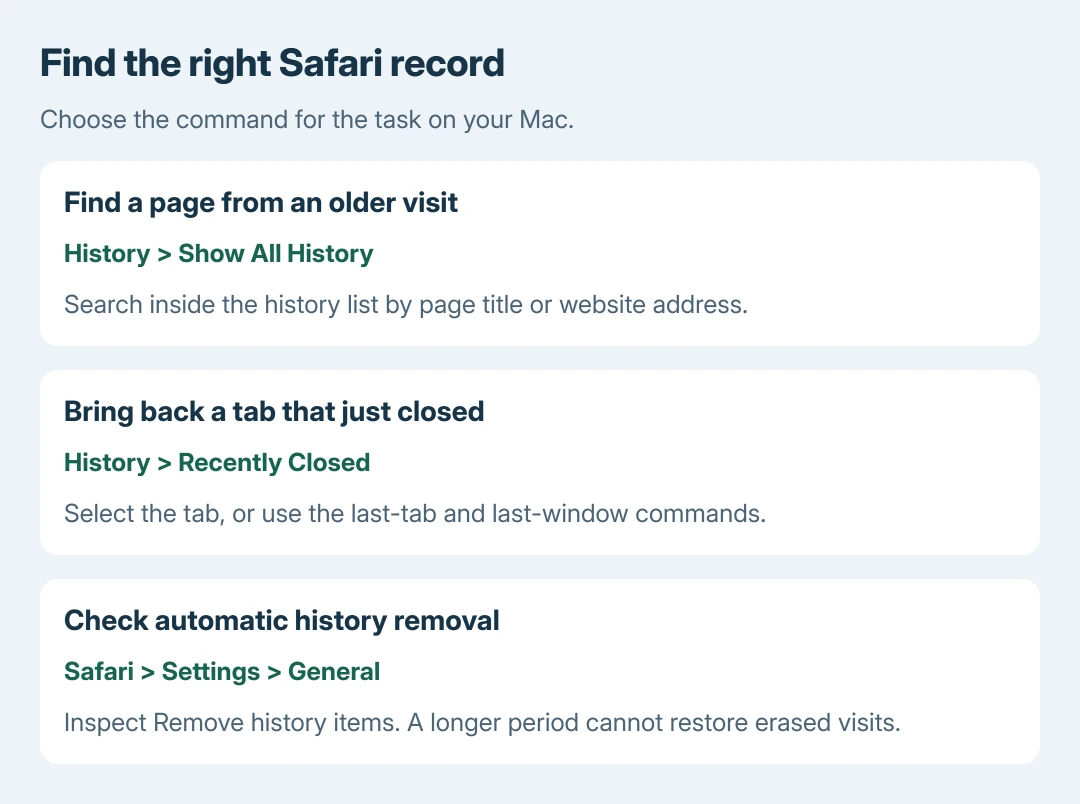
Safari search history on a Mac is available through History > Show All History. Use the search box inside that window to find a remembered website or page title. Typing into Safari's address bar starts a different kind of search.
An absent result can mean the visit was private, removed, or made in another profile. Check the history list before changing browser settings or clearing anything.
Search the History window for the missing page
Bring Safari to the front so Safari appears beside the Apple menu. Open History in the Mac's menu bar and choose Show All History. The page changes to a list of recorded visits.
Click the search field at the upper right of that list. Enter a distinctive word from the page title or part of its website address. Try a shorter term if a complete phrase produces no results.
Status: Apple's Mac Safari history, reopening and retention instructions checked October 28, 2026. No personal browsing records were accessed.
Apple documents this history search procedure. Expand a date group when browsing by day, then double-click the matching page to reopen it.
Check the address before entering account details on a reopened page. A result is a record of a visit, not a guarantee that the website or its content has stayed the same.
For the equivalent phone task, use the iPhone browser-history controls. The Mac's menu-bar commands do not describe Safari's touch interface.
Recover a recently closed tab through its own menu
If the page disappeared moments ago, choose History > Recently Closed and select its entry. This is faster than searching months of visits when the real task is reopening a tab.
Apple says History > Reopen Last Closed Tab restores the last closed tab. The menu also offers commands for the most recently closed window and for reopening windows from the previous session.
Choose the command that matches what closed. A window can contain several tabs; reopening one tab and reopening an entire window have different results.
After recovering it, the Safari window and tab settings can help control where subsequent links open. Those preferences do not restore erased visits.
Check why an older visit is missing
Open Safari > Settings > General and inspect Remove history items. Apple states that Mac history can be retained for up to a year, with this setting controlling automatic removal.
Changing that setting now does not recreate records already discarded. A visit older than the selected retention period may no longer be available through History.
Private Browsing does not save visited pages in the ordinary history list. If Safari profiles are in use, switch to the one where the page was opened; histories remain separate between profiles.
The address-bar suggestion list also mixes several sources, including bookmarks and open pages. A suggested address therefore need not be an entry that the History search can display.
Our recommendation is to search a remembered domain before trying a vague subject. It reduces unrelated results without requiring the exact wording of an old search query.
When the record cannot be found
Look for the address in saved bookmarks, Reading List, messages or a document where it was shared. A downloaded copy may still exist even when Safari no longer lists the visit.
History synced through iCloud can include visits from other Apple devices. Treat it as an account's available Safari record, rather than proof that each page opened on this Mac.
For a history window that stays empty after ordinary new browsing, contact Apple Support with the Safari version, selected profile and retention setting. Do not erase browser data while trying to preserve a missing record.
The Short Version
Search recorded visits in Show All History. Use Recently Closed for a tab that just vanished. Check the profile and retention period when an older page is absent; private or removed visits cannot be recovered by rerunning the search.

Isaac Smith is the founder and editor of PC Glance, a website that covers computers, laptops, and technology. He is a tech enthusiast and a computer geek who loves to share his insights and help his readers make smart choices when buying tech gadgets or laptops. He is always curious and updated about the latest tech trends.