
You tap a link or open Safari after a few hours, and the first page sits blank for 10 seconds or more. After that, Safari is quick again until the next cold start.
That is annoying when you only wanted to check one thing. I read Apple's Safari pages and a MacRumors thread where iPhone and iPad owners have tested fix after fix.
What owners describe
The thread has about 330 views and 14 replies, and its opening post sets out the pattern: the first page "can take an excruciatingly long time, I'm talking like 10 to 15 seconds."
Owners report that once that page loads, everything else is fast. Another owner times the first load at "15-60 seconds" after Safari has sat unused for several hours, while other browsers open the same page at once.
It is not every iPhone, since one owner found the opposite, with pages loading slightly faster on iOS 27.
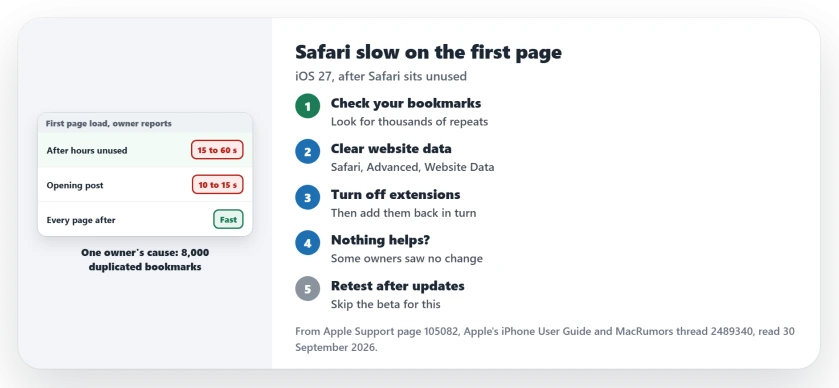
Status: checked 30 September 2026. Apple has not named a fix. One owner traced it to 8,000 duplicated bookmarks, and clearing website data helped another.
1. Look for duplicated bookmarks
Duplicated bookmarks were the whole problem for one owner, whose iPhone 17 Pro and iPad both had it. In their words: "Found my issue. It was bookmark's. Had a cloud sync issue. 8k bookmarks duplicated"
Open Safari, tap the Bookmarks button, and scroll through your folders. Thousands of repeats of the same sites point to a sync problem, not to your browsing.
Our bookmarks sync page covers rebuilding the bookmark store when sync goes wrong.
2. Clear your website data
One owner said that clearing website data "has sped Safari up significantly" for them, and they repeat it every couple of months.
On its Safari page, Apple says to "Go to Settings, tap Apps, then select Safari. Tap Advanced, then choose Website Data." Then tap Remove All Website Data.
That keeps your history, but Apple notes it also clears data that sites use to keep you signed in, so you may have to sign in to some sites again.
3. Turn off extensions to test
In Settings, tap Apps, then Safari, then Extensions. Apple's steps are to tap each extension and switch Allow Extension off.
There is a reason to try this on iOS 27. The same owner said a dark mode extension they use now warns that on a cold launch, it may take a few seconds to kick in.
If the first page loads fast with every extension off, switch them on again in turn until the delay returns.
4. Know what did not help
One owner listed a long run of fixes with no change: deleting all Safari data, turning off Advanced Tracking & Fingerprint Protection, disabling extensions, new profiles and turning off iCloud Private Relay.
So if step 1 and step 2 do nothing for you, you are not alone. It may be a bug that only an update can fix.
5. Watch the next update
The first poster moved to the iOS 27.2 public beta and said it "feels" better, though they are still watching it.
I would not install a beta just for this. Keep your iPhone on the regular release and check again after each update.
Other Safari problems
If Safari reloads tabs whenever you return to it, the tab reloading page covers that. If an extension is grayed out, the extensions page explains why.
Why is Safari so slow to open the first page on iOS 27?
Owners have not found one cause: duplicated bookmarks explained it for one, website data helped another, and some saw no change with any fix.
Does clearing Safari history fix slow loading?
It helped one owner, who clears website data every couple of months. Another deleted all Safari data with no change.
Is Safari faster on iOS 27.2?
The first poster said the 27.2 public beta seems better, which is one report on a beta.
The Short Version
- The first page after a rest can take 10 to 60 seconds.
- Check your bookmarks for thousands of duplicates.
- Clear website data in Safari's Advanced settings.
- Turn off extensions to test.
- Some owners saw no change with any fix.
- One owner found 27.2 beta better.
- Stay on the regular release and retest.
Where to Next
Open your Safari bookmarks now and scroll for repeats. Then clear website data and time the next cold start.
If none of this helps, comment with your model and how long the first page takes. I will track what owners find.

Isaac Smith is the founder and editor of PC Glance, a website that covers computers, laptops, and technology. He is a tech enthusiast and a computer geek who loves to share his insights and help his readers make smart choices when buying tech gadgets or laptops. He is always curious and updated about the latest tech trends.