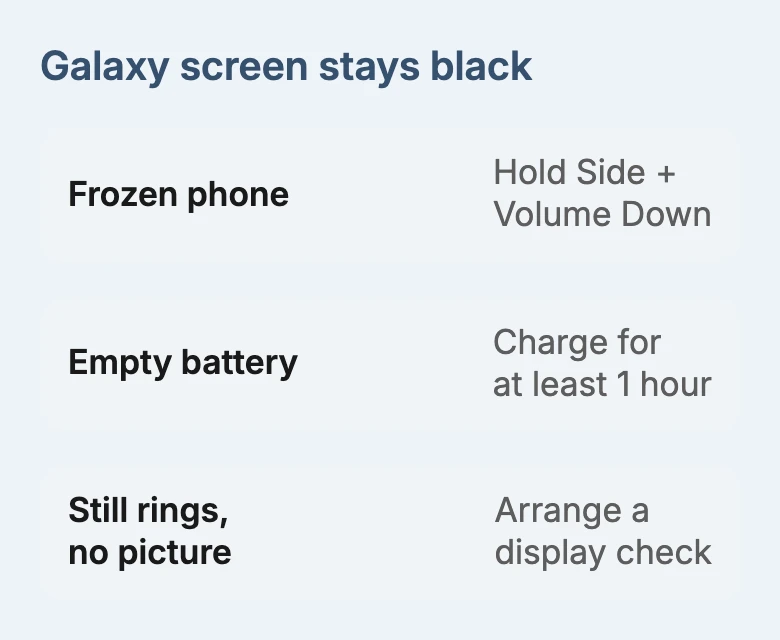
A Samsung phone black screen can mean a freeze, an empty battery, or display failure. Try a forced restart with Side and Volume Down, then charge an unresponsive phone before considering screen replacement.
A Galaxy still receiving calls needs a display check; a phone that makes no sound and won't respond also needs its power system checked. These steps cover both cases, including older Galaxy models with a battery you can remove.
In this guide
1. Check for damage before connecting the charger
Remove the case, then inspect the handset, charging cable, adapter, and port. A case can hold a button down or stop the cable from plugging in all the way. The plug should fit firmly rather than wobble inside the port.
Look for bent contacts, corrosion, a damaged cable, or a cracked display. A fall followed immediately by a black screen is useful information for the repair shop, even if the glass hasn't shattered.
Don't charge a wet or visibly damaged phone; arrange inspection instead. Taking off a case is fine, but leave a sealed Galaxy closed rather than opening it to reach the battery.
For a dry, undamaged phone, continue with the button restart. It works without touching anything on the display, so a frozen touchscreen won't stop you from trying it.
If the picture returns but Android touch still doesn't respond, check accessories, accessibility settings and safe mode before assuming the whole display has failed.
2. Hold the restart buttons long enough
Press Volume Down together with Side, keeping both held for 20 seconds. Older models call the second button Power. Keep both pressed rather than tapping them or releasing as soon as nothing happens.
Samsung recommends a 20-second press in its blank-display instructions. A brief press can take a screenshot on a working phone; it doesn't carry out this restart.
If the Galaxy logo appears, let the phone finish starting. Enter your PIN, password, or pattern afterward. Fingerprint or face unlocking won't replace the backup unlock method immediately after a reboot.
On an older Galaxy designed with a removable battery, take that battery out for 60 seconds, put it back, and try starting the phone. Use this option only on a model with a removable back, not a modern glued or sealed phone.
If the screen comes back, the phone can still show an image, but you haven't yet worked out why it keeps freezing. If the same app keeps causing trouble, use the frozen Android troubleshooting steps after recovering access.
The Galaxy restart controls also cover ordinary restarts once the screen responds. If nothing lights up now, move to charging rather than repeating the button hold indefinitely.
3. Charge for an hour, even without an immediate icon
Charge the phone for at least one hour using a wall outlet and a cable and adapter suitable for your Galaxy. With a loose connection or damaged cable, you can't tell whether the phone is getting the charge it needs.
The charging symbol may take up to 10 minutes to appear after the battery has run down. A blank screen during those first minutes doesn't mean the phone has rejected the charger.
I'd give this check its full hour before booking a screen replacement. A deeply discharged phone and a broken display can initially look identical, but only the first is helped by charging.
If the connection seems doubtful, try a compatible charger and cable you know can charge another device. Change the cable or adapter rather than pushing harder into a damaged port. Leave the phone somewhere you can notice unusual heat.
Once the hour has passed, disconnect the charger. Hold Power or Side for 15 to 20 seconds and watch for the Galaxy logo. This is the power-on step, using one button rather than the two-button forced restart.
If the screen comes back, switch the phone off and reconnect it until it's fully charged. A phone that repeatedly runs flat or won't charge reliably needs its charging fault checked, even though the display works again.
4. Call the phone to check whether it is still running
Use another phone to call your number and listen beside the Galaxy. If the Galaxy rings, vibrates, or responds in another way, it has power despite its black screen. Note exactly what it does.
If ordinary screens work and only the answer screen is missing, restore the Samsung call display before requesting a panel repair.
Silence doesn't tell you as much. Silent mode, a missing signal, an inactive SIM, or an empty battery can all stop this check from producing sound. Don't treat silence alone as a reason to order a display assembly.
If it rings but stays black after the restart, tell the repair service that the handset still receives calls. That detail helps them check the display and its connection instead of treating it solely as a phone that won't power on.
A phone that shows the logo but goes dark again is also different from one that never displays anything. Record whether the screen fails before the lock screen, only after unlocking, or only when a particular app opens.
For that wider no-power comparison, the Android startup checks explain the signs to report. Keep the Galaxy-specific button timing here when trying the physical restart.
5. Arrange service when the display stays dark
If the display remains black after these checks, book a diagnosis with Samsung's repair team or an approved Galaxy service center. Ask them to diagnose no picture or no power, according to the response you observed.
Give the exact model and any recent damage or software change. Report whether it rings, vibrates, shows charging, or briefly displays the logo. Those details describe the fault better than calling it dead.
Don't erase the phone simply to see whether an unseen menu changes something. A factory reset wipes the phone's local data, and a damaged screen still needs repair. Tell the service center if your photos or other files aren't backed up.
If the phone temporarily becomes usable, back up what matters before handing it over. Ask whether the proposed repair can preserve local data and whether your warranty or accidental-damage cover applies to the diagnosed fault.
The Short Version
Check damage, keep Side pressed with Volume Down for 20 seconds, then charge for an hour. If it stays black but rings, request display-related service. No response calls for a no-power diagnosis.
Checked November 27, 2026.
 If you have any business, I can build it online