
You go to Settings, Accounts, Your info, expecting to find "Sign in with a local account instead". It is not there.
Neither is any way to remove the Microsoft account, and you start to wonder whether Microsoft has simply taken the option away.
It has not, quite. It has moved behind another setting with a name that sounds like it does something else entirely, and that is why so many people conclude it is gone.
Here is where it actually is.
The setting that unlocks it
Reported by an adviser on Microsoft's Q&A boards, answering somebody whose option was missing.
In his words: "If the setting to 'Switch to a Local account is missing, do you see a setting labelled 'Stop automatically logging into apps with this account', that setting will also switch your user account to a Local account."
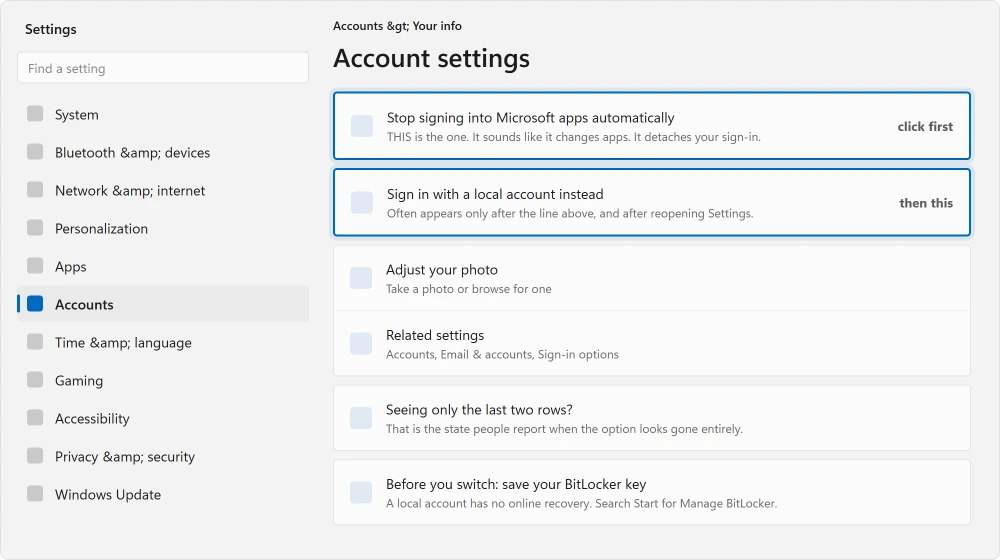
That is the answer, and nothing about the wording tells you so. "Stop automatically logging into apps" sounds like it changes how apps behave.
What it actually does is detach your Windows sign-in from your Microsoft account, which is the thing you came here for.
On some builds the wording is closer to Stop signing into Microsoft apps automatically, in the same place under Your info. Use whichever of those you can see.
Ours, and marked as ours: after clicking it, close Settings completely and open it again. On several builds the local account option only appears on a fresh visit to that page, which is why people click it, see no change, and give up.
The normal route, when it is there
If the option is present, this is all it takes.
Open Settings, then Accounts, then Your info. Under Account settings, choose Sign in with a local account instead and follow the prompts.
You will set a username and a password. Then restart the machine, which matters more than it sounds and is easy to skip.
Choose a password you will not lose. A local account has no online recovery, and forgetting it means there is no reset email. The security questions are your only way back in short of reinstalling, so set them when Windows offers them.
Never had a Microsoft account, even at first setup? Then a drive can sit at waiting for activation until you finish or remove it.
Why people want this, and one reason that surprised me
Most people want it for privacy, or because they dislike being pushed into an account to use their own computer.
Others never finish making that account, because Microsoft's press and hold check keeps saying Try again.
Reported by an owner with a much more concrete problem: his Microsoft account was tied to an email address he no longer had access to, and it was stopping him using Windows Defender, which reported itself as "managed by my organization".
In his words: "I really dislike having a microsoft account on my PC instead of a local account, mainly because that microsoft account is on an email i don't have access to, AND it is preventing me from enabling windows defender."
That is worth knowing as a category. An account you cannot sign into does not just annoy you, it can leave parts of Windows locked in a state you cannot change, because Windows believes something else is managing them.
And if you are here because you cannot get into the Microsoft account at all, read this first: Microsoft says its own staff cannot let you in.
What you lose, honestly
Documented by Microsoft on its account switching page, which is straightforward about preferring you do not do this.
It recommends using a Microsoft account rather than a local one, on the grounds of integration with its services, security, and syncing across devices.
That is a real list rather than marketing, so here is what actually goes: settings and theme syncing between machines, which only matters if you use more than one.
OneDrive stops signing itself in on its own, though you can still sign into OneDrive by hand. Microsoft Store purchases tied to the sign-in also go, and you sign into the Store itself instead, which still works.
This one is the serious one: automatic BitLocker key backup to your account. If your drive is encrypted and the key was stored against your Microsoft account, make sure you have that key saved somewhere else before you detach the account.
If Windows keeps pushing you to sign in elsewhere too, Copilot showing a blank page is a related sign-in fault.
Ours, and marked as ours: check that before anything. Search Start for Manage BitLocker. If it says encryption is off, none of this applies to you. If it is on, back the key up to a file or a printout first.
If the option is missing on a work or school machine
Then it may genuinely be blocked rather than hidden.
A machine joined to a work domain or enrolled in management has these options removed by policy, and no amount of clicking finds them. That is the same "managed by my organization" message the owner above ran into.
And if you are weighing editions rather than accounts, Windows 11 Home against Pro sets out what actually differs.
Ours, and marked as ours: if you bought the machine second-hand and it still says that, it was never properly removed from its previous owner's management.
That is not something you can fix in Settings, and it is worth knowing before you spend an evening trying.
What happened to the people asking
I read two threads and neither ended well, which is worth saying plainly.
On the first, three separate people arrived with the same missing option. One described exactly what he could see: "The 'Account Settings' part does not show, only 'Adjust your photo' and 'Related settings' and 'Related Support'".
A Microsoft adviser gave the standard route, which assumes the option is there.
Nobody confirmed a fix on either thread.
So the setting named at the top of this page is adviser guidance rather than a confirmed fix, and I am labelling it that way. It is the only answer I found that actually addresses a missing option rather than assuming a present one.
Status: written 22 August 2026. The local account option can hide behind a setting about signing into apps. Neither thread read reached a confirmed fix.
Adding a second person has the same buried link, and it is easier to find on that screen. Add a user without a Microsoft account.
Why is there no option to sign in with a local account?
It is usually hidden rather than absent. Look for a setting about signing into Microsoft apps automatically, in the same Your info page.
Clicking that detaches your sign-in, and the local account option often appears after you close and reopen Settings.
What do I lose by switching to a local account?
Settings syncing between machines, OneDrive signing itself in, and the Store tied to your sign-in.
The important one is BitLocker: if your drive is encrypted and the recovery key was backed up to your Microsoft account, save that key elsewhere before you detach it.
Can I switch back to a Microsoft account later?
Yes. The same Your info page offers to sign in with a Microsoft account instead, and it is a reversible change in both directions. Your files and installed programs stay where they are either way.
Why does my PC say managed by my organization?
Because Windows believes something else controls those settings, which happens on work machines and on second-hand ones never properly removed from a previous owner's management.
One owner found it blocking Windows Defender entirely. It is not something Settings can undo.
The Short Version
- The local account option hides behind a setting about signing into Microsoft apps.
- Close Settings and reopen it after clicking that. The option often appears only then.
- A local account has no online password recovery. Set the security questions.
- Save your BitLocker recovery key elsewhere before detaching the account.
- Microsoft documents that it recommends a Microsoft account instead. That is fair to know.
- On managed machines the option is removed by policy and no clicking finds it.
Where to Next
Search Start for Manage BitLocker before you change anything. Thirty seconds, and if your drive is encrypted it is the difference between a tidy switch and losing access to your own files.
If Windows keeps asking you to sign into things generally, Copilot showing a blank page is a related sign-in fault with a confirmed workaround.
And if you are weighing up editions rather than accounts, Windows 11 Home against Pro sets out what actually differs.
A local account still takes a fingerprint or a face, and setting that up takes about two minutes.
Worth knowing before you switch, because a passkey on a Microsoft account has nowhere to live on a local one.
Did the hidden setting work for you, or was yours really gone? Post it below with your Windows build. I would like to know which builds still have it, because nobody records that.

Isaac Smith is the founder and editor of PC Glance, a website that covers computers, laptops, and technology. He is a tech enthusiast and a computer geek who loves to share his insights and help his readers make smart choices when buying tech gadgets or laptops. He is always curious and updated about the latest tech trends.