Money received through Apple Cash can go into Cash App through Add money, or through your bank if that option isn't available. Check the Apple Cash card first: ordinary bank cards used with Apple Pay don't hold a separate Apple Pay balance.
Cash App currently lists Apple Pay as an add-money option. Start there if your app offers it. Otherwise, move Apple Cash to your own bank account, then add money from that account or its debit card in Cash App.
In this guide
Check which balance you're moving
Open Wallet on your iPhone and tap Apple Cash. The balance shown there is the money received through Apple Cash. A debit card next to it uses money in your bank account. It doesn't hold another balance with Apple.
An Apple Account balance used for apps, subscriptions, or gift-card purchases is different again. Don't start an Apple Cash bank transfer unless the balance you want to move actually appears on the Apple Cash card.
Money in your checking account can fund Cash App through a supported payment method. To move your Apple Cash balance, choose it in the Apple Pay payment sheet if it's offered, or transfer it out of Apple Cash first.
I'd check the direct option before paying for an instant bank transfer. Check which card you're paying with, though: using Apple Pay doesn't automatically mean the charge will come from Apple Cash.
Try Add money in Cash App first
Cash App's current add-money instructions include bank accounts, debit cards, Apple Pay, and Google Pay. Choose a payment method your app shows; there isn't a separate Apple Pay account number to enter.
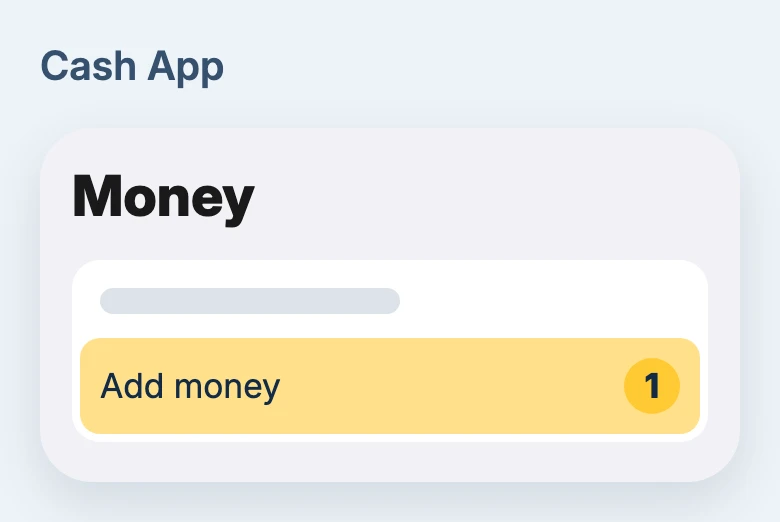
- Open Cash App and select the Money tab.
- Tap Add money and enter the amount you want to move.
- If Apple Pay is offered, select it and review the payment sheet.
- Check which card will pay for it. Select Apple Cash if it's available for that transaction and that's the balance you intend to use.
- Review the amount and any charge shown, then follow the prompts to approve the payment.
Return to the Money tab and check the new balance and transaction entry. The added money should show as a completed transaction. Adding a card to Wallet alone doesn't move its money into Cash App.
If the app doesn't offer Apple Pay, or the payment sheet doesn't let you use Apple Cash, use the bank route next. Don't keep approving a different bank card while expecting the Apple Cash balance to decrease.
Adding your Cash App Card to Wallet serves a different purpose: it lets you spend using that card through Apple Pay. That action alone isn't a transfer from Apple Cash into Cash App.
Move Apple Cash to your own bank account
The standard bank transfer takes 1 to 3 business days and has no Apple Cash transfer fee. Use this route when you can't add Apple Cash directly and don't need the money immediately.
Use a United States bank account you own. Check its routing and account numbers in your banking app or bank statement before entering them. A mistaken number can send the transfer to the wrong account.
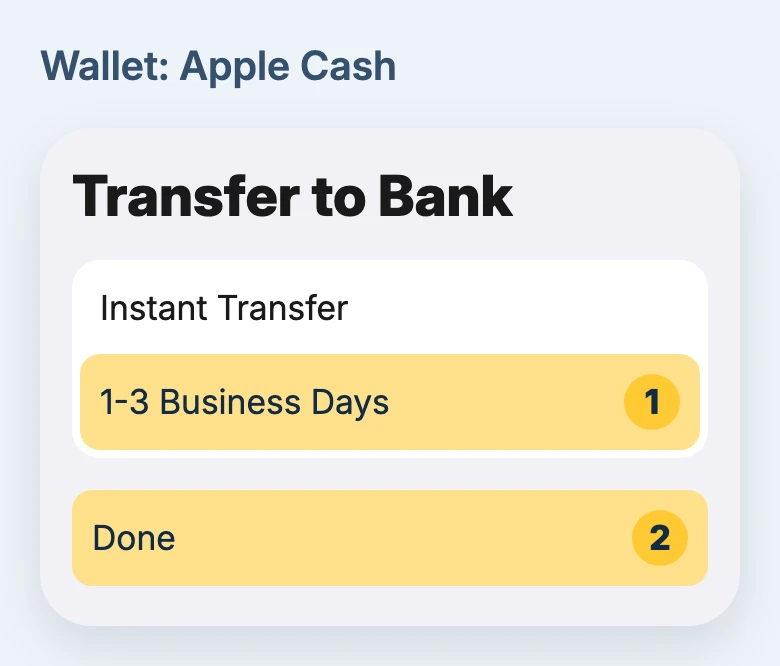
- Open Wallet, tap Apple Cash, then tap the More button.
- Select Transfer to Bank.
- Enter the amount, close the amount entry if prompted, and tap Continue.
- Select 1-3 Business Days, then Done.
- Choose Add A Bank Account if your bank isn't already listed. Enter and confirm the routing and account numbers.
- Check the receiving account, then confirm with the button press and Face ID, Touch ID, or passcode shown on screen.
On an iPad, begin in Settings > Wallet & Apple Pay > Apple Cash > Transfer to Bank instead. From there, choose a transfer method as you would on an iPhone.
Apple's bank-transfer instructions explain the timing and the account requirements. Wait until your bank shows the deposit as available before trying to fund Cash App from it.
Add the deposited money to Cash App
Once the bank deposit arrives, open Cash App and check which bank account is linked. If you need to connect it, open your profile, then Account & settings > Linked bank accounts > Link bank, and follow the prompts.
You may need to link a debit card first. Choose the debit card for the bank where your Apple Cash deposit arrived, or another supported payment method you want to use.
Return to Money > Add money, enter the amount, check which account or card you're paying from, and confirm. Check that Cash App shows the addition and that your bank account shows the matching transaction.
For a debit card that won't finish Wallet setup, the Wallet card-addition checks address that separate problem.
Use Instant Transfer when the timing matters
Apple Cash can send funds to an eligible US debit card through Instant Transfer. It generally arrives immediately, though you should allow up to 30 minutes. Security checks may take longer.
The current Apple Cash fee is 1.7%, with a $0.25 minimum and $25 maximum. The confirmation screen shows the exact fee, which is deducted from the transfer. Subtract that fee when working out how much you'll have left to add to Cash App.
Start from Apple Cash > More > Transfer to Bank, enter the amount, then choose Instant Transfer instead of the business-day option. Review the eligible debit card and fee before confirming.
Don't assume that every card accepted for purchases also accepts incoming instant transfers. If your Cash App Card isn't offered as a transfer option, use your bank's eligible debit card or the standard bank-account transfer.
When Wallet won't open, address that problem separately from a rejected transfer. The Apple Pay access checks cover missing cards and payment shortcuts.
Track a missing transfer before sending another
Check both transaction histories to see where the money stopped: Apple Cash to the bank, or the bank to Cash App. Record the amount, time, destination, and status. Avoid creating a second payment while the first is still pending.
For an Apple Cash Instant Transfer missing after 2 hours, request an Apple Cash Specialist at Green Dot Bank through the linked support page. Use the same route if a standard transfer hasn't arrived after 3 business days.
If the bank deposit arrived but adding money to Cash App failed, open Cash App's support chat. Ask them to check that transaction and the account or card used to pay, rather than reporting the earlier Apple Cash transfer as missing.
The Short Version
Check Add money and the card selected in Apple Pay. Otherwise, transfer Apple Cash to your bank, wait for the deposit, then add money in Cash App. Compare the instant-transfer fee before choosing speed.
Checked November 29, 2026.
 If you have any business, I can build it online