
You copy a link on your iPhone, press Command-V on your Mac, and the Mac pastes whatever you copied there earlier. Universal Clipboard has stopped crossing between your devices, in one direction or in both.
I would switch Handoff off and on again on both devices, before signing out of anything. Apple names Handoff as one of the three switches Universal Clipboard needs at both ends.
One owner fixed it exactly that way. Handoff already looked on.
The Ask Different question has 44,519 views. A MacRumors thread opened on 6 October 2026 shows it still catching iOS 27 owners.
What Apple needs on both devices
Apple's Mac guide to copying between devices lists three switches that must be on at both ends: Wi-Fi, Bluetooth and Handoff. It also wants one Apple Account, signed in on both devices.
Distance counts too: "Your devices must be within 30 feet (10 meters) of one another". Speed counts as well. What you copy is only "available on your Clipboard for a short time". So paste soon after you copy, not after lunch.
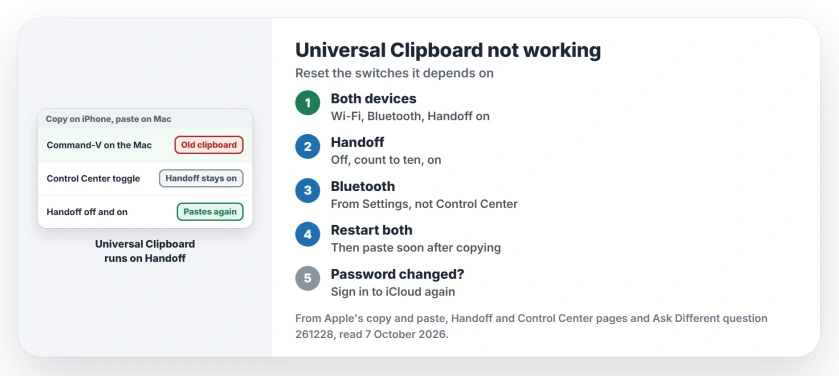
Status: checked 7 October 2026. Universal Clipboard needs Wi-Fi, Bluetooth and Handoff on, on both devices. Owners fixed it by toggling Handoff, restarting Bluetooth or signing in again.
Ours: no switch is called Universal Clipboard. Apple says "Universal Clipboard isn't a feature that you see", and it runs on Handoff. So a stuck Handoff takes your clipboard down with it, which is why our order starts there.
1. Turn Handoff off and on, on both
On your Mac, Apple's Handoff page says to open System Settings, click General, then AirDrop & Continuity, or AirDrop & Handoff on older versions. Look for the Allow Handoff switch.
On your iPhone or iPad, open Settings, then General, then AirPlay & Continuity, or AirPlay & Handoff, and find Handoff. Switch it off at both ends, count to ten, then switch it on again.
One owner on Ask Different had Handoff on at both ends, yet "turning the feature on and off fixed the issue".
Another owner found it simply switched off on a brand new iPhone. With Handoff on again, "It's working back like a charm", they wrote.
The owner who opened the MacRumors thread tried this toggle and got nowhere, so keep going if yours is the same.
2. Restart Bluetooth from Settings, not Control Center
Two readers fixed it by turning Bluetooth off and back on, on both devices. One said it "did the trick for me". The other said switching it at both ends "got the handoff working again for me".
The iPhone needs care here. Apple says tapping Bluetooth in Control Center disconnects your accessories, yet "Both Wi-Fi and Bluetooth will continue to be available". That covers "Continuity features, like Handoff and Instant Hotspot".
So the Control Center button leaves Handoff running. Use Settings, then Bluetooth on the iPhone, and the Bluetooth switch in System Settings on the Mac.
Then do what Apple's guide gives as its last step: "restart your devices and try again".
If AirDrop also fails between the same two devices, the wireless link between them is probably the problem. Our AirDrop page works through that side.
3. After a password change, sign in again
One owner's clipboard stopped after they changed their Apple Account password, and no toggle brought it back. They signed out of iCloud on their Mac, signed in again, and it then worked towards the iPhone only.
Then they did the same on the phone. In their words, "UC worked in both directions".
Before you sign out of anything, look on both screens for a waiting prompt. An owner in January 2026 had every switch right.
A small iCloud request for their Mac password had opened behind other windows, and in their words "you might just miss this small pop-up".
What I would not do
Signing out of iCloud is my last resort, not my first. It is the heaviest step here, because both devices then have to sync your iCloud data all over again. The two toggles cost seconds.
I would also skip the answers that delete preference files on the Mac. None of the owners there said it worked.
What does the iPad's Allow Paste box mean?
When that box names another device, it is Universal Clipboard working as Apple meant it to. Our Allow Paste page shows how to tell a device prompt from an app prompt, and what each one means.
The Short Version
- Wi-Fi, Bluetooth and Handoff on at both ends, one Apple Account, within 30 feet.
- Turn Handoff off and on, on both devices.
- Restart Bluetooth from Settings and System Settings; Control Center leaves Handoff on.
- Restart both devices, then paste within a short time of copying.
- Changed your password? Sign in to iCloud again, Mac first, then iPhone.
Where to Next
Copy a word on your Mac and paste it on your iPhone right now, then try the other way round, so you know which direction is broken.
Which step brought your clipboard back, and on which iOS and macOS versions? Tell me, and I will rank the steps by your replies.

Isaac Smith is the founder and editor of PC Glance, a website that covers computers, laptops, and technology. He is a tech enthusiast and a computer geek who loves to share his insights and help his readers make smart choices when buying tech gadgets or laptops. He is always curious and updated about the latest tech trends.