A long table can make Word 2016 freeze during header editing. Moving table labels into repeating table rows resolved one reported case; a separate .doc copy let another owner edit again.
Start with a copy of the document. Check whether it happens only in a file with long tables or even in a new blank document. A printing problem without freezing needs different checks.
In this guide
1. Put table headings inside the table
This fix fits documents where the page header contains the labels for a table that continues through many pages. An inventory or payment-history document can have a separate header table positioned over its main table.
On a spare copy, move those labels into the first row or rows of the main table. Keep an ordinary page header for information that belongs to the document as a whole, such as its title or page number.
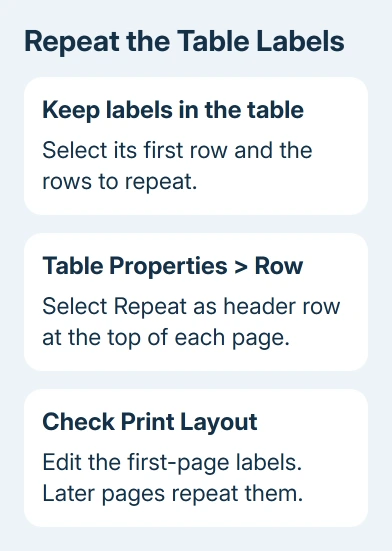
Select the first table row and any immediately following rows that need to repeat. The selection must include the table's very first row. Right-click the selected rows and choose Table Properties.
On the Row tab, select Repeat as header row at the top of each page, then select OK. This route works in Word 2016 even when instructions for newer versions use different ribbon tab names.
Remove the duplicated table labels from the page header in this working copy. Then edit the remaining header text and check whether Word still pauses after every keystroke.
In the Microsoft forum case, an adviser examined the file and recommended this layout change. The owner then reported success. Other participants had similar symptoms without the same result.
That's why I'd try this change first when your header is really acting as the heading for one long table. It addresses the document structure involved in that case rather than changing unrelated Windows settings.
2. Check that repeated rows behave as intended
Switch to View > Print Layout and scroll to the table's next page. The continuing table should begin with the heading rows you selected. They aren't separate editable copies on each page.
Edit the table headings on the first page. The repeated headings on later pages should change with them. You can then see whether both the first-row selection and the repeated headings are working.
If the rows don't repeat, check for a manual page break inside the table. Automatic page breaks allow repetition; a manually inserted page break inside the table doesn't. Keep the table flowing normally where repeating rows are needed.
Also check that the document hasn't become several separate tables. Repetition belongs to each table, so the first table's labels won't automatically become headings for a different table later in the document.
Keep a sortable inventory in one table. A split-table workaround was discussed for this fault, but an owner rejected it because they needed to sort the whole inventory.
Once the layout works, save the copy, reopen it, and try the header edit again. Check page numbers and section-specific headers as well, since moving table labels doesn't replace those document features.
If the table is responsive but the header simply fails to appear on paper, use the separate header and footer printing checks. That page addresses output settings rather than the repeated freeze.
3. Try a separate .doc copy for an urgent edit
When the layout change doesn't fit the document, use File > Save As > Browse. Choose Word 97-2003 Document (*.doc) and save under a different name. Keep the original .docx file untouched.
Close the new copy, reopen it, and try editing its header or footer. A different owner reported that the .doc conversion stopped the crash and restored editing.
Use that copy to finish an urgent edit. Keep your other documents in their current format. Modern document features and formatting can change in this older format, so inspect any compatibility warnings and compare the saved pages.
Check the parts that matter to your file: table widths, pictures in cells, page numbers, and any fields or references. A responsive header is useful only if the document you need to deliver remains correct.
If the .doc copy behaves the same way, return to the original copy for the next comparison. Saving repeatedly under different names doesn't change the underlying layout.
4. Compare a blank file before changing Office
Create a new blank document, type a short header, and edit it. If that works, focus on how the original document is laid out. File length alone doesn't identify the cause.
The original thread included a 13-page table and a much longer inventory. One participant also reproduced the fault in a newly made table document. Those reports don't support a universal page-count limit for Word.
If the blank file freezes too, preserve your work and exit Word. Press Windows+R, type winword /safe, and press Enter. Test another blank document in that session.
When Safe Mode works, check File > Options > Add-ins > Manage: COM Add-ins > Go. Turn off one suspect add-in at a time and retest after starting Word normally. If Safe Mode makes no difference, move on to the support steps.
In that discussion, Safe Mode, Office repair, and moving the file off OneDrive had each failed to help affected owners. Don't keep repeating those attempts if your results are the same.
Before a larger document rebuild, follow the copying a Word document guide so the working version and original remain easy to tell apart.
When the document still freezes
If a blank file works but the long table freezes, make an example without personal or confidential details, keeping the failing layout. Note whether the pause starts on opening the header, typing, scrolling, or inserting a footnote.
Send that copy to your organization's document or Office support team. Include File > Account > About Word details and the results of the blank-document and Safe Mode comparisons.
If blank files freeze too, ask IT to repair Office and test the document in a supported version. October 14, 2025 was the end of Office 2016 support. Plan an upgrade for unresolved product faults instead of waiting for a new 2016 patch.
The Short Version
For a long table with its column labels in the page header, move those labels into repeating table rows. A separate .doc copy is an owner-confirmed workaround; compare a blank file if either approach doesn't help.
Checked November 17, 2026.
 If you have any business, I can build it online