Word for Mac version 16.25 had reports of every document opening in a tiny window. Open Word first, resize its window, then open the document through File > Open or the recent list instead of double-clicking the file in Finder.
That workaround keeps you working without changing templates. In a current Word version, compare saved documents with new blank ones: Word might remember the size for a saved file while still opening every new file in a small window.
In this guide
1. Open the document from inside Word
Save any work that's open, then launch Microsoft Word from Applications or the Dock. Make its window the size you want by dragging an edge or corner. Open the document using Word's File > Open command or its recent-document list.
Microsoft's original issue summary offered opening Word before the file as the workaround for version 16.25 (190512). After that update, windows opened at the same size instead of remembering the chosen size.
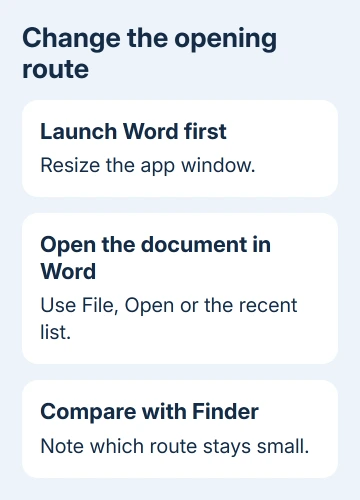
Compare that result with the same file opened by double-clicking it in Finder. If opening from Word gives you a usable window, keep that route while checking updates. Changing the opening route leaves the document itself intact.
If the window is outside the visible desktop instead of simply small, use the Mac off-screen window steps. Moving an unseen window back to the desktop needs different controls from making Word remember its dimensions.
If both opening routes stay small, check whether only this file is affected. Compare a saved file before changing preferences. Don't remove Word's settings folder just because one document opens at the wrong size.
2. Compare an existing document with a new one
Open a copy of an existing document, resize its window, and save it. Close that document and reopen it from inside Word. Check the window's edges, not how large the page looks inside it. Page zoom and window size are different settings.
On a Windows PC, Word staying large after Restore Down needs window sizing and position checks instead of the Mac opening workaround.
One owner reported that resaving restored an existing file's remembered size, while new documents still opened small. So check both: fixing the saved file didn't fix new documents for that owner.
Open a fresh blank document and compare its window. If the saved file behaves but the new one doesn't, record both results. Saving an existing document doesn't set the opening size for every new file.
Make a short note of each result: an existing document after resaving, a new blank document, and opening through Finder versus Word. Those comparisons tell support much more than a description that Word is always too small.
A default-font change belongs in the template. Window sizing is a separate issue: compare an ordinary blank document before rebuilding a template to repair an app-wide opening problem.
3. Update through the route used to install Word
Open Word > About Word from the menu bar; write down its version. Version 16.25 belongs to the 2019 report. Write down the version on your Mac; an old search result can't tell you which build you're running.
For Word installed from Microsoft's website, choose Help > Check for Updates. In Microsoft AutoUpdate, install the offered updates, then reopen Word. Save your documents before letting the updater close the app.
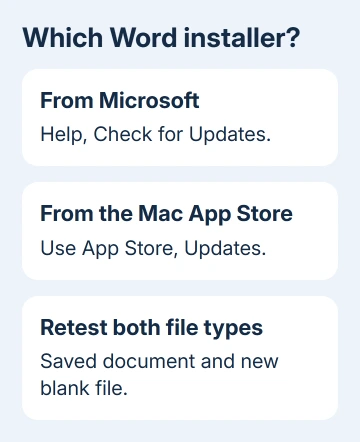
If the Mac App Store supplied Word, check the store's Updates section. Microsoft AutoUpdate doesn't handle that copy. Check the store before concluding that an update is missing.
Repeat both opening routes after updating. Compare a saved document and a new blank one, because the original reports differed between them. A larger window in only one case is a partial improvement.
If an older Mac can't install the offered Word release, check the operating-system requirements before trying random installers. Ask your organization or software supplier which supported Office version your Mac can run with its license.
4. Treat old Insider and rollback advice as history
The thread includes a report that an Insider update fixed the issue. It also includes a later report that version 16.26 still opened small windows on some Macs, while another Mac opened the same apps full size.
Version 16.26 left some Macs with the same problem. Install the update available for your copy and compare it on your Mac. Keep your usual update channel rather than joining a test program for old advice.
Another owner reported success after replacing Word, Excel, and PowerPoint with their 16.24 versions and leaving updates manual. That describes what worked at the time; it isn't a sensible current repair for a supported installation.
I'd keep the opening workaround rather than reinstall a years-old Office build for window sizing. A tiny opening window is inconvenient, but replacing working apps and stopping their updates changes far more than the window behavior.
Leave Normal.dotm, Word's default template, and its preferences alone unless the problem points to them. Template changes didn't fix new-document sizing in the original report. Repair a template only if the problem follows it.
5. Report a current reproduction with the opening route
If the current app still forgets its window size, send steps that show the problem through Help > Feedback if available, or use Microsoft Support. Include Word's full version and your macOS version.
Describe whether you opened Word first, used its recent list, or double-clicked a document in Finder. Include whether resaving an existing document changes the result and whether a blank document still opens small.
Mention whether connecting an external display changes the result. Include the display arrangement rather than assuming a defective monitor. The original reports varied by machine, so this detail can help support.
While the problem remains, open Word before the document if that helps on your Mac. It changes your opening routine without replacing Word or its templates. Keep the comparison results with the support case.
The Short Version
Open Word, resize it, then open the file through its menu or recent list. Compare a resaved file with a new blank one and update through the correct installer. Old Insider builds and rollbacks aren't current repair targets.
Checked November 16, 2026.
 If you have any business, I can build it online