Word Online doesn't offer all of desktop Word's tab controls. Set custom tab stops using the desktop Word app.
For a paragraph indent or nested list, first click inside your text. Tab can change an indent instead of inserting a tab character.
The fix depends on which result you need. Moving a paragraph's first line won't create the same alignment as a tab stop halfway across a line, and a browser moving keyboard focus isn't editing the document at all.
In this guide
1. Match the fix to what Tab is doing
Click inside the paragraph where you're typing. Confirm that the text cursor appears there before pressing Tab. A highlighted ribbon button or browser control means the keyboard is acting on that control instead of your paragraph.
In a new ordinary paragraph, click just before its first character and try Tab once. If only the first line moves inward, Word has changed the first-line indent. That can be the right result for an essay paragraph.
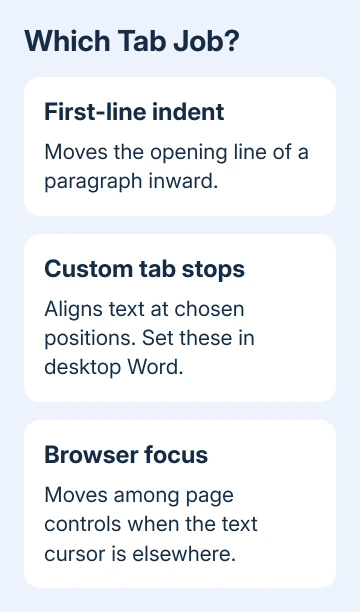
If you're placing a date at the right edge or separating a label from its value in mid-line, that paragraph indent isn't the control you need. Go to the desktop tab-stop steps in section 2.
If you're working in a list and want a sub-item, use section 3. A list level makes the item part of a larger point in your outline; it isn't simply a wide space before its text.
Microsoft's current tab-stop instructions say Word for the web recognizes tabs in documents but doesn't support setting or removing tab stops. Don't use the web ruler as though it were the desktop Tabs dialog.
The old Office Online discussion described more severe inline-tab restrictions beginning in 2014. Later replies still complained in 2018. They don't tell you how every current browser behaves.
2. Set custom stops with the desktop app
In Word for the web, choose Editing > Open in Desktop when that command is available. Open the file in installed Word, using an account allowed to open it.
You'll need desktop Word installed, with a separate license if your account requires one. Switching browsers won't add the desktop tab-stop controls.
On Windows, select the paragraphs that need alignment. Open Home, use the Paragraph group's small dialog-launcher button, then choose Tabs at the bottom of the dialog.
Enter the measurement in Tab stop position, choose the Alignment you need, and choose a Leader if the document needs one. Click Set, then OK. The stop belongs to the selected paragraphs.
For a right-aligned date, use a right tab stop at the intended position rather than pressing the spacebar until the date looks aligned. That choice controls which part of the text lines up at your chosen position.
On Mac, select the paragraphs and choose Format > Tabs. Enter the position under Tab stops, choose the alignment and leader, then use the add control to set it and click OK.
Save the document, then reopen it in the web app and inspect the affected lines. The web app can recognize the tabs already stored in the document even though its editing controls don't match desktop Word's.
If one selected paragraph still behaves differently, return to desktop Word and check that paragraph's stops. Changing the paragraph before it won't fix a separate block elsewhere in your document.
For a right tab that seems unable to pass the paragraph indent, use the right tab-stop checks. That is a desktop formatting problem, separate from missing web controls.
3. Use a list level for a nested bullet
For a new list in the web app, choose Home > Bullets or Home > Numbering. Type the main item and press Enter to create the next item.
Press Tab before typing the sub-item. The new item should move to a deeper level in the list. The web app supports this way of building an outline, even though it can't set custom tab stops.
Check both the indentation and the bullet or numbering level. Moving text inward can resemble a sub-item without actually creating a nested list.
If the issue happens in installed Word instead, follow the desktop bullet indentation fix. Its AutoCorrect setting is in desktop Word; you won't find it in the web app.
For an existing complex outline, I'd make structural changes in the version where the document was designed. You can then check each numbering level against its paragraph formatting more easily.
4. Use a table when the content really has columns
For a short form with separate labels and answers, a table can be a better web editing layout than a row of manual spaces. Put each label in one cell and its answer in the next.
Choose Insert > Table, then select the number of columns and rows needed. Use a copied document when replacing an existing layout, so the working version remains available for comparison.
This is useful for structured information such as a name, date and reference number. It isn't a substitute for every paragraph that happens to contain a tab, especially where a required template already defines the alignment.
After entering the content, check it at the page width used for printing. Long values can wrap inside cells, so check the longest entry, not just the first row.
Avoid rebuilding a formal template solely to work around a missing web control. If the document must retain exact tab positions, use the desktop steps and keep its existing structure.
Check the recipient's layout before sharing
After saving, inspect the file using the recipient's Word version. Inspect an ordinary paragraph, a nested list and any line that relies on custom stops. Each uses a different formatting feature.
Use print preview for a final layout check. If a line is correct in desktop Word but changes in web editing, keep that formatting work in desktop Word and report the difference with a small nonconfidential sample.
Old replies suggested other browsers or extensions, but later replies explained that paragraph indentation had been mistaken for inline tabs. An old tab-fix recommendation isn't enough reason to install an extension.
If a simple document still won't let you make an edit the app supports, use Help > Feedback in Word. For work accounts, give IT an example document and the browser's version when requesting a support case.
The Short Version
Click inside your text, then distinguish paragraph indentation from inline alignment. Set or remove custom tab stops in desktop Word. Use list levels for sub-items and tables when your information belongs in columns.
Checked November 17, 2026.
 If you have any business, I can build it online