Word can't download online templates when the template service is blocked or unavailable. Try another design, then check that Office can download online content. A template already saved on your computer can still work.
The error also appeared in much older Word releases. Office 2007 validation and service-pack advice doesn't apply to Microsoft 365. Use your version's current controls, not those obsolete downloads.
In this guide
1. Try another design and check saved templates
In a current Windows edition of Word, choose File > New and select a different online design. Open its preview, then select Create. When it works, Word creates an editable document ready for saving.
If a second design downloads, note its name along with the one that won't download. Word can reach the service, so you can focus on the design that won't download. Use an alternative for today's document before repairing all of Office.
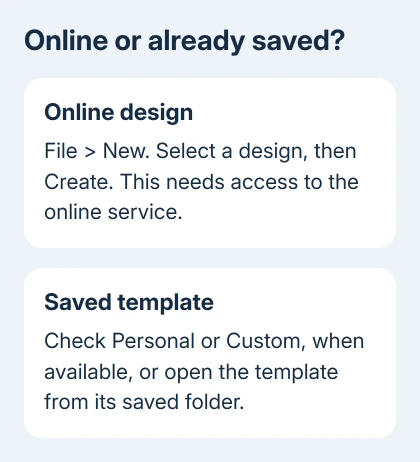
Check for a saved copy of the template too. Depending on the Word version and template setup, File > New may show a Personal or Custom tab. Older versions can call their local choices My templates.
One owner found the template already available locally, avoiding another download. Open that saved template through Word, then give your finished document a new name to keep the reusable original intact.
If those tabs aren't present, don't assume Word lost a template. They depend on where personal templates are stored and how that installation is configured. Search the folder where you originally saved the template, if you know it.
2. Check the connection without resetting Word
Check an ordinary website using your browser. If it also fails, restore the computer's internet connection first. Word can't retrieve a new online design while Windows is offline, even though existing local documents continue to open.
If browsing works, close the template dialog and retry later, keeping the design's name. Browsing successfully doesn't mean every Office connection works. It does tell you the computer hasn't lost internet access altogether.
A contributor in the old thread said the same download error cleared the next day. Trying again can help with a temporary interruption, though other causes still need fixing.
At work or school, ask IT whether Office template downloads are allowed on that network. Include the failure time and Word build details. Don't disable the firewall or company filtering to get a template.
If only your Mac's older Word gallery closes without creating anything, the Word 2016 Mac template repair covers a different cache fault. The Windows privacy path in the next section isn't a Mac cache repair.
3. Allow online content where the account permits it
For a personal Microsoft account in current Word for Windows, open File > Account > Account Privacy > Manage Settings. Look under Connected experiences for the controls covering downloads of online content.
These are Office features that contact online services to retrieve material, including templates and pictures. If downloading online content is turned off, enable downloads to use that feature, confirm the change and retry File > New.
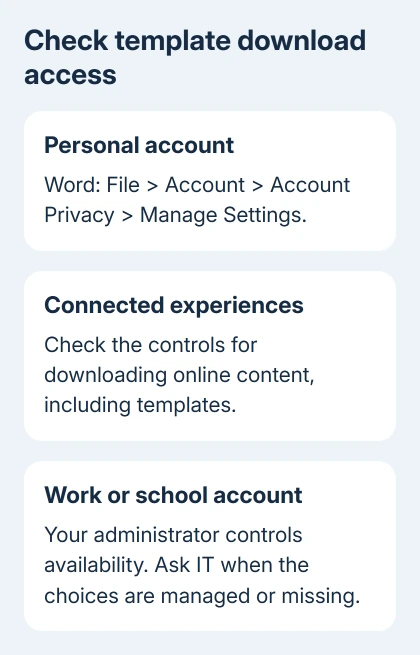
Microsoft's connected-experience controls explain the difference between personal and organizational accounts. A work or school administrator decides whether these features are available for that account.
If the choices are missing or managed, ask IT about its policy for Office online-content downloads, including the exact error. Reinstalling Word won't remove an organization policy that turns the feature off.
Don't switch on unrelated options because the privacy window offers them. The setting relevant to the gallery is downloading online content. Features that analyze document content have a different purpose.
4. Update Word and compare with a blank document
Choose File > New > Blank document, type a sentence, and save the test file locally. If that works while online templates fail, Word can create and save a basic document; the problem isn't stopping Word from creating every kind of document.
If a blank document also won't open, follow the Word startup checks instead. When Word can't create any document, keep checking the app itself rather than repeatedly retrying the template gallery.
In Microsoft 365 and supported desktop Office for Windows, open File > Account > Update Options > Update Now. Let the update finish, reopening Word when prompted. Retry the named template so you're comparing the same action.
If there is no Update Options button on a company computer, ask IT how that installation receives updates. Without that button, you'll need IT to check whether your copy is up to date.
5. Keep old-version advice in its proper place
The 2010 question's accepted answer suggested Office 2007 validation and Service Pack 2. A later owner said validation hadn't helped. That's historical advice, not current Microsoft 365 setup.
Another owner succeeded by running an Office program as administrator. I'd check supported download controls first. Running Word as administrator just to use templates gives it extra permissions when you're opening other people's documents.
Older File > New galleries may look different or lose access to their original online service. Keep local templates you own. Ask your workplace about supported Office before spending time trying old service links that may no longer work.
When the gallery still refuses the download
For a supported personal installation, use Word's Help menu to reach support. Send the design's exact name, the full error, Word's version from File > Account > About Word, and whether a second design and blank document work.
For managed Office, send IT those details plus the account type and privacy-control result. Ask them to check template-service access and policy before a repair. Include separate errors if other Office features fail too.
The Short Version
Try another design and any local copy. Check internet access and Word's online-content controls under Account Privacy. Update supported Office, keeping Office 2007 validation advice separate from current troubleshooting.
Checked November 17, 2026.