Word for Mac 2016 had faulty UK English templates: clicking Create closed the gallery without opening a document. The repaired designs could stay hidden behind Word's old template cache. Clear that cache to download replacements.
Use this repair when the gallery silently closes. A missing cache folder, damaged personal template, or Normal.dotm warning needs another check. Office 2016's support has ended, so these are historical repair steps.
In this guide
1. Clear the UK template cache Word keeps reusing
This fault has a specific pattern. Word still appears open in the Dock, but choosing certain gallery templates and clicking Create makes its window disappear. Other templates can open normally, and no crash message appears.
Save any open documents and quit Word with Word > Quit Word. Keep the Mac connected to the internet. Word needs that connection to fetch replacement templates after its cached copies are removed.
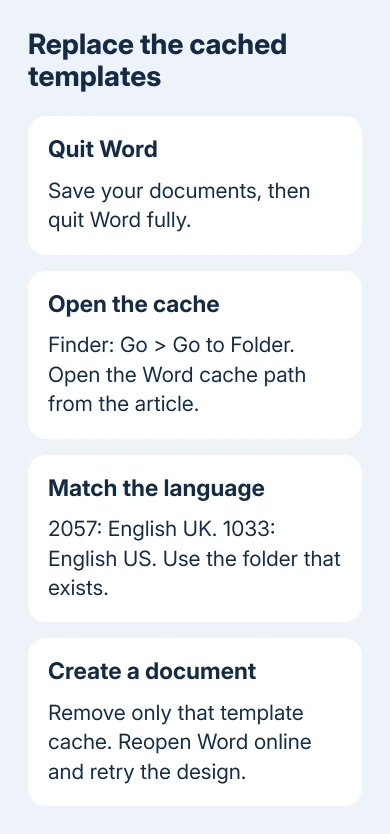
In Finder, choose Go > Go to Folder. Paste this complete path, including the opening tilde, then press Return:
~/Library/Containers/com.microsoft.Word/Data/Library/Caches/2057/The opening tilde means the home folder for your Mac login. The number 2057 identifies UK English templates in this older Word setup. Check the folder address before changing anything; the target is a template cache inside Word's container.
Move the contents of that folder to the Trash. Leave the surrounding Caches, Library, and com.microsoft.Word folders alone. This step removes downloaded template copies, not your saved documents or the entire Word installation.
Reopen Word and choose a template that failed earlier. Let it download, then click Create. The repair has worked when that design opens as a new document you can edit. Seeing the gallery again isn't enough.
Microsoft says Word downloads corrected templates after its template cache is cleared and the app relaunches. That repair was for faulty UK designs; other template problems need their own checks.
Try a second failed design. If both now create documents, save your work normally. If the failure continues, check the language folder and template type next rather than emptying the same cache again.
2. Check 1033 when the UK folder doesn't exist
Finder reporting that 2057 can't be found doesn't mean you typed the path incorrectly. A later reply in the original discussion identified 1033 as the folder for English US templates.
Return to Go > Go to Folder and enter the parent cache location:
~/Library/Containers/com.microsoft.Word/Data/Library/Caches/Look for 1033 if your templates are English US. Don't create a 2057 folder or rename another folder to match the instructions. An empty folder you make yourself won't contain the old templates Word needs to replace.
With Word closed, remove the US template cache only when 1033 is actually present at this location. The same Office-team follow-up said to clear that cache too, letting Word download fresh copies when you reopen it.
Reopen Word and retry the design. Double-clicking an individual cached template can also show whether that file opens. Note which designs fail so support can check those particular templates.
One later owner still couldn't find the expected folder and said the instructions didn't work for them. That matters: don't search unrelated Library folders and delete anything called a cache just to force this procedure to fit.
If neither language folder exists, move to the next check. These repair steps don't give another path that works for every later Word release, language, or installation.
3. Separate gallery designs from your own template
Check whether a blank document opens and whether the trouble is limited to one gallery design. Those results tell you whether you're dealing with the old downloaded-template fault or a broader document-opening problem.
An existing file that won't open needs the Word document-opening checks. Clearing a gallery cache doesn't repair the contents of a document someone emailed to you.
For a personal .dotx or .dotm template, open a separate copy through File > Open, keeping the original intact. If other templates work, ask its creator for a fresh copy before changing Word settings.
Owners also opened templates from inside Word's application package, but some files were in another language. I'd use the cache repair first; an unfamiliar language resource isn't a good substitute for the intended design.
Don't edit files inside Microsoft Word.app to repair the gallery. The package contains application resources, and the cache procedure doesn't ask you to change them.
A message naming Normal.dotm points to Word's default template instead. Follow the Normal.dotm repair for that warning rather than deleting downloaded gallery designs.
Saved blocks missing only from the Insert menu need the Mac AutoText list checks before replacing another template.
4. Identify the Office edition and update route
Open Word > About Microsoft Word and note the edition and version. The template reports came from Word 2016 builds, including 15.27. That was the reported version; installing that old build today isn't part of this repair.
Office 2016 for Mac stopped receiving support on October 13, 2020. It no longer receives new security or bug-fix updates. An updater saying there are no updates doesn't mean this edition is still supported.
For supported Office downloaded from Microsoft, Help > Check for Updates opens its update route. A Mac App Store installation uses App Store > Updates instead. Follow the route for the copy installed on your Mac.
An upgrade also depends on the Mac's operating system and the license you own. On a school or work Mac, give IT the Word version and macOS version and ask which supported Office installation the organization provides.
On Windows, a Word template download error also needs its online-content permissions checked.
When the gallery still won't create a document
Send your school or workplace help desk the failing template's exact name, Word version, language, and whether 2057 or 1033 exists. Include whether blank documents and a different gallery design open successfully.
For a supported personal copy, use Word's Help menu to reach support with those same details. Ask for help with template downloads or name the design that won't open. Office 2016 no longer has normal phone or chat technical support.
The Short Version
Clear the matching 2057 or 1033 cache with Word closed, then reopen it online and create a document. Missing folders and personal-template errors need separate checks. Plan a supported replacement for Office 2016.
Checked November 16, 2026.