
An Imminent Threat Alert is stuck on your iPhone with no dismiss button, and tapping it does nothing at all. That is unsettling before you have even read what it says.
Almost always this is a genuine emergency alert rather than a fault, and it clears in a way nobody guesses first time.
Swipe it, do not tap it. Let me show you exactly where and how.
First, ten seconds to rule out a fake
Do this first. Scare pages imitating emergency alerts are real, and the two need completely different fixes.
A genuine alert lives on your Lock Screen and in Notification Center. Lock the iPhone and look, or swipe down from the top. If it is there, this page applies.
A fake lives inside a browser tab. If it only appears while Safari is open, close the tab and it is gone. Nothing has happened to your iPhone.
Clear the alert that is on screen now
Do not tap it. Tapping opens it and leaves it where it was.
Drag the alert from right to left, then choose Clear. That is the whole action, and it is the step people miss because the alert carries no visible close button.
Two things stop that working, and both have caught people out.
Do it from Notification Center, not the Lock Screen. One owner spent days on this: "I was trying it from my Lock Screen several times but that didn't work. Make sure you are NOT on your locked home screen when sweeping left. Open your phone and pull down from the top to find that persistent notification and from there, swipe left."
The button may not say Clear. Owners report it reading Clear, Delete or Remove depending on the alert, so take whichever appears after the swipe.
If the screen has locked up entirely and ignores the swipe, force restart the iPhone and try again.
Why it comes back, and what is actually known
Nobody has proved it either way, so take the two explanations in order of how well they fit.
The likeliest one: it has not expired yet. A senior contributor spelled it out in July: "Swipe left to remove it temporarily. It will keep coming back….even if you restart your iPhone…..until the NWS system removes the alert. That might take a few days."
That fits the reports better than anything else on offer.
Almost every owner who names their alert describes a National Weather Service one, a snow squall or a flash flood, and those who time it say three days or five rather than forever.
An alert that clears once the issuing authority retires it behaves exactly like that.
The second, which is unproven and mine rather than anyone's: since December 2025 an iPhone has had two alert systems rather than one, so switching off the set you know about can leave another running.
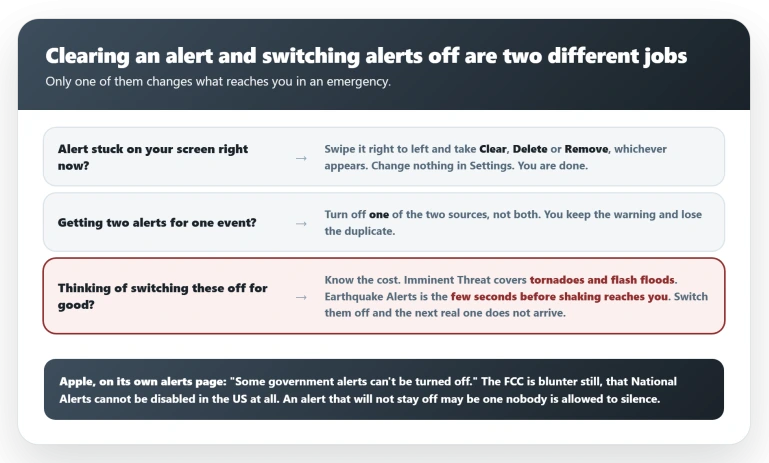
Apple's alerts support page documents the new one: "Enhanced Safety Alerts are available in the United States and Taiwan and require iOS 26.2 or later", and "These alerts are delivered by Apple and will appear and sound different than a Government Alert sent by your local government."
Apple adds that you can receive both for one event: "If Government Alerts are enabled and issued by your local authorities via carrier networks, your iPhone might receive them in addition to Enhanced Safety Alerts."
That would explain the owners who turned off every government alert and still saw one return.
But weigh the evidence honestly. Nobody in that thread mentions Enhanced Safety Alerts, and nobody reports stopping a recurrence by switching it off.
The words "Imminent Threat" settle nothing either, since that is a long-standing FEMA and FCC category for carrier alerts rather than a label Apple invented.
Check the second setting because it is quick. Do not be surprised if the alert was going to expire anyway.
Before you switch anything off
Everything from here is about the switches, so be clear what they do.
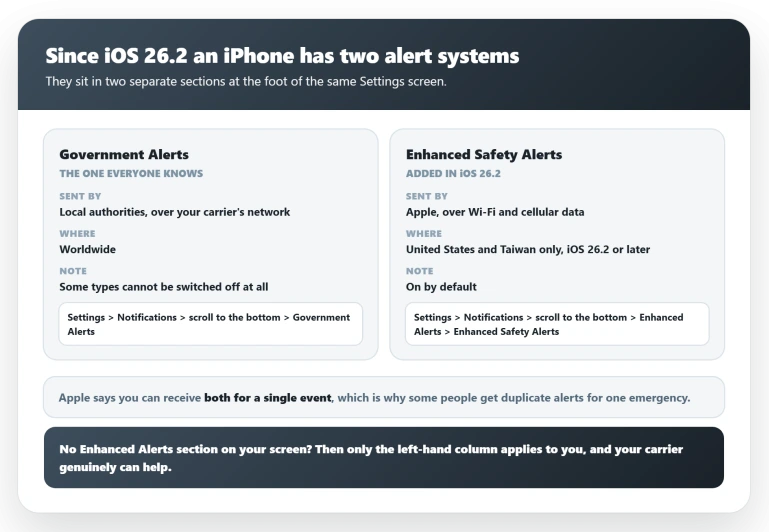
These alerts warn you about things that can kill you. Imminent Threat covers tornadoes and flash floods.
Earthquake Alerts gives you a few seconds before shaking reaches you, the difference between standing up and getting under a table. Switch either off and the next real one does not reach you.
Clearing a stuck alert needs none of this. The swipe is the fix. If that is all you came for, you are done.
If your complaint is two alerts for one event, turn off one source, not both. You keep the warning and lose the duplicate.
With that said, the switches are below.
Both settings, and where each one lives
Both sit at the foot of the same Settings screen, in two different sections. Finding one and stopping there is what catches people.
Government Alerts, the carrier ones. Go to Settings, Notifications, scroll to the bottom, and under Government Alerts turn each type on or off.
Enhanced Safety Alerts, Apple's own. Go to Settings, Notifications, scroll to the bottom, and under Enhanced Alerts tap Enhanced Safety Alerts.
Inside are Earthquake Alerts, Imminent Threat Alerts and Improve Alert Delivery.
Apple states the defaults: "Earthquake Alerts and Imminent Threat Alerts are turned on by default, and Improve Alert Delivery is turned off by default." Apple's page describes no opt-in prompt, so on a supported iPhone the second set is simply on.
No Enhanced Alerts section on that screen? Then you are below iOS 26.2, or outside the two countries Apple offers it in.
Yours is a carrier alert, the carrier advice genuinely does apply, and the second system is not your problem.
If you are below 26.2, our page on what the latest update changes covers whether to install it.
Two limits before you start toggling. Apple notes that "Some government alerts can't be turned off", and separately that "In some countries or regions, you may not be able to turn off Government Alerts." Beyond Apple, the FCC is clear that the category now called National Alerts, formerly Presidential Alerts, cannot be switched off at all in the United States.
So an alert that refuses to stay off may be one nobody is permitted to silence.
One thing to leave alone. Improve Alert Delivery is not a volume control.
Apple says it improves "alert timeliness and reliability", and that turning it on shares your approximate location with Apple, though "Apple does not store your approximate location data." It will not stop anything.
What the forums are telling people, and why it is wrong
The busiest thread runs to 69 replies and 467 "Me too" votes, and the answer Apple flags at the top is the one thing on it that will not help.
The question, posted on 1 January 2026, could not have been clearer: "I have an iphone17Pro with ios26.2. I received a CRITICAL Imminent Threat Alert. How do I get rid of it?"
Minutes later a volunteer asked where the alert had appeared, suggesting that if it was in a browser it was a scare advert.
That is a fair question, and it is the check this page opens with. He went on to give the correct advice repeatedly from March onward.
The problem is not the volunteer, it is the badge. Apple still flags that first exchange as the top-ranking answer, and it carries four Helpful votes, while the reply that actually works sits below it with 174.
A reader who trusts the marker goes hunting for a browser advert instead of swiping.
One other line gets repeated and sends people somewhere that cannot help: that the alerts do not come from Apple, so ask your carrier to reset your alert service.
That is usually right, since almost every alert described in the thread is a National Weather Service one carried over a mobile network.
It stops being right only for Apple's own Enhanced Safety Alerts, and nobody there establishes theirs was one.
The same volunteer told four people to swipe right to left, which is the fix this page leads with.
Status: no Apple fix or acknowledgment. The swipe clears it. The recurrence is unexplained, with alert expiry the likeliest cause. Recheck when iOS 27 ships.
What does not help
- Tapping the alert. It opens it and leaves it in place. The swipe is the only route to Clear.
- Turning off Government Alerts and expecting the current one to vanish. Several owners switched off every government alert and still saw it return, which is what makes expiry the likelier explanation.
- Calling your carrier about a stuck alert. They can discuss what they broadcast, but nobody in the largest thread reports a carrier reset clearing one.
- Resetting the iPhone. One owner tried it before finding the swipe. It does not remove a notification that is still queued, and on an iPhone still running iOS 18 it can hand you an update you did not ask for.
- Turning off Improve Alert Delivery to stop the alerts. It is off by default anyway, and it governs how well alerts reach you rather than whether the system sends them.
If none of that worked
Some owners describe an alert surviving the swipe, the force restart and every setting change. If that is you, stop changing things.
Give it a few days. If expiry is the cause, and it is the best explanation anyone has, the alert clears itself once the issuing authority retires it.
Meanwhile the alert is a notification like any other, so if your wider notification behavior is off, our pages on notifications that are hard to read and Mail notifications not arriving cover neighbouring faults.
If it is still there after a week, that is worth an Apple Support case rather than another reset.
How do I get rid of an Imminent Threat Alert on iPhone?
Drag it from right to left and choose Clear. Do not tap it.
If nothing appears, open Notification Center on the unlocked phone rather than acting on the Lock Screen, and check that a large Text Size is not pushing the button off screen.
Why does the same alert keep coming back after I restart?
Nobody has proved it. The likeliest explanation, from a senior Apple Community contributor, is that the alert stays live until the issuing authority retires it, which takes days.
A second possibility is that iOS 26.2 added a separate Apple-run system that switching off Government Alerts does not touch.
Checking that second setting is quick, so it is worth doing while you wait.
Should I just turn emergency alerts off?
Not to clear a stuck one, because the swipe does that and changes nothing.
Turning off Imminent Threat or Earthquake Alerts means the next genuine warning does not reach you, and Earthquake Alerts buys you seconds before shaking starts.
If duplicates are the problem, switch off one source rather than both.
Are these alerts from Apple or from the government?
Both, now. Government Alerts come from local authorities over your carrier's network. Enhanced Safety Alerts are delivered by Apple, in the US and Taiwan, on iOS 26.2 or later.
Apple says you may receive both for one event, which is why some people see duplicates.
The Short Version
- Swipe the alert right to left and choose Clear. Tapping it does nothing useful, and the button may read Delete or Remove instead.
- Do it from Notification Center with the phone unlocked, not from the Lock Screen.
- It most likely returns because the alert has not expired, and it clears itself once the issuing authority retires it.
- iOS 26.2 added a second alert system, Enhanced Safety Alerts, delivered by Apple rather than your carrier. Unproven as a cause here, but quick to check. Government Alerts is the other section, at the foot of the same screen.
- No Enhanced Alerts section? You are below iOS 26.2 or outside the US and Taiwan, and your carrier can genuinely help.
- Some alerts cannot be turned off at all. Apple says so, and the FCC is explicit that National Alerts cannot be disabled in the US.
A call going out rather than an alert coming in: If the phone dialled emergency services itself, our guide to an iPhone that called emergency services covers the triggers and what the switches do not stop.
Where to Next
Swipe it, do not tap it. Right to left, then Clear, from Notification Center with the phone unlocked.
If it comes back, that is usually because the alert has not expired rather than because the fix failed.
If yours keeps returning for days, tell me roughly where you are in the world, because these are issued regionally and that context helps a lot.

Isaac Smith is the founder and editor of PC Glance, a website that covers computers, laptops, and technology. He is a tech enthusiast and a computer geek who loves to share his insights and help his readers make smart choices when buying tech gadgets or laptops. He is always curious and updated about the latest tech trends.