
There is a ceiling on how many people your iPhone will block, and almost nobody knows it is there. One owner hit it at 5,569 blocked contacts and got an error message saying so. Until then, blocking had simply started failing silently.
That is one of seven reasons this goes wrong, and I promise it is the most satisfying one to find.
The others are quicker. Two of them are just a route that moved, and one is not a fault at all.
1. Block from inside the email, the way Apple documents it
Start with the official route, because it is the one that still works when the others have changed.
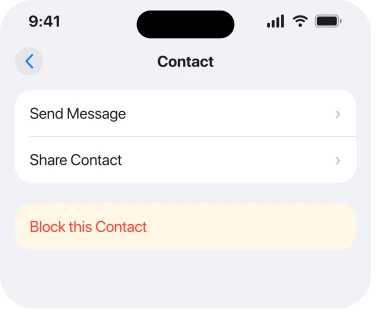
Apple, in Block phone numbers, contacts, and emails on your iPhone or iPad: "From the Mail app, open the email that has the contact that you want to block. Tap the contact at the top and tap View Contact Card. Then tap Block this Contact."
Three taps and one trap. Tapping the sender's name once often just expands the header. Tap it again to get the card. Block this Contact sits some way down that card, so scroll.
If the option is genuinely absent from the card, move to the next rung rather than repeating this one.
2. Try the swipe route, which a Level 10 member uses instead
Faster. And it survives some of the cases where the contact card does not offer the option.
Owl-53, a Level 10 member with 112,889 points, gave it step by step on the thread: "Swipe Left >> and look for 'More' Click on More Additional actions become available Scroll down to bottom Look for 'Block contact'".
So swipe left on the message in your inbox list, tap More, and scroll to the bottom of the menu that appears.
Worth knowing that the same member reported having around 250 blocked contacts and no trouble at all, which matters later on this page.
3. Add the address by hand, because the list moved in iOS 26
This is the change behind a lot of the reports. It is not a bug.
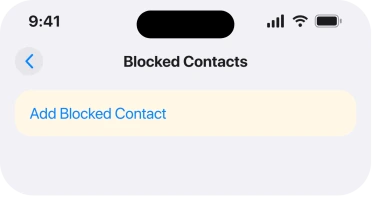
Apple documents a separate route under the heading Block Contacts in Settings in iOS 26: "Open the Settings app. Tap Privacy & Security. Tap Blocked Contacts. Tap Add Blocked Contact, then enter the contact that you want to block. Tap Block Contact."
Read where that lives. Settings, Privacy & Security, Blocked Contacts. Not under Mail, where people have looked for it for years, and not under Phone.
That single move explains a wave of reports that blocking had disappeared. It had not. It relocated, and it also stopped being per app, which is why the list you find there holds numbers and email addresses together.
4. Look in Trash before you decide it failed
Half the reports of blocking not working are blocking working exactly as designed.
Apple: "When you block an email address from Mail, it goes to the trash folder."
The mail still arrives. Your iPhone does not refuse it at the door. It accepts it and files it straight into Trash, so if you are judging success by whether anything came through, you will conclude it failed every time.
Apple adds one more thing worth having: "Email blocking works across all your Apple devices." So you only have to do it once, and if it did take, your Mac and iPad already know.
Mail stopped arriving altogether, rather than arriving from the wrong people? Different fault. Cannot Get Mail on iPhone is the page for that one.
5. Check whether your blocked list has hit its ceiling
Now the one nobody publishes, and the reason it is this far down the page is that it only bites people who have been blocking spam for years.
j wfromtorrance posted the exact wording iOS produces: "You've reached the maximum number of blocked contacts. To block additional callers, remove a blocked contact in Settings". They had 5,569 blocked contacts.
That is a real, hard limit. It is not documented on the page that tells you how to block people. Until you hit the message, blocking just quietly stops taking.
Go to Settings > Privacy & Security > Blocked Contacts and look at the size of the list. Does it run to thousands? Then this is very likely your answer, and nothing else on this page will help.
6. Prune the list, and there is a number owners aim for
The fix for rung 5, with a figure from the same thread.
Mac Jim ID, a Level 10 member with 92,072 points, reported what worked for people: "those that have reduced the blocked contacts to below 3,000 have found they will once again work".
⚠️ Treat three thousand as a reported working figure rather than a published limit. Apple does not print a number anywhere I could find, and the owner who hit the error was well above it while the member in rung 2 was fine at around 250.
Apple gives the removal route for iOS 26: "Open the Settings app. Tap Privacy & Security. Tap Blocked Contacts. Tap Edit, or tap the Unknown contacts then tap Edit. Tap the delete button next to contact that you want to unblock. Tap Unblock."
Most of a long list is dead spam numbers nobody will ever use again. Clear a few hundred. Then test blocking, and repeat, rather than deleting the lot at once.
7. Check your iOS version, because 26.4 broke this for a lot of people
The last rung is version-shaped, and the thread behind it is one of the busiest on the subject.
The original report came on 1 April 2026 from an iPhone 17 Pro Max on iOS 26.4, and it has collected 96 Me Too votes. Blocking of spam and junk email stopped working after that update.
On 14 May 2026, Javier Huerta posted the outcome: "Success!!! It looks like the latest update to iOS 26.5 fixed the blocking issue".
Still on 26.4? Get to a current build first. Test again before you start pruning lists. The route is Settings > General > Software Update.
⚠️ One thing from that thread I am reporting carefully. Another poster said Apple Support told them it was a known issue. That is a support call, not a published statement, and Apple has acknowledged nothing publicly that I could find. If blocked callers are still getting through to you rather than blocked email, blocked numbers still calling or texting is a different fault with different causes.
What does not help
- Blocking the same address repeatedly. If the list is full, every attempt fails the same way.
- Deleting the Mail app. The block list is a system list now, and it is not stored in the app.
- Marking as junk instead. Useful, but it is a different mechanism and it does not populate the blocked list.
- Signing out of iCloud. The list syncs across your devices, so signing out risks the list rather than repairing it.
- Judging it by whether mail still arrives. It will arrive. It goes to Trash, and that is Apple's design.
Status: iOS 26.6.1, checked 18 August 2026. The 26.4 wave was reported fixed by 26.5 for at least one owner. The blocked-list ceiling is owner-reported and Apple publishes no figure.
Why can I not block an email sender on my iPhone?
Most often because the block list has hit a limit, or because you are looking for the control where it used to live. On iOS 26 the list is at Settings, Privacy and Security, Blocked Contacts rather than under Mail.
Where is the blocked list on iOS 26?
Settings, then Privacy and Security, then Blocked Contacts. It holds phone numbers and email addresses together, and you can add an address by hand from that screen with Add Blocked Contact.
Does blocking an email address stop it arriving?
No. Apple states that a blocked sender's email goes to the trash folder, so the message still reaches your phone and is filed away. Judging the block by whether anything arrived will always look like a failure.
Is there a limit to how many contacts an iPhone can block?
There appears to be. One owner hit an error at 5,569 blocked contacts, and another member reported that people who cut the list below about three thousand got blocking working again. Apple publishes no number.
The Short Version
- Apple's route is the email, the sender's name, View Contact Card, Block this Contact.
- A swipe left, More, and Block contact is the faster route.
- On iOS 26 the blocked list lives at Settings, Privacy and Security, Blocked Contacts.
- Blocked email still arrives and goes to Trash, which is Apple's design.
- A full block list makes blocking fail silently until an error finally appears.
- Owners report blocking working again after cutting the list below about three thousand.
- iOS 26.4 broke this for many people and 26.5 fixed it for at least one.
Where to Next
What makes this one worth reading twice is that three completely different things all end with the same sentence, which is that blocking does not work. A moved menu, a design people misread as failure, and a genuine ceiling on the list.
Only the third one is really broken, and it is the only one that will not fix itself.
One thing I still cannot pin down is where the real limit sits. The reports run from a working list of 250 to an error at 5,569, with three thousand offered as the number that gets things going again. If you have hit that error, tell me exactly how many contacts were on your list when it appeared, and we can start narrowing it properly.

Isaac Smith is the founder and editor of PC Glance, a website that covers computers, laptops, and technology. He is a tech enthusiast and a computer geek who loves to share his insights and help his readers make smart choices when buying tech gadgets or laptops. He is always curious and updated about the latest tech trends.