
Your email stopped arriving on its own and you are certain you did not touch a setting. You did not.
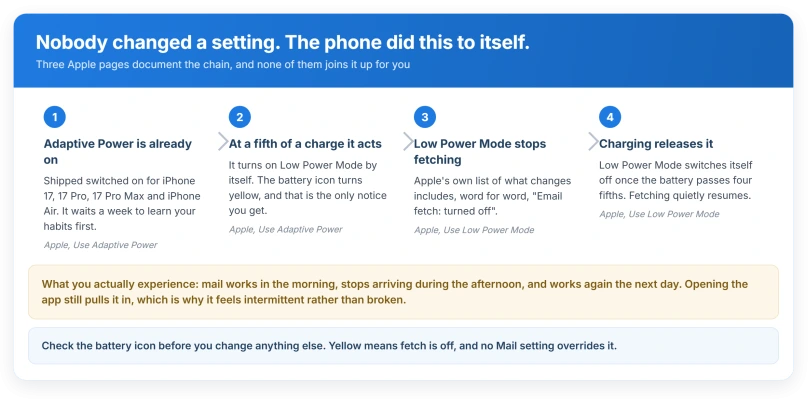
On the newest iPhones a power feature that is on out of the box switches Low Power Mode on at 20 percent, and Low Power Mode turns email fetch off.
Mail then arrives only when you open the app, and once you charge past 80 percent it quietly starts working again.
Let me take you along the whole chain, because every link in it is Apple's own.
The chain, and every link is Apple's own
Three separate Apple pages document this, and none of them joins it up for you.
Apple, on Adaptive Power: it will "Turn on Low Power Mode when your battery reaches 20 percent".
The same page: "Adaptive Power is on by default on these models: iPhone 17, iPhone 17 Pro, iPhone 17 Pro Max, iPhone Air".
Apple, on Low Power Mode, in its list of what changes: "Email fetch: turned off".
And the release, again from Apple: "When you charge the device to 80% or higher, Low Power Mode turns off."
So on those four phones, with nothing touched by anybody, mail stops fetching in the afternoon and starts again overnight. That pattern, working in the morning and dead by evening, is the signature.
One detail explains why it may not have happened until recently.
Apple: "Adaptive Power needs at least 7 days to learn your charging habits, so it won't engage before then." A phone that behaved for its first week and then started this is doing exactly what it was designed to do.
The one-second check
Look at the battery icon at the top of the screen. Apple: "When Low Power Mode is active, the battery icon in the status bar turns yellow."
Yellow means fetch is off. Nothing else on this page matters until that is dealt with, because no Mail setting overrides it.
To clear it now, plug the phone in and take it past 80 percent, or switch Low Power Mode off by hand in Settings, Battery.
To stop it happening at all on one of those four models, the switch is Adaptive Power on the same screen.
Look at that icon before you go anywhere near Mail, because if it is yellow you already have your answer.
Apple contradicts itself here, and the contradiction is the answer
This is worth showing you, because it explains the exact thing you are seeing.
Apple's iPhone User Guide says Low Power Mode "optimizes performance for essential tasks like making and receiving calls, sending and receiving email and messages, accessing the internet, and more."
Apple's support article says, in its own list: "Email fetch: turned off".
Both pages are live today and they appear to say opposite things about email.
Ours, and it resolves cleanly: they only agree if "sending and receiving email" means what happens while you are actually in the Mail app, and "Email fetch" means the scheduled check that runs in the background.
Which is precisely the complaint. Mail works when you open it and never arrives before you do.
Before anything else, is it arriving or just hidden
These are two completely different problems and most advice never separates them. Three taps does it.
In Mail, tap the back arrow at the top left until you reach the Mailboxes list. Then open the individual account's own Inbox, not All Inboxes.
- New mail is sitting there. It is arriving, and this is a display problem. The suspects are Mail categories, an inbox filter, or a Focus filter, and our page on Mail categories on iOS 26 covers where messages get sorted to.
- New mail is not there. It genuinely is not arriving, so carry on down this page.
There is a second confirmation if you want certainty.
Apple: "The number of unread messages shown on your Home Screen reflects the number of unread messages in your Primary category. To show your total number of unread messages in all categories, go to Settings > Notifications > Mail > Customize Notifications, then turn on All Unread Messages."
If the badge jumps the moment you do that, mail has been arriving all along.
The other causes worth knowing, none of which is a fault
A Focus filter, which does not sync to your other devices. Apple documents that you can "specify which email accounts are visible in Mail when a particular Focus is on", and separately notes that "Focus filters don't get synced across devices when you have Share Across Devices turned on".
That is the explanation for the most common sentence readers write: I can see the email on my iPad but not on my phone.
A filter set on the phone stays on the phone, and because a Focus can be scheduled by time or place, the problem comes and goes.
Mail switched off for cellular data. Apple: "If a setting is off, iPhone uses only Wi-Fi for that service." Mail then works at home and dies the moment you leave. The switch is under Settings, Cellular.
A rule you set years ago on the server. iCloud rules can move or delete mail before it reaches the phone, and you can audit them without a computer at Settings, your name, iCloud, Mail, iCloud Mail Rules.
Apple: "It may take up to 15 minutes for new or changed rules to take effect on incoming emails."
Junk filtering. Apple, plainly: "Filtering out junk mail can block a legitimate email from reaching your inbox." And a deadline worth knowing: "Email messages in the Junk folder automatically delete after 30 days."
iCloud storage, which is the one hard stop. Apple: "If you run out of iCloud storage, you won't be able to send or receive emails with your iCloud Mail address." Device storage is not documented as a cause anywhere, despite what you will read.
The wrong provider chosen when the account was added. Apple publishes a list showing that a pile of ordinary-looking addresses are really Yahoo or AOL underneath, including comcast.net, cox.net, sbcglobal.net, frontier.com, rogers.com and verizon.net.
Apple: "If the email provider you chose when adding your email account is not correct, remove the account from your device, then choose the correct email provider when adding it again." An account added through the generic Other option may never have been offered Push at all.
Status: iOS 26.6, checked 15 August 2026. Adaptive Power is on by default only on iPhone 17, 17 Pro, 17 Pro Max and iPhone Air, and it needs seven days before it engages.
Honestly, iOS 26 did not break email
This matters because the internet says otherwise, and the evidence does not support it.
Apple has acknowledged no Mail delivery bug in iOS 26, and we found no evidence of a widespread one.
We are not going to put a number on that, because we did not gather the forum evidence ourselves and we are not prepared to publish a count we cannot stand behind.
What we can point at is where the 2026 complaints actually cluster, because it turned up twice in separate research: a run of Outlook.com sign-in failures in late April 2026 that was a Microsoft outage, corroborated by a university IT department logging the same thing against Apple Mail while the Outlook app kept working.
If your mail stopped when you updated, the update is still the least likely explanation.
What does not help
- Deleting and re-adding the account, before you have checked the battery colour. If Low Power Mode is on, a fresh account will behave exactly the same way.
- Reinstalling Mail or resetting network settings. Neither touches the fetch schedule or a Focus filter.
- Clearing storage on the phone. Apple documents no device-storage threshold for mail. Any specific figure you have read was invented.
- Waiting for a point release. There is nothing to fix.
- Retyping your password. If you are being asked for one repeatedly, that is a different problem, and the Outlook password loop explains why retyping can never work.
Why does my email only arrive when I open the app?
Because the background check has been switched off while the foreground one still works. On the newest iPhones the usual reason is Low Power Mode, which Apple's own list says turns email fetch off, and which switches itself on at 20 percent battery. The battery icon turns yellow when it is active.
Does Low Power Mode stop push email too?
Apple's wording is specifically "Email fetch", which is the scheduled background check. Ours, from that wording: an account that pushes, such as iCloud or Exchange, should be unaffected. Apple does not state this either way, so treat it as our reading rather than a promise, and use the yellow battery as the test.
Why does it work on my iPad but not my iPhone?
The likeliest answer is a Focus filter. Apple lets a Focus hide particular mail accounts, and documents that these filters are not synced between your devices even when Focus sharing is on. So a filter you set once on the phone stays there, and the iPad never learns about it.
The Short Version
- Look at the battery icon first. Yellow means Low Power Mode, and Apple says that turns email fetch off.
- On iPhone 17, 17 Pro, 17 Pro Max and iPhone Air this happens on its own at 20 percent, because Adaptive Power ships switched on.
- It clears itself once you charge past 80 percent, which is why the fault seems to come and go.
- Apple's user guide and its support article appear to contradict each other on this, and the contradiction explains the symptom.
- Open the account's own Inbox, not All Inboxes, to tell "not arriving" from "arriving but hidden".
- A Focus filter can hide an account, and those filters do not sync to your other devices.
- iOS 26 did not break email delivery. Apple has acknowledged no Mail bug, and we found no evidence of a widespread one.
Where to Next
Look at the battery icon before you touch a single mail setting. Yellow explains the whole thing, and it undoes itself the moment you charge past eighty.
If you would rather it never happened again, the switch that starts the chain is the one to turn off, and you keep manual control of Low Power Mode.
Where mail stopped entirely on the night of an update, the cause is usually elsewhere. A restart is when an expired account finally asks again.
If your icon is not yellow and mail still only arrives when you open the app, leave me a comment, because then we are looking at something else entirely.

Isaac Smith is the founder and editor of PC Glance, a website that covers computers, laptops, and technology. He is a tech enthusiast and a computer geek who loves to share his insights and help his readers make smart choices when buying tech gadgets or laptops. He is always curious and updated about the latest tech trends.