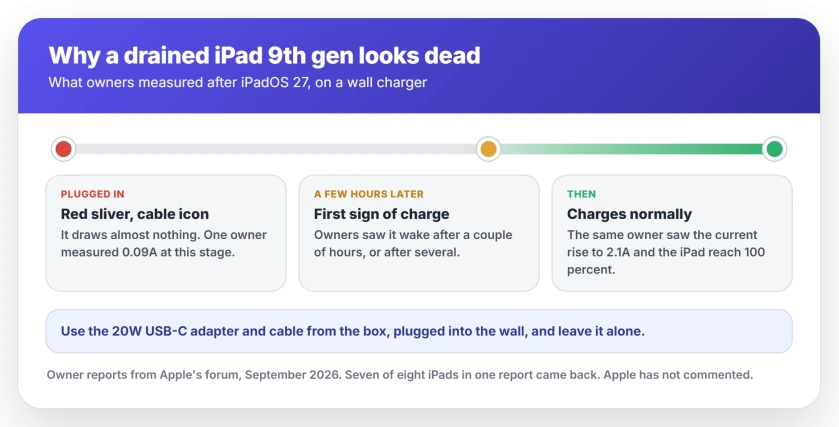
A drained iPad 9th generation on iPadOS 27 can sit on the charger for hours showing only a red battery and a cable, since it draws almost no power at first. Leave it on the 20W charger from the box, in a wall socket, for hours.
Once it's back on, install iPadOS 27.2. Two owners say it fixed the charging fault, including one whose iPad would only charge while switched on.
In this guide
What the red battery and cable mean
That picture is the iPad asking for power: its battery is too flat to start. Press any button on a drained iPad and it appears, so seeing it with nothing plugged in simply means the battery is empty.
If the cable stays in the picture with the charger connected, the iPad isn't taking a real charge yet. On iPadOS 27 that stage can last hours.
One parent measured why: just 0.09A at first, climbing to 2.1A once it got going. Their son's iPad reached 7% after several hours, then charged normally to 100%.
The fault is common. By November 8, the biggest forum thread on it carried 584 Me too votes.
1. Use the 20W charger from the box, straight into the wall
The iPad 9th generation came with a 20W USB-C Power Adapter and a Lightning to USB-C cable. Use that pair, plugged into a wall socket, because at the start the iPad needs every bit of current it can get.
A computer's USB port, a small phone charger or a power bank is the wrong tool here. One owner's iPad started charging properly the moment they switched to the 20W block.
Want to see what a charger is actually delivering? Reading the charging rate explains how, without guessing.
2. Give it hours, not minutes
When a dead iPad won't start, Apple's advice is to charge it for up to an hour. On this model since iPadOS 27, owners report two hours, several hours, overnight, and in one case about a day and a half before it reached full.
One person looking after a batch of these tablets hit the fault eight times in two days, and all but one came back after a couple of hours on the charger. So plug it in, walk away and check back later.
3. No change after a few hours? Re-seat the cable, then force restart
Two owners woke a stuck iPad by unplugging and replugging the cable. One saw the Apple logo after seven or eight tries, and the iPad restarted at 2%. Give it a few goes, pushing the plug fully in each time.
If that does nothing, force restart with the charger still attached. Hold the Home and top buttons down together, and release both once you see the logo.
Then leave it on the charger again. The person who started the main thread did a few force restarts one morning and the iPad came back later that day, so time may have done as much as the restarts.
4. Keep it switched on while it charges
Before 27.2, some 9th generation iPads only charged while they were on. One owner's sat at 45% for more than two hours while switched off, then gained 4% in nine minutes once turned on.
So once yours wakes, leave it on while it charges, with the screen locked if you like, rather than switching it off to charge.
5. Install iPadOS 27.2 as soon as it's on
With some charge in it, open Settings > General > Software Update and install iPadOS 27.2, keeping the iPad on the charger while it updates.
Two owners say 27.2 fixed it. One, whose iPad had only charged while switched on, updated and left it plugged in and switched off overnight, and it reached 100%. The other wrote that 27.2 had fixed the charging problem.
Apple's notes for 27.2 don't mention it. The earlier 27.0.1 update didn't help: two iPads that arrived already on 27.0.1 had the fault, and another running it went flat and stuck in mid-October.
6. Don't let it run flat again
The fault bites when the battery hits zero. For one owner it came back after a brand new battery ran down to 0%, and another found the second time worse, with an overnight wait before it charged.
Until you're on 27.2 and it has charged normally a few times, top it up before it dies. If the battery drains fast once it's running again, iPad battery drain after an update covers what settles down by itself and what doesn't.
If it still won't wake after a day
At this point, stop waiting. One of those eight iPads never came back, and an iPad that shows no sign of charge after a full day on the 20W charger needs a repair.
Book it in with Apple or an authorized service provider. Tell them it drained flat after iPadOS 27 and how many hours it sat on the charger, so they don't start from zero.
Ask for the battery to be tested before anyone replaces it. One shop found a swollen cell, while another found the original battery charged fine in a second iPad.
Don't erase or restore it first. A restore wipes the iPad, and your data is safe while it simply sits dead.
iPhone SE owner? A different glitch
An iPhone SE from 2020 has its own charging oddity on iOS 27, and it's only the icon. The charging icon vanishes a few seconds after you plug in, even though the phone is charging.
Restarting the phone with the charger connected brought the real percentage back for one owner. Another only saw it with a fast charger in a Mac's USB-C port, while a slow charger and wireless charging were fine.
If your iPhone really isn't taking a charge, the iPhone charging checklist works through it in order. And if a laptop in the house says plugged in but its charge won't rise, the number it stopped at tells you why.
iPadOS 27 brought these iPads a second fault, too: a Home button that ignores the triple-click in Guided Access, and a force restart gets you out.
Why won't my iPad 9th generation charge after the update?
A drained iPad 9th generation on iPadOS 27 can take hours to start charging, because it draws almost no current at first. Leave it on the 20W charger from the box, and once it's on, install iPadOS 27.2, the update two owners credit with fixing it.
Why does my iPad show the charging screen when it's not plugged in?
The red battery with a cable is the iPad asking for power, because its battery has too little charge to boot. Plug it into the 20W charger and leave it. On a 9th generation with iPadOS 27, it can take hours to wake.
Did iPadOS 27.2 fix the iPad 9th generation charging problem?
For two owners, yes: one reported their iPad charging properly again, even while switched off. iPadOS 27.0.1 didn't fix it, and Apple's notes for 27.2 don't mention the fault.
How long does a dead iPad take to charge?
Usually under an hour before it turns on. After iPadOS 27, owners of the 9th generation report two hours or more, and one waited about a day and a half. Keep the wall charger connected rather than checking it every few minutes.
Is my iPad battery dead?
Probably not. In one report, seven of eight iPads that looked dead came back after a couple of hours on the charger. If yours shows no sign of charging after a full day on a 20W charger, have the battery tested.
The Short Version
- On iPadOS 27, a drained iPad 9th generation may seem dead for hours while it trickle charges.
- The red battery with a cable means the battery is too flat to start, plugged in or not.
- Use the 20W charger from the box, straight into the wall, and wait hours.
- No change after a few hours? Re-seat the cable, then force restart.
- Once it's on, keep it on while charging and install iPadOS 27.2.
- Still dead after a full day? Book a battery test, and don't restore it first.
Checked November 8, 2026.
 If you have any business, I can build it online