
You select a paragraph in Pages, open Writing Tools and choose Proofread. It used to point out each missing comma. Now it misses many of them, or the tools open in a Siri window that does not do the job.
That is annoying when you rely on it for work. The fix is simple. It has a cost. I will explain what changed in macOS 27, the switch that brings the old Writing Tools back, and a middle road if you want to keep Siri.
What changed in macOS 27
The owner who raised it described the old behavior: "It used to point out what the error is (insert a comma, use a semicolon, etc.)". After the upgrade, "they now appear in the Siri AI popup. This would be fine except it doesn't work".
A Level 6 member recognized the cause: "That sounds like the new Siri AI integration rather than the old Writing Tools".
Apple's macOS 27 page confirms the link: with Siri AI (Beta) on, "you can compose, rewrite, proofread, and get feedback on your writing."
So with Siri AI on, your proofreading goes through Siri. That is where it falls short.
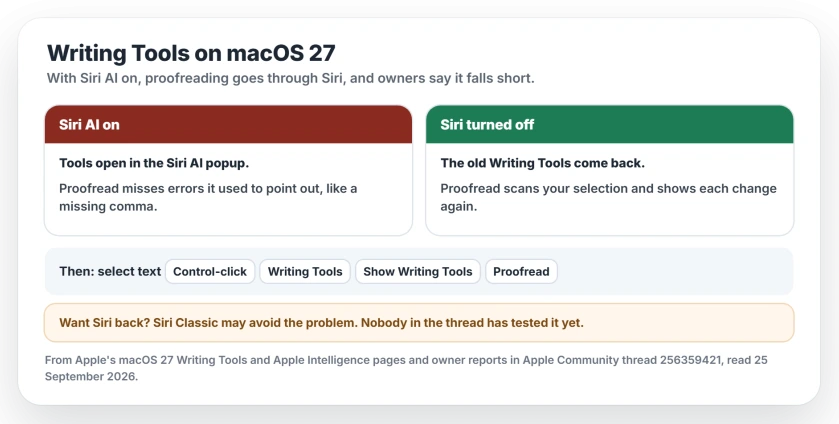
Status: 25 September 2026, macOS 27. Apple's own page says Siri AI takes over proofreading when it is on. Three owners got the old Writing Tools back by turning Siri off. Apple has not called it a fault or promised a change.
1. Turn Siri off
This is the fix. The owner who raised it tested it: "If I turn Siri off in System Settings, it behaves as it did before".
A Level 10 adviser does the same on their own Mac: "Turn off Siri like I do". One owner in the forum thread turned Siri off too and got the old Writing Tools back.
You will find the switch in System Settings, under Siri. Our Apple Intelligence guide has the exact route for the Mac and the iPhone.
2. Open Writing Tools the classic way
With Siri off, open the tools from the text itself, using the adviser's steps: "Select the text in your Pages document, right-click and choose Show Writing Tools". Then, in their words, "It will scan your selection and indicate changes".
Apple's Mac guide gives the same route: "Control-click the selected text, choose Writing Tools, then choose Show Writing Tools". Then click Proofread.
3. Want Siri back? Try Siri Classic
Turning Siri off means no voice Siri on your Mac at all. Too much? There is a middle road. Apple's Mac steps for it: "Click Turn On Siri, then select Use Siri Classic."
That guess is ours: the problem came with Siri AI, so Siri Classic may leave the old Writing Tools alone. The thread has no test of that yet, so try it and check Proofread again.
And if Siri AI itself answers with "something's gone wrong", that is a separate problem with its own fixes.
What you give up
With Siri off, you lose Siri on the Mac, including the Siri AI writing features. Writing Tools stay. Proofread works as it did before the upgrade.
If other things broke with macOS 27 too, Mission Control has its own fixes.
Why is Writing Tools not working on macOS 27?
With Siri AI (Beta) on, macOS 27 sends proofreading and rewriting through Siri, and owners find it misses errors the old Writing Tools caught; turning Siri off brought the old behavior back for them.
How do I get Proofread working again on my Mac?
Turn Siri off in System Settings, then select your text, Control-click it and choose Writing Tools, then Show Writing Tools, and click Proofread.
Does turning off Siri remove Writing Tools?
No. Owners who turned Siri off kept Writing Tools and got the old Proofread back. You lose Siri itself, not the writing features.
Will Siri Classic fix Writing Tools?
Possibly. Siri Classic has not been tried in the thread yet. Switch to Siri Classic, then try Proofread and see.
The Short Version
- On macOS 27, Siri AI takes over Writing Tools when it is on.
- Proofread then misses errors and opens in the Siri AI popup.
- Turning Siri off brought the old Writing Tools back for three owners.
- Open them with Control-click, Writing Tools, Show Writing Tools.
- Siri Classic may keep Siri and fix it too. That part is untested.
Where to Next
Turn Siri off, then run Proofread on a paragraph you know has a few mistakes in it. You will see the difference at once.
If you try Siri Classic, tell me whether Proofread works with it. That answer would help every Mac owner who wants to keep Siri.

Isaac Smith is the founder and editor of PC Glance, a website that covers computers, laptops, and technology. He is a tech enthusiast and a computer geek who loves to share his insights and help his readers make smart choices when buying tech gadgets or laptops. He is always curious and updated about the latest tech trends.