
Your iPhone 18 Pro Max is days old, and it feels warm in your hand even when you are barely using it. The battery drops faster than you expected. On the charger, it seems to stop filling.
It is worrying when a phone this new, and this expensive, runs hot. I will explain what Apple calls normal in the first days, why the charging pauses, and the point where you should take it back.
What owners saw
In the forum thread, the first poster put it simply: "iphone 18 pro max stays over heating and losing battery quick barely using it". There was no temperature warning on screen.
In a later reply they added: "Not over heating and just gets very Hot and doesn't charge and battery starts draining". Eight people have pressed Me too. Other owners report the same since launch day.
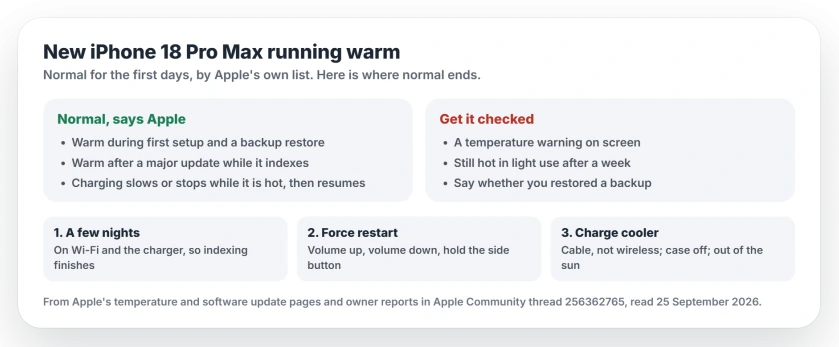
Status: iOS 27, checked 25 September 2026. Apple lists first setup and restoring a backup as normal reasons for warmth. A Level 10 volunteer says the indexing after a transfer takes a few days.
Why a new iPhone runs warm
A new iPhone is working hard in the background for its first days. Apple's page on temperature lists the moments your phone "feels warmer". Two of them are "Set up your device the first time" and "Restore from a backup".
Apple's verdict on that list: "These conditions are normal". And that is before the iOS 27 update.
Apple's page on updates adds the battery side. After a major release, it says, a phone can run warmer and drain faster for a while as it catches up on background work.
A Level 10 volunteer applied that to this exact phone: "Your phone is still indexing the data you moved over to the device, which can take a few days".
Why it stops charging when it is hot
This part looks like a fault, but it is the iPhone protecting itself.
Apple says that when the inside gets too warm, "Charging, including wireless charging, slows or stops". It resumes once the phone cools.
So a phone that is busy indexing, sitting in a case, on a wireless charger, can easily pause at the same percentage for a while.
1. Give it a few nights
This advice is ours: leave the iPhone on Wi-Fi and on the charger overnight for three or four nights. Indexing finishes fastest then.
Do not judge the battery in week one. Most of what you see now is setup work, not how the phone will behave next month.
2. Force restart it
That volunteer also recommends a force restart, and wrote: "I Force Restart my iPhone after EVERY iOS update and if no updates for a while, once a week".
Apple's steps: a quick press of volume up, then volume down, then the side button, held until the logo shows.
3. Charge it cooler
Wireless charging is also on Apple's list of things that make an iPhone warmer. While it settles in, I would use a cable.
Leave the case off while it charges, keep it out of the sun, and never leave it in a parked car. Apple warns that heat like that "can permanently shorten battery life".
4. When it is not normal
Some signs mean it is time for help rather than patience. If a temperature warning appears on screen, stop using the phone and let it cool.
If it is still hot during light use after a week, the setup excuse is gone. Book a check with Apple Support. Mention whether you restored from a backup.
I would do that sooner rather than later if you are still inside your return window.
Other iPhone 18 Pro Max problems
If yours restarts on its own as well, the iPhone 18 Pro Max restart page explains the diagnostics check. For heat that started after an update on an older iPhone, the iOS 26 overheating fixes go further.
Why is my new iPhone 18 Pro Max so hot?
Apple says an iPhone feels warmer when you set it up the first time and when you restore from a backup. A Level 10 volunteer says the indexing after a transfer takes a few days.
Is it normal for a new iPhone to get hot?
Yes, for the first days. Apple calls warmth during first setup and backup restores normal, and says the phone cools once the process is complete.
Why is my new iPhone not charging when it is hot?
Apple says charging slows or stops once the phone's insides get too warm. It resumes once the phone cools down.
How long does a new iPhone stay warm after setup?
A Level 10 volunteer puts the indexing at a few days. Still hot after a week of light use? Get it checked.
The Short Version
- Your new iPhone runs warm while it sets up and restores your data.
- Apple calls that normal, and says your hot phone pauses charging on purpose.
- Give it a few nights on Wi-Fi and power.
- Force restart it once.
- Charge it with a cable, with your case off.
- A temperature warning, or heat after a week, means get it checked.
Where to Next
Plug it in tonight, on Wi-Fi, and judge it again in three days.
If it is still hot by then, add a comment saying whether you restored from a backup or set it up as new. That detail matters more than anything else here.

Isaac Smith is the founder and editor of PC Glance, a website that covers computers, laptops, and technology. He is a tech enthusiast and a computer geek who loves to share his insights and help his readers make smart choices when buying tech gadgets or laptops. He is always curious and updated about the latest tech trends.