

You updated your Mac, and now Safari 27 stutters when you scroll some sites. The same pages glide in Chrome. That makes it hard to blame the websites.
I read the Apple Community thread, where 24 people pressed Me too, and Apple's own Safari help. Apple has no fix out yet. Still, a few things make it easier to live with until one arrives.
What the thread describes
The opening post put it plainly: "After updating to Safari 27 on macOS, I started noticing noticeable stuttering and jerky scrolling on some websites".
You may notice it most on pages with moving parts. On a shop page, "when the cursor is over a product card that displays additional information or hover effects, scrolling becomes noticeably choppy and the entire page seems to stutter".
It reaches big sites too. "I have also noticed occasional scrolling stutters on YouTube and even on Google Search".
And the comparison that matters to you: "I tested the same websites in Google Chrome on the same Mac, and scrolling is smooth there".
A second owner agreed that "Media heavy web pages seem to struggle and stutter the worse". Their next line: "But even text only web pages still scroll less smoothly in MacOS 27".
The 60 Hz pattern, and why it is unconfirmed
ParaSupaman passed on what they had read: "it has been mentioned that this issue only seems to affect displays that run at 60 Hz". They added that "MacBook Pro's and other 120 Hz displays apparently do not appear to have this issue".
The reports fit so far. jean-paul260 wrote: "Same issue with Mac Mini M1 + LG 27 60 Hz display".
Still, that link is secondhand, and nobody in the thread has tested a 120 Hz screen side by side. If your Mac has one, you can help settle it.
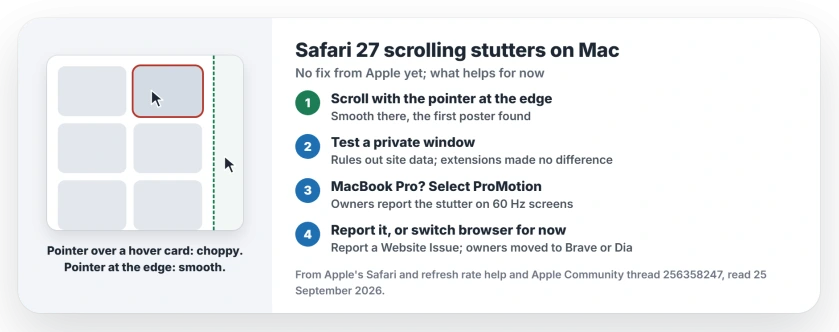
Status: Safari 27 on macOS 27, checked 25 September 2026. No fix from Apple yet. Owners see the stutter on 60 Hz screens and hover-heavy pages.
1. Scroll with the pointer at the page edge
The first poster found something odd. On the same page, "scrolling is smooth when the mouse cursor is positioned on the side of the page".
So on a shop or video page, park the pointer in the margin before you scroll. It is a workaround, not a fix, and that advice is ours.
2. Rule out extensions and site data
Apple's Safari help starts with extensions: "If you installed any Safari extensions, turn extensions off". The first poster already had: "Disabled all Safari extensions" made no difference.
Apple's next test is a private window: "To prevent the website from using that data, view it in a private window". Press Shift-Command-N and open the same page.
If it scrolls smoothly there, remove that site's data in Safari Settings, Privacy, Manage Website Data. If it still stutters, your data is not the cause. Resetting feature flags did not help either, going by the first post.
3. On a MacBook Pro, check the refresh rate
Apple says that "On 14-inch and 16-inch MacBook Pro models with Apple silicon, select ProMotion". The same page suggests lower rates for video, then going "back to the default for your display" afterwards.
The setting lives in System Settings, Displays, where Apple's step is to "Click the Refresh Rate pop-up menu and choose a refresh rate".
Our reading: if the 60 Hz pattern holds, a MacBook Pro left at 60 Hertz could show the stutter, and so could an external display set lower than its best rate. I could not find an owner who has tested this yet.
4. Report it to Apple from the page
Apple added a reporting tool in Safari 26: "you can also report the issue to Apple to help Apple improve web compatibility". Reload the stuttering page first.
Then click the Page Menu button in the Smart Search field and "choose Report a Website Issue". Apple notes the item "appears only after reloading the page". Each report tells Apple which sites stutter.
5. Use another browser for heavy sites, for now
Owners report two stopgaps that work. ParaSupaman said: "Also, as a workaround, I am currently using the Brave browser (based on Chromium) which works perfectly smoothly".
Alpha-Centauri, on a Mac mini with a Studio Display, wrote: "I moved to Dia Browser for now". Chrome scrolled smoothly for the first poster.
Keep Safari itself current too. Apple says a later Safari comes "by following the steps to update macOS". Apple ships Safari inside macOS, so a fix would arrive the same way.
Other Mac problems after macOS 27
If your mouse scrolls badly everywhere, not just in Safari, the Magic Mouse page for macOS 27 covers that. For a stuck desktop overview, see Mission Control on macOS 27.
Why is Safari scrolling choppy on macOS 27?
Apple has not said. Owners see it since Safari 27, worst on pages with hover effects and media, and on 60 Hz screens, going by the thread.
Is there a fix for Safari 27 scroll stutter?
Not yet, as of 25 September 2026. Keep the pointer at the page edge, report it with Report a Website Issue, and install macOS updates as they arrive.
Does Safari 27 stutter on 120 Hz MacBook Pro screens?
One owner read that it does not, but that is secondhand. If you have ProMotion, make sure it is selected in Displays settings.
Which browser scrolls smoothly on Mac right now?
Owners moved to Brave and Dia, and the first poster found Chrome smooth on the same pages.
The Short Version
- Safari 27 stutters on some sites; Chrome does not.
- Scroll with the pointer at the page edge.
- Test a private window to rule out site data.
- On a MacBook Pro, select ProMotion in Displays.
- Report each bad site with Report a Website Issue.
- Use another browser for heavy sites until a fix.
Where to Next
Pick the site that stutters worst for you and send one report from it today.
If a macOS update fixes the stutter for you, say which version in the comments. I will update this page the same day.

Isaac Smith is the founder and editor of PC Glance, a website that covers computers, laptops, and technology. He is a tech enthusiast and a computer geek who loves to share his insights and help his readers make smart choices when buying tech gadgets or laptops. He is always curious and updated about the latest tech trends.