
You go to find your Mac's FileVault recovery key, because Apple says the Passwords app keeps it. You click All, and your Mac is missing. The Show Recovery Key button in FileVault settings may be gray as well.
I would make a new recovery key rather than keep hunting for the old one, as two answers on Ask Different did, one with a single Terminal command and one with FileVault off and on again.
The question has 1,109 views since late June.
Why your key is not there
Apple's Passwords guide says: "Click All in the sidebar, then click the name of your Mac in the list". For the asker, it simply was not there.
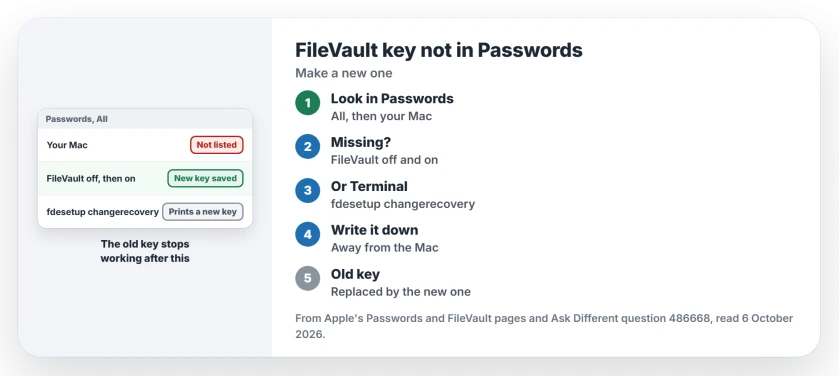
Status: checked 6 October 2026. Macs upgraded to macOS Tahoe had no FileVault entry in Passwords. Turning FileVault off and on created one, as a member confirmed.
A second member saw the same thing on two Macs, both upgraded to Tahoe. In their words: "I think this feature was added in Tahoe and is not retroactive to upgraded systems". If that is right, an older key never moved into Passwords.
1. Turn FileVault off, then on again
That member turned FileVault off in System Settings, then switched it back on right away. They wrote: "Each operation took only a few seconds". Then the entry appeared: "Now I do have the Passwords entry, and the button is active".
Note their warning. The old key stops working: "Note that the key will be replaced with a new one when you take these steps", so if you wrote the old one down, write the new one down too.
2. Or make a new key in Terminal
The accepted answer used one command, from an administrator account:
sudo fdesetup changerecovery -personalTerminal asks for your password, then for your user name and password again. Then it prints the new recovery key. The member had done this on macOS 15, months earlier.
Ours: it skips the off and on step. I would copy the key into Passwords yourself afterward, since the Terminal route only prints it.
Where to keep the new key
Apple says plainly: "Keep a copy of this key somewhere other than your encrypted startup disk", and it also warns against keeping it with your Mac, where others could find it.
Ours: a printout in a drawer at home, plus the Passwords entry, covers the usual risks. A photo on the same Mac does not.
What the key is for
Apple's line: "If you forget the password for your Mac, you can reset the password by entering the recovery key". Without the key, a forgotten password gets much harder.
If you are locked out already, a Mac that will not accept the correct password covers the recovery route.
And on a Windows PC?
The idea is the same, with different names. Windows calls its key the BitLocker recovery key, and finding your BitLocker recovery key shows where Microsoft stores it.
The Short Version
- Macs upgraded to Tahoe may have no FileVault entry in Passwords.
- Turning FileVault off and on created the entry for one owner.
- Or run sudo fdesetup changerecovery -personal in Terminal.
- Both routes replace the old key with a new one.
- Keep a copy somewhere other than the Mac itself.
- The key resets your password if you forget it.
Where to Next
Open Passwords now, click All and look for your Mac's name; if it is missing, make a new key today, before you need it.
Did your Mac have the entry after Tahoe? Tell me in the comments.

Isaac Smith is the founder and editor of PC Glance, a website that covers computers, laptops, and technology. He is a tech enthusiast and a computer geek who loves to share his insights and help his readers make smart choices when buying tech gadgets or laptops. He is always curious and updated about the latest tech trends.