
You click Get or the price in the Mac App Store, and the sheet opens without its Buy or Install button. Restarting and signing out change nothing. It is maddening when you just want the app.
I would drag the App Store window partly off the screen and back again. That brought the button back for an owner on Ask Different, and a second member confirmed Hover Text as the trigger.
The question has 956 views since April.
What makes the button vanish
The answerer reproduced it on their Mac. They turned on Hover Text, then held Command over items such as Cancel, and the button disappeared.
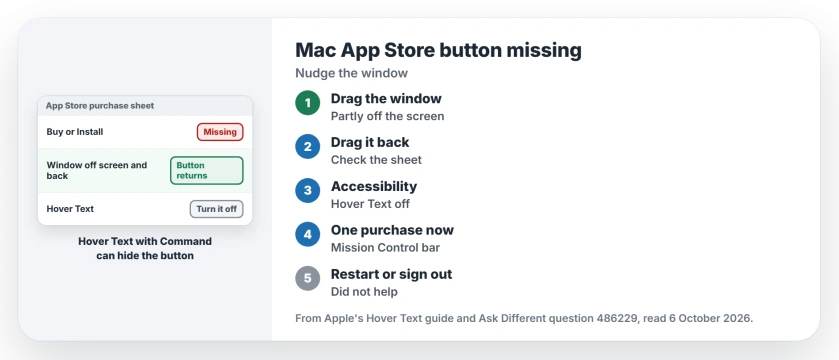
Status: checked 6 October 2026. The Mac App Store showed a purchase sheet with no Buy button. Dragging the window off screen and back restored it; Hover Text off stopped it for a member.
Apple says Hover Text enlarges the text under the pointer while you hold the Command key. So a feature for reading small text can hide the App Store's most important button.
1. Drag the window off the screen and back
Grab the App Store window by its top edge and pull it partly past the side of the screen. Then drag it back into place.
The accepted answer credits the asker with the result: "dragging the main AppStore window slightly offscreen and back again" brought the Purchase button back. Ours: it takes seconds, so I would try it first.
2. Turn off Hover Text
Open System Settings, click Accessibility, then Hover Text, and switch it off. Apple's Hover Text guide shows the same route.
A second member checked it and posted: "Turning off Hover Text restores normal behavior for me". I would leave it off while you shop, and turn it back on afterward if you rely on it.
3. Or drag the window into Mission Control
Another member found a shorter-lived fix. Drag the window, purchase sheet and all, up into the spaces bar at the top of Mission Control.
The accepted answer calls this "less permanent", so expect the button to go again. Use it for one purchase right now.
What the asker tried first
The asker had already rebooted and signed out of the store and back in. Neither brought the button back.
Quitting the App Store did not help either. The answer says the missing button "will stay lost even after quitting and re-launching AppStore".
Is something wrong with my Apple Account?
No. The asker's account worked in the App Store on their iPhone. In their words: "The same account works in the iOS App Store".
If apps download on your iPhone but not on your Mac at all, iPhone apps that will not download on a Mac covers that fault; for a store that has vanished from your iPhone, see the App Store icon missing on iPhone.
The Short Version
- The Mac App Store can open a purchase sheet with no Buy or Install button.
- Hover Text with the Command key can hide it.
- Drag the App Store window partly off the screen and back.
- Turn off Hover Text in Accessibility settings.
- Dragging the window into Mission Control works for one purchase.
- Restarting and signing out did not bring it back.
Where to Next
Nudge the window off the screen edge now and look at the sheet again; if the button returns, switch Hover Text off before your next purchase.
Did the window trick work, or was Hover Text already off on your Mac? Say which in the comments.

Isaac Smith is the founder and editor of PC Glance, a website that covers computers, laptops, and technology. He is a tech enthusiast and a computer geek who loves to share his insights and help his readers make smart choices when buying tech gadgets or laptops. He is always curious and updated about the latest tech trends.