
You press the cloud button on an iPhone or iPad app in your Mac's App Store. It spins for a few seconds. Then it flips back to the cloud, and nothing installs.
That is annoying when ordinary Mac apps download fine. I read Apple's App Store guides, then a MacRumors thread comparing notes from owners of M2 to M5 Macs.
What owners see
The thread has about 2,000 views. The opening post lists the pattern: after a few seconds, "it goes back to the cloud button", and "The app is not installed".
Other owners saw it on an M4 MacBook Air, an M2 Max Mac Studio, and M4 Pro and M5 Pro Macs. One saw it on macOS 26 and on the macOS 27 beta.
Only one kind of app is hit. Apple labels them in the store: iPhone and iPad apps that run on a Mac "are labeled with Designed for iPhone or Designed for iPad."
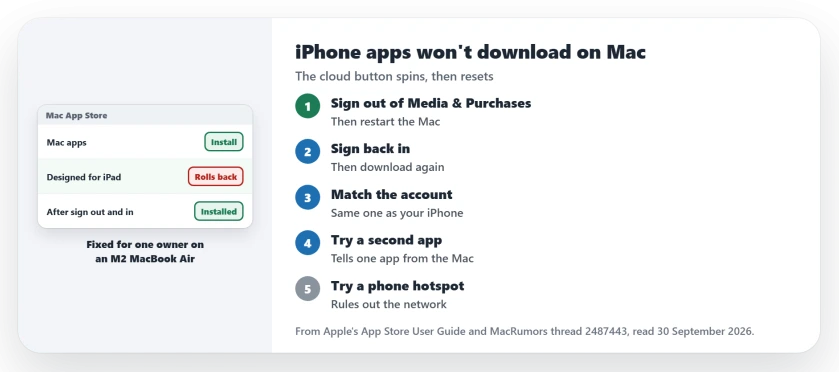
Status: checked 30 September 2026. Signing out of Media & Purchases, restarting and signing back in cured it for one owner. Another got two of three apps working after a Store sign-out.
1. Sign out, restart, and sign back in
One owner on an M2 MacBook Air got past it this way, and I would try it first on your Mac. They deleted the stuck app, then opened System Settings, their Apple Account, then Media & Purchases, and signed out.
After a restart, they signed back in. Then they downloaded the app again. It installed, and it was the latest version.
Apple's App Store guide gives the store's own route: "Choose Store > Sign Out." Then use Sign In, in the lower-left corner of the window.
If the App Store opens a purchase sheet with no button at all, nudging the window brings it back.
2. Match the Mac's account to your iPhone
One member suggested a mismatch as a cause. In Media & Purchases, confirm the Mac is signed in with the account your iPhone uses.
If it does not, the purchases your iPhone knows about may not reach the Mac. That part is user-reported, and quick to confirm.
3. Try more than one app
Another owner used the Store sign-out, then tried again. Two of their three iPad apps installed, and one still failed.
They took it as a way to tell a broken Mac apart from one broken app. If other apps install, the problem is with that one app, not your Mac.
4. Try another network
The same member who suggested checking accounts had one more test. In their words: "A phone hotspot rules out a captive network blocking Apple's commerce hosts."
Switch the Mac to your phone's hotspot once. If the app installs there, look at the network you usually use.
5. Check the app still offers a Mac version
Apple says iPhone and iPad apps you buy that work on your Mac "are shown when you view your purchased apps in the App Store." Open your account in the App Store. Look for the app there.
One member thought a developer might have stopped offering it on the Mac. Another owner found that every such app failed, even ones they had installed before, so I would check several before you blame the developer.
Other Mac app problems
If a downloaded app will not open because the Open Anyway button is missing, the Open Anyway page covers it. On iPhone, apps stuck on Waiting have their own fixes.
Why won't iPhone apps download on my Mac?
Owners of several Apple silicon Macs see the download start and roll back. An owner on an M2 MacBook Air got it working by signing out of Media & Purchases, restarting and signing back in.
Why does only one iPad app fail on my Mac?
One owner got two of three apps working and suspected the third was an issue on the developer's side. Try another app to tell the two apart.
Do all iPhone apps work on a Mac?
No. Apple labels the ones that do as Designed for iPhone or Designed for iPad, and lists them in your purchased apps.
The Short Version
- The download spins, then rolls back to the cloud.
- Sign out of Media & Purchases, restart, sign in.
- Or choose Store, then Sign Out, in the App Store.
- Match the Media & Purchases account to the iPhone.
- Try a second app to rule out one bad app.
- Try a phone hotspot to rule out the network.
- Look for the app in your purchased apps.
Where to Next
Sign out of Media & Purchases now, restart the Mac, and sign back in. Then try the app again.
If it still rolls back, a comment naming your Mac and macOS version would help me track it. New fixes will go on this page.

Isaac Smith is the founder and editor of PC Glance, a website that covers computers, laptops, and technology. He is a tech enthusiast and a computer geek who loves to share his insights and help his readers make smart choices when buying tech gadgets or laptops. He is always curious and updated about the latest tech trends.