Browsing history on an iPhone lives inside the browser used to open the page. In Safari, open its History list; in Chrome, tap More > History. The phone does not combine those lists into one complete record.
Safari's controls differ between iOS 26 and iOS 27. Start with the matching route, then look in the other browser if the expected visit is missing.
In this guide
Open Safari's History for the installed iOS version
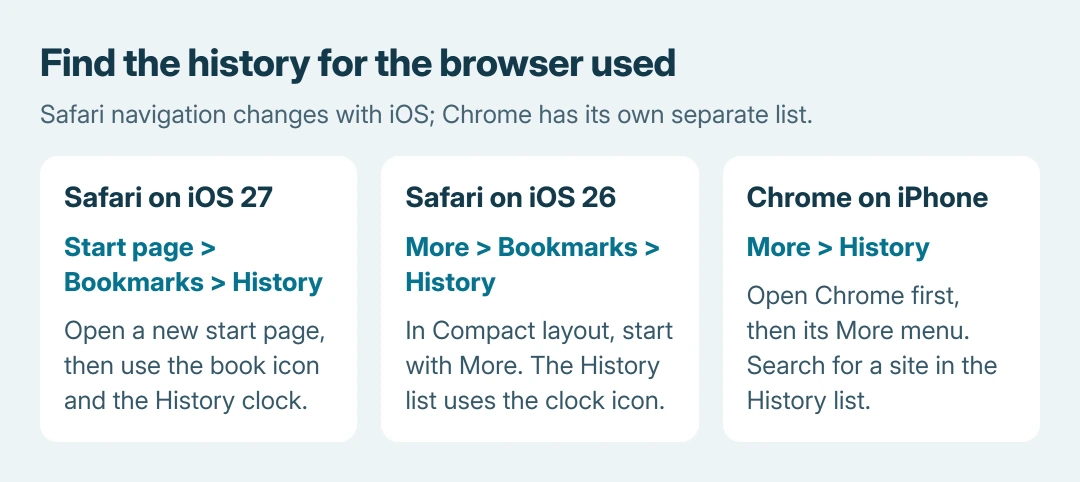
On iOS 27, open Safari and go to its start page. If needed, tap the Tabs button and the Add (+) button to open one. Open Bookmarks with the book icon, then tap History, shown with a clock icon.
Apple documents this navigation in its Safari history and website-data guide. Stop at the history list to review visits; Clear History is an erase operation, not a way to display more results.
Status: Safari history routes compared in Apple's iOS 26 and iOS 27 guides on October 26, 2026. Google's iPhone Chrome instructions also checked; no browsing history was accessed.
With Safari's Bottom or Top tab layout, the Bookmarks control can be on the toolbar directly. Tap the book, then the clock, without first changing layouts.
On iOS 26's Compact layout, tap More, then Bookmarks, then the History clock. Apple's iOS 26 Safari introduction supplies that route; the newer start-page instructions should not be substituted for it.
Browse the listed visits and tap the page to reopen it. If the goal is to recover a set of open tabs, the missing Safari tabs checks address Tab Groups and recently closed tabs separately.
Look in Chrome when Safari has no matching visit
Open Chrome, tap its More menu, then History. Use the search bar at the top to look for a site or a remembered word from the page. Tap a result to reopen it.
Google says Chrome's history list covers visited pages from the last 90 days. It excludes Incognito visits, deleted entries and internal Chrome settings pages.
An unexpectedly empty Chrome list needs the missing-history checks for filters, browser profiles and device sharing.
That 90-day limit belongs to Chrome's documented list. It is not a retention guarantee for Safari, every website account or every app on the iPhone.
With history sync enabled, Chrome can show visits from another device using that Google Account. An entry in this list therefore does not always establish that the visit happened on this particular phone.
For a Mac's visit list, search desktop Safari records through its History menu.
Separate browser visits from a Google Account's activity
A search made while signed in to Google can appear in the account's My Activity records, depending on its activity controls. Open myactivity.google.com, check the account shown, and inspect the available date and product filters.
Google's activity guidance explains that saved activity depends on the account and enabled controls. This is a useful second place for a remembered search, but it is not a complete Safari browsing log.
For cleanup on a computer, delete Chrome visits and saved Google searches separately.
The order of checks is ours: inspect the browser used for the visit first, then the relevant account's activity. Searching an unrelated browser or Google Account cannot display records it never received.
When the history list still lacks the page
Private Browsing pages do not enter Safari's History, and Incognito pages do not enter Chrome's. A cleared record also cannot be redisplayed by refreshing the history screen.
For future visits that should enter History, open a regular Safari tab before browsing.
Safari profiles keep their browsing history separate. Check the profile used for the visit before concluding that the record was erased. Apple also documents Safari history syncing through iCloud across signed-in Apple devices.
If the missing item was deliberately saved, use the Safari bookmark checks. Bookmarks and history serve different purposes, and a saved link may remain even when its visit is absent.
Check open tabs, saved links and relevant messages for another copy of the address. For a continuing display or sync problem, contact Apple or Google with the app and system versions; erasing browser data would remove possible records.
The Short Version
Open Safari's clock-marked History list or Chrome's More > History. Match Safari's navigation to the iOS version and layout. Check the correct profile and account, and keep private visits, deleted records and saved bookmarks separate.
 If you have any business, I can build it online