The Google Pixel December 2025 update added quarterly Android changes, security patches and charging, Bluetooth and display fixes. If that release is still installed, look for newer software in Settings instead of reinstalling December.
December 2025 is now an older release. Its build number, Android security date and Google Play system date answer different questions, which explains why two update screens can appear to disagree.
In this guide
Identify December's release without confusing the dates
Google says the December 2025 announcement uses BP4A.251205.006 as the global build for its published Pixel models. Some carrier and regional versions add endings to that number, so check the whole build.
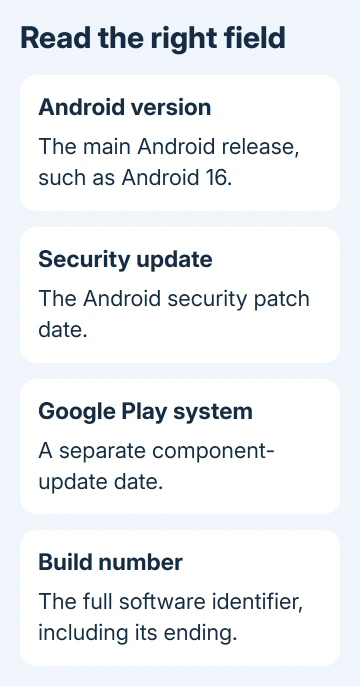
For example, the announcement includes .A1, .B1 and .C1 variants for particular device and carrier groups. A different ending isn't automatically an installation failure. Compare the model and carrier heading as well as the number.
The security bulletin uses 2025-12-05 as the patch level that covers its listed issues. That date identifies security coverage. It isn't the date every phone received the download, and it isn't the separate Google Play system update date.
Open Settings > About phone > Android version. Note the full build and both update dates before deciding something is missing. If you ask support for help, send each date with its label as well as the main Android number.
The release was part of the Android 16 QPR2 period. QPR means quarterly platform release: a larger set of Android changes between the main annual versions. It doesn't mean the phone must show Android 17 to have received December's changes.
Know which faults the original release addressed
The original notes list several kinds of fixes rather than one universal battery or display repair. Some entries cover a broad group of models; others name only certain phones in the footnotes.
Two battery fixes address a blank or question-mark battery icon and an 80% limit that may be incorrect under certain conditions. Those fixes target these two problems; they don't promise longer battery life.
The January 2026 Pixel repair list separately names a battery-drain fix and explains which models received it.
The display entries include flashing, black screens, freezing and dim brightness on the Pixel 10 family. A separate entry covers an inner-display flicker or black screen while launching certain games on Pixel 10 Pro Fold.
Earlier display repairs differed: compare the October Pixel model groups for Pixel 7 shutdowns and Pixel 10 frozen screens.
Audio crashes, camera stability and fingerprint-unlock failures have their own device group, including Pixel 9 and Pixel 10 models. The release also includes broader Bluetooth connection and system-stability improvements.
For Pixel 6, 6 Pro and 6a, the notes identify a separate emergency-calling stability fix. Don't use an emergency number to test an update. Report any continuing calling problem through the carrier and Pixel support routes.
Check that the footnote lists your device for the problem you're seeing. For example, a Pixel 8 owner shouldn't read the Pixel 10 display list as a confirmed fix for every Pixel 8 screen fault.
Install the update offered now, rather than an old package
Open Settings, choose System, then open Software updates. On versions that use the older label, look for System update. Follow the available update prompt while the phone has a reliable Wi-Fi connection and enough charge.
The supported route today is the newest release offered for that phone. An old December number found in a forum post isn't a reason to replace newer software with that older package.
After the installation stage finishes, complete the requested restart. A Pixel can install the update in the background, but it still needs that restart to start using the new software.
Return to the version information afterward. Confirm the full build instead of looking only for a changed Android number. Monthly maintenance releases can change security and build information without changing the main Android version.
For an unresponsive device, follow the Pixel restart controls before attempting the update check again. You'll need the screen working again before you can check Settings.
A fault remembered as a March bug needs the March year-and-symptom checks to separate video dimming from crashes or a frozen interface.
I'd use the normal update screen before considering a manual package. It gives you the software offered for your phone without the extra work of manually installing it.
An older Google Play system date is a separate check
The entry labeled Google Play system update arrives separately from the full Pixel release. Open its own check in Settings when its date looks old, then complete any offered update or restart.
Your phone can show an Android security date from December and a Play date from another month. Record each field by its actual label instead of describing the phone as missing the December update based on one date alone.
Likewise, an app feature can arrive through an app update rather than the operating system. For contact-widget problems, check the Pixel VIPs app updates before assuming another system installation is required.
Choose the next check to suit the field or feature that's out of date. A missing app feature, an old Play component and an out-of-date Android security patch aren't fixed through the same button simply because all three involve updates.
When a supported phone won't move past the old release
Compare your model with the current Pixel support list. Pixel 6 and 7 generations have a different support length from Pixel 8 or newer. That support period starts when the model first goes on sale, rather than the day you bought it.
A failed download can be retried automatically. If you dismissed its notification earlier, return to the software-update screen and request another check. You don't have to wait for the notification to appear again.
Write down the error if another attempt stops. A storage warning, an interrupted download and a phone saying it is already current are different outcomes. Give support the one actually shown on your device.
For help, open the contact route in Pixel Phone Help. Include the model, carrier, complete build and update error. Ask why that specific supported phone isn't receiving its offered software.
If the fault remains on newer software, ask for help with that current problem. Describe whether it affects charging, wireless connections or the display; an old release's fix list doesn't tell you what's causing today's problem.
The Short Version
December 2025 combined quarterly Android changes, security patches and device-specific fixes. Read the complete build and each labeled date, then check Settings for current software rather than searching for December packages.
Checked November 16, 2026.
 If you have any business, I can build it online