The September 2025 Google Pixel software update brought Android 16 fixes, with builds for Pixel 6 through 9a, Pixel Tablet and Pixel 10. To update today, use Settings > System > Software updates and install the release currently offered.
For a phone still showing a September 2025 date, check whether you're reading its Android security update or Google Play system update. Those are separate entries. One current date doesn't mean both update systems are up to date.
In this guide
Match the old release to the right Pixel
The rollout began September 3, 2025, for supported devices running Android 16. It was phased by device and carrier. That announcement describes the release at the time, not a rollout still taking place in November 2026.
Open Settings > About phone > Android version to read the installed Android version, security update and build number. On Pixel Tablet, start with About tablet. Compare the complete build, including any letters after its last number.
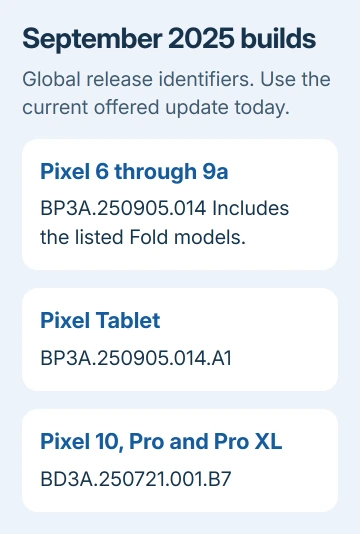
The global announcement listed these builds:
- BP3A.250905.014: Pixel 6, 6 Pro, 6a, 7, 7 Pro, 7a, 8, 8 Pro, 8a, Fold, 9, 9 Pro, 9 Pro XL, 9 Pro Fold and 9a.
- BP3A.250905.014.A1: Pixel Tablet.
- BD3A.250721.001.B7: Pixel 10, 10 Pro and 10 Pro XL.
The listed Pixel 10 build has digits that look like a July date, even though it belongs to this September announcement. Don't judge its release month from that part alone. Don't apply the Pixel 6 through 9a build number to a Pixel 10.
This announcement's device list doesn't include the Pixel 10 Pro Fold. The original Pixel Fold and Pixel 9 Pro Fold are. Those similar names matter when checking whether a particular model received a listed fix.
Read the fix list by model, not just by symptom
Google lists model groups for each change in its September 2025 announcement. A fix appearing on the page doesn't mean every Pixel received that exact correction.
For Pixel 6 through Pixel 9a, including the listed Fold models and Pixel Tablet, changes included fingerprint response, Bluetooth stability, call audio, network stability and several interface problems under certain conditions.
Other changes for that group covered a keyboard that stopped responding, Pixel Launcher crashes, unresponsive touch across apps and duplicated long screenshots. The update addressed these faults, but that doesn't mean every owner had them.
For trouble tied to March instead, check which March Pixel bug matches before following a playback workaround for a system freeze.
The camera stability changes applied to Pixel 8, 8 Pro, 8a, Fold, Pixel Tablet, 9, 9 Pro, 9 Pro XL, 9 Pro Fold and 9a. The announcement didn't attach that camera change to Pixel 6 or Pixel 7 models.
The Battery Health display correction was for Pixel 9, 9 Pro, 9 Pro XL, 9 Pro Fold and 9a. A display correction isn't a promise of longer battery life, so don't read it as a remedy for every battery complaint.
Actual drain appears in the January Pixel update details, with a different device group from this Battery Health display correction.
For Pixel 10, 10 Pro and 10 Pro XL, the display fix addressed the screen turning black during transitions from a webpage in an in-app browser. That doesn't mean it fixed every black-screen fault.
For flickering or a frozen display after that release, October's Pixel repairs identify the affected model families.
Across the listed supported devices, changes also included system stability and a power button issue while connected to Android Auto and charging over USB-C. Some changes may depend on carrier or region, as the announcement notes.
Bring the phone onto its available release
I'd use the normal updater before considering a manually downloaded package. It chooses an available release for your device, so you don't have to match an old filename to a similar model name.
- Charge the Pixel battery to 75% or more, then connect to Wi-Fi.
- Open Settings > System > Software updates. Some versions call the entry System update.
- Open the system-update entry if the screen lists several update types. Check its status and complete the prompts for downloading and installing it.
- Select the restart action when installation is ready. Pixel updates become active after restarting.
- Return to About phone > Android version and read the security date and build again.
Use the offered newer release even if your search began with September 2025. You want the supported software available for your phone now; its build doesn't need to match this old release.
If you need help with the restart controls, the Pixel restart guide separates normal restarts from a frozen phone. Restarting is the finishing step after installation, not a substitute for downloading an update.
Check which September date is still showing
Android security update identifies Android's security patch level. Google Play system update comes through a separate update system. The entries appear together in Settings but don't need identical dates.
Open the entry labeled Google Play system update if that's the date that hasn't changed. Use the software-update controls in System to update the phone's Android release. A fresh app update from Play Store is another separate thing.
Changing the phone's calendar won't make a newer build arrive. Nor does repeatedly comparing the Google Play date with a Pixel firmware build tell you whether the firmware installation failed. Read the label attached to each value.
When the update won't finish or no update appears
For a not enough space message, free storage before trying again. Start with downloads or large files you recognize. The Android backup guide helps check what's protected before removing a local copy.
For an unfinished download, leave the phone connected. Android can retry it within the next few days and notify you. Return to the status screen for its next attempt instead of removing unfamiliar system files.
Battery use can rise during downloads, setup and background work after an update. That's different from the September 2025 Battery Health display bug. Judge the phone's behavior rather than assuming an old release note explains it.
A model's update support and its installed software branch affect what it can receive. Don't enroll in a beta simply to chase a date. A beta has its own release path, and leaving it can involve erasing data.
If an eligible phone remains on an unexpectedly old build, use Settings > Tips & support > Contact us where available, or Pixel Phone Help's contact options. Provide the model, full build, Android security date and exact updater message.
That gives support something specific to check: an installation error, which update system you're checking, or the release available for your phone and carrier. Avoid a factory reset just because one of the two date fields looks old.
The Short Version
September 2025 used BP3A builds for Pixel 6 through 9a and Tablet, and a different BD3A build for the listed Pixel 10 models. Match fixes to the model group. For everyday updating now, install the current offered release and restart.
Checked November 16, 2026.
 If you have any business, I can build it online