FaceTime activates in Settings > Apps > FaceTime. Enable it, then select a phone number or Apple Account email for incoming calls. Phone-number activation needs carrier SMS service, even with Wi-Fi.
Turning on the switch doesn't mean your number has finished activating. If it's still waiting, you can use an enabled email address for FaceTime while you sort out the number.
In this guide
Start with the number or email you want people to call
Before changing settings, decide whether people should call your number or your email. A phone number lets people use the number they already know. An Apple Account email is useful when you want FaceTime calls to reach that account instead.
Phone-number-only FaceTime doesn't require an Apple Account sign-in. Signing in adds the account's email addresses as contact choices. Choose what you actually want to share with callers.
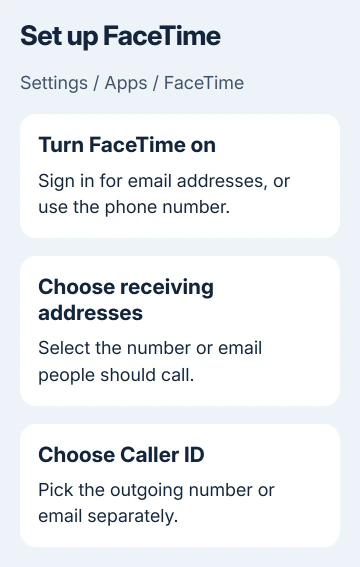
Apple explains the separate incoming-address and outgoing-identity choices in its FaceTime setup instructions. Check both choices even when one email will handle incoming and outgoing calls.
Before starting, connect the iPhone to Wi-Fi or cellular data. To activate a phone number, that cellular line needs to be able to send SMS texts. An internet connection alone won't replace those carrier texts.
Turn on FaceTime and select the receiving addresses
Open Settings > Apps > FaceTime and switch FaceTime on. On older iOS versions without the Apps list, open Settings > FaceTime directly. Both routes open the FaceTime settings.
If you want to use your Apple Account, choose the sign-in option and follow the prompts. Find the section that lists the numbers and emails where you can receive FaceTime calls. Select each one you want people to use.
A check beside an address means it's selected for receiving FaceTime calls. Leave an unwanted address unselected, especially when people are accidentally calling an old email rather than your current number.
Scroll to Caller ID and select the number or email you want other people to see on outgoing FaceTime calls. This is separate from choosing incoming addresses, so check both parts of the screen.
If your iPhone has multiple cellular lines, check that the number shown is the one you want to activate. The line you use for cellular data isn't necessarily the number you want friends to call.
For a missing FaceTime row, find its app settings through Apps. If the switch is locked, ask whoever manages the phone to check its restrictions.
Make one call to confirm the setup
Open FaceTime and select New Call on versions that show that button. Enter a number or email that the other person has enabled for FaceTime, select the recipient and choose a video or audio call.
Use a contact who can confirm which address works on their device. A saved contact card can contain several numbers and emails, and calling an unused one can make successful activation look like a failed setup.
An unavailable-contact-card error has its own FaceTime address checks, including a direct call before editing the saved card.
Next, ask them to call the address you just enabled. An outgoing call checks that you can start a conversation; an incoming call checks the contact method people will actually use to reach you.
If email calls connect but the phone number remains unselected or pending, continue with number activation. If both addresses are enabled but calls fail, the FaceTime calling checks cover that different problem.
I'd use this two-way call check before changing account settings again. This checks whether the chosen number still needs attention or the call itself is failing, without undoing a setup that's already working.
Finish phone-number activation when it stays pending
Messages such as Waiting for activation or Activation unsuccessful need the activation repair steps. Check Settings > General > Date & Time and correct the time zone, then check Software Update for an available iOS update.
The number also needs SMS messaging for activation. If the iPhone asks you to accept a possible carrier charge for the activation text, accepting lets it send that message.
For prepaid service, ask whether credit or a restriction is blocking activation texts. Ask about international SMS specifically. Being able to send a local text doesn't tell you whether international texts work.
Then open Settings > Apps > Messages and turn iMessage off. Return to Apps > FaceTime and turn FaceTime off. Restart the iPhone, then turn both services back on.
For an older iPhone interface, the Messages and FaceTime entries are directly inside Settings. Use the same off, restart, on sequence through those entries instead of searching for an Apps menu the phone doesn't have.
After these checks, your carrier may need 24 hours to finish verifying the number. Turning the switches off and on every few minutes won't help while activation is still waiting to finish.
Use an email while the number is being checked
Open Settings > Apps > FaceTime, complete the Apple Account sign-in if needed, and select the email address in the reachable-address section. Choose that email under Caller ID if you want outgoing calls to use it too.
Tell the other person which email to call. Their usual shortcut to your mobile number won't necessarily reach the email you just enabled, even though both contact methods belong to you.
This changes the FaceTime address, not the iPhone's cellular phone number. Ordinary carrier calls and texts still use the line's own number. Keep that distinction clear when asking someone to try the call again.
If the email needs verification, check the addresses in your Apple Account and follow the verification prompts there. You'll need to sign in. Those account details are separate from the FaceTime switch.
Take a persistent activation failure to the right support team
After 24 hours, contact the carrier if the number still won't activate. Ask them to check international SMS, activation-message charges and restrictions on the specific line. Provide the exact number and the time you retried activation.
If the carrier confirms SMS is working, use Apple Support's iMessage and FaceTime activation help. Tell support whether your email works, whether the number has a check beside it, and which error you still see after the restart sequence.
An account-blocked message needs account help rather than another network reset. Likewise, a missing app or unavailable regional feature won't be fixed by waiting for an SMS. Report the exact screen so support can follow the right case.
The Short Version
Turn FaceTime on, select incoming addresses and set Caller ID separately. Phone-number activation needs SMS and can take 24 hours. Use an enabled email address while the carrier checks a number that remains pending.
Checked November 10, 2026.
 If you have any business, I can build it online