
An AMD SCSI driver update can leave Windows unable to reach its startup drive. For the reported 9.3.0.221 failure, System Restore brought one PC out of the boot loop. Start with a restore point from before that driver installed.
This concerns a storage driver distributed through Windows Update in May 2021. It is separate from Radeon graphics software, even on a computer that has an AMD processor.
Match the driver to the failure
The reported update was Advanced Micro Devices, Inc. - SCSIAdapter - 9.3.0.221. After restarting, the PC repeatedly stopped with INACCESSIBLE_BOOT_DEVICE. Automatic repair and resetting the BIOS did not get that owner back into Windows.
Status: checked November 3, 2026. The 9.3.0.221 failure and successful restore are user-reported from May 2021. Microsoft's recovery instructions remain available.
That exact timing and driver name matter. An INACCESSIBLE_BOOT_DEVICE error can also follow a changed storage mode or a different update. The stop code alone does not identify this AMD driver.
Restore the PC from Windows Recovery
Microsoft documents System Restore as a way to undo recent system changes without removing personal files. It can remove programs and drivers added after the chosen point.
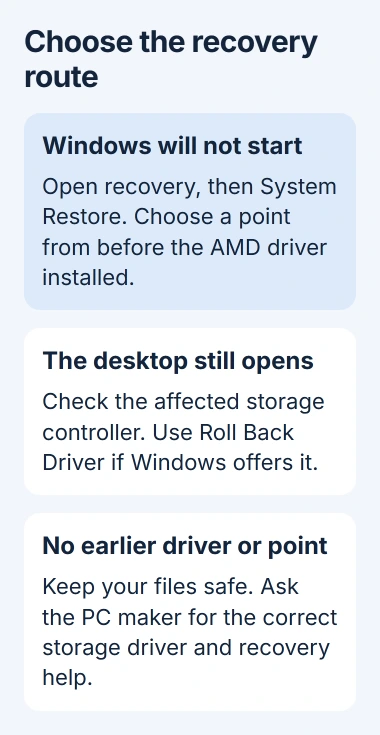
Repeated startup failures normally bring up Windows Recovery. From Automatic Repair, select Advanced options. Then choose Troubleshoot, Advanced options, and System Restore.
An encrypted Windows drive may require its BitLocker recovery key. Have that key ready before starting recovery. A missing key is a reason to stop and recover access to the account or organization that holds it.
- Select a restore point dated before the AMD driver installation.
- Enable Show more restore points if the first list does not contain an earlier one.
- Choose Scan for affected programs to review what will change.
- Select Next, then Finish, and let the restoration complete and restart the PC.
The owner who reported this failure reached the desktop after restoring. They also reported changed network and sign-in behavior afterward, so check those settings when Windows starts again.
The expected result is a normal Windows sign-in screen instead of another stop error. Keep a copy of important files once access returns, before troubleshooting the update further.
When the recovery screen does not appear
Microsoft says two interrupted starts can trigger recovery on the third start. Start the PC, then hold its power button when the Windows or manufacturer logo appears to turn it off. Repeat once, then allow the third start to continue.
Use that procedure only to reach recovery from a failed startup. Do not interrupt an active BIOS update or the System Restore operation itself.
If recovery still will not load, use Windows installation media and select its repair option instead of installing Windows. With no suitable restore point, the System Restore guide explains that limitation.
Roll back the controller if Windows still opens
For a PC that reaches the desktop, Microsoft's driver guidance offers Roll Back Driver. Open Device Manager, locate the affected storage controller, and open Properties, then Driver.
Check Driver Version against the update that preceded the problem. Do not pick a Radeon display adapter simply because it also says AMD. The controller name and category can differ between motherboard installations.
Select Roll Back Driver if available, choose a reason, confirm, and restart. A disabled button means Windows has no previous driver available through that control. Do not uninstall unrelated storage controllers to make it appear.
If the update returns or restoration fails
Ask the PC or motherboard manufacturer which storage driver matches the model and installed Windows version. Give support the driver version, stop code, and the result of System Restore.
The original owner saw another update attempt after recovery, so restoring did not prevent it from returning. If Windows remains inaccessible, arrange recovery of unbacked-up files before agreeing to a reinstall.
The Short Version
- Match the failure to the AMD SCSIAdapter update, especially version 9.3.0.221.
- Restore a point from before the driver installation when Windows cannot start.
- Use the affected controller's rollback option if the desktop is accessible.
- With no usable recovery point, get model-specific driver and data-recovery help.

Isaac Smith is the founder and editor of PC Glance, a website that covers computers, laptops, and technology. He is a tech enthusiast and a computer geek who loves to share his insights and help his readers make smart choices when buying tech gadgets or laptops. He is always curious and updated about the latest tech trends.