
Your Apple Watch greets you by the wrong name. Not a typo and not a nickname you set: someone else's name entirely, printed on the screen every morning.
It is not stored on the Watch. Nothing you do to the Watch will touch it, and a factory reset will not clear it either.
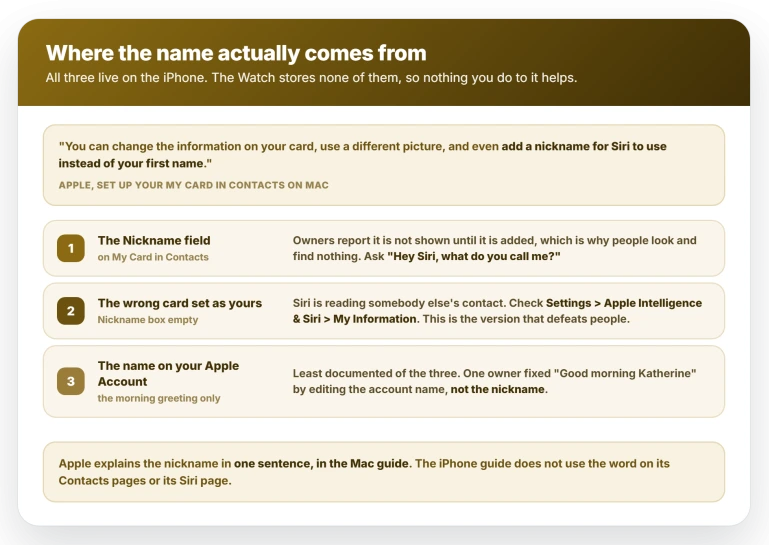
The name is on your iPhone, in one of three places, and watchOS 26 has nothing to do with it. Owners have been reporting this since 2015.
Ask Siri what it thinks your name is
Start here, because the obvious test misleads.
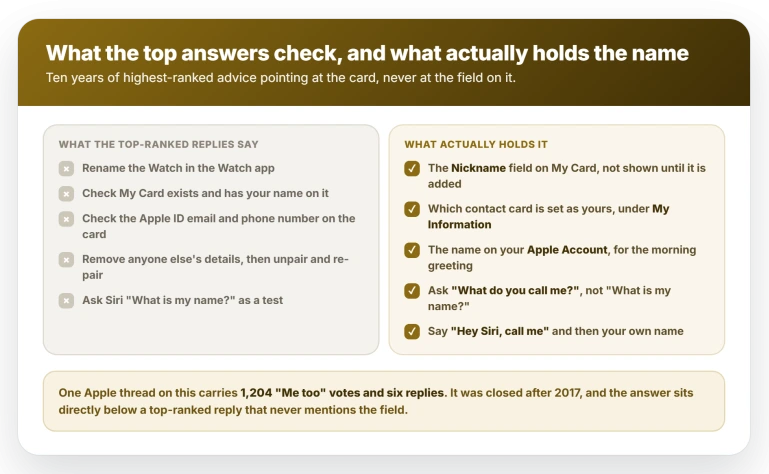
Ask Siri "What is my name?" and it will usually say your real name even when the wrong one is set.
One owner worked out why: "Even when I ask Siri to call me something other than my name, if I ask it 'What is my name' it will still answer my real name. Only when I ask it 'What do you call me?' does it give me my code name."
So ask "Hey Siri, what do you call me?" instead.
Be clear what the answer tells you. A wrong name means Siri is holding one, so try the spoken fix first.
It does not tell you which store it came from: a nickname you never set and a contact card that is not yours answer the same way. A right name points you at the account name instead.
Say the fix out loud, using your actual name
Say "Hey Siri, call me Howard", using your own name.
The owner greeted as "Amy" got back to normal that way: "I was finally able to get back to normal by saying, 'Hey, Siri, change my nickname to Howard.'" A second owner, called "12:30" for years, fixed it in July 2026 and posted straight after: "Oh my god that only went and worked! I just said 'hey Siri call me by name' and it updated it lol."
Say the name, do not describe it. That owner got away with a loose phrasing; another did not: "Mine calls me 'by my name' because once years ago I told my phone 'call me by my name'." Siri sometimes takes the words after "call me" as the name itself, so say the name you want.
The command can also misfire. A parent trying it on a child's Watch found it had renamed an existing contact rather than setting a nickname: "that changed the name of the 'Daddy' contact to be the kid's name".
If the Siri command does nothing
Several owners tried the command and got nowhere.
Restart the iPhone first. An Apple Community Specialist recommending the voice command in 2021 opened with that step, and one owner fixed his that way after the command appeared to fail.
It is not universal: the owner that Specialist was helping wrote "I keep changing it but it doesn't work."
Then edit the card by hand. Apple documents the route as far as the control you need: "Tap My Card at the top, then tap Edit. Scroll down, then tap 'add field.'" Those are Apple's words on the Tell Siri about yourself page, written for the pronunciation field.
The same control holds Nickname. Clear the value, or add the field and leave it empty, then tap Done.
Owners report the Nickname row is not shown until it has been added, so people open the card, see no such field and give up.
The man greeted as "Amy" reported exactly that: "I pulled up the 'me' card to look for the nickname field. Couldn't find one." He found it captioned on his shared photo instead, so check there too.
Treat the spoken command as the reliable route and the manual edit as the backup.
If you still cannot find it, Apple documents the field on iCloud.com, where you can "add fields for additional information, such as a birthday, nickname, or spouse's name".
Apple says those changes "appear on all your devices that have Contacts turned on in iCloud settings", and notes you need a tablet or computer to use it.
The field Apple names only in its Mac guide
The name sits in a Nickname field on your own contact card, called My Card.
Apple explains it in one sentence, in the Contacts guide for the Mac:
> "You can change the information on your card, use a different picture, and even add a nickname for Siri to use instead of your first name."
That sits on the Mac Contacts guide, where an Apple Watch owner will never go.
On the iPhone, Apple's My Card page lists what you can edit as "including your name, address, phone number, and birthday".
Nickname is not in that list, and the word does not appear on the iPhone guide's Contacts pages or its Siri page.
The Siri page walks you to the exact control that reveals the field, then names a pronunciation field instead.
That gap shows in the search results: one Apple thread carries 1,204 "Me too" votes and six replies, and the reply Apple ranked top never mentions the Nickname field.
When the box is empty, Siri has the wrong card
This is the second cause, and the one that defeats people.
If the Nickname field is empty and the wrong name persists, Siri is pointed at somebody else's card.
One owner found it directly: "My watch started calling me Anquan (not my name) and I found out that it was going off a contact in my contacts list rather than me."
A parent hit the same fault setting up a child's Watch through Family Setup, adding a contact called "Daddy" so the child could reach them: "Their Apple Watch used this as 'their' contact card. So Siri calls them 'Daddy'."
Another found his card switched to his business rather than his personal one, so Siri answered with the business name.
Apple's own instruction is to go to Settings, tap Siri (or Apple Intelligence & Siri), tap My Information, then tap your name. Confirm it points at your card.
If your card is missing, enter your details, then "return to the contact list, touch and hold your contact, and tap Make this My Card".
Not every case resolves. In August 2025 an owner whose Watch called him "Father" found the Nickname field already empty, checked My Information and reported "Nope but thanks. Shows my standard name", had Siri answer with his normal name, and had no contact named Father.
Nobody in 203 replies solved it. A few stay unexplained, so work the three checks and know when to stop.
The morning greeting can read your account name
The third possibility is the least documented.
The greeting is printed on the screen rather than spoken, and owners report it appears only once a Sleep schedule has been set.
The owner greeted as "Amy" was explicit: "it was a screen message, not a voice message." Apple's sleep tracking page confirms the greeting exists without mentioning a name: "In the morning, just glance at the greeting to see how much charge remains." No sleep schedule means no greeting at all.
Two owners report that this screen reads the name on their Apple Account rather than the contact nickname.
One fixed it that way in December 2023: "I found that my Apple ID had my name as Katherine. I changed that, and now I get 'Good morning Katie.' Fixed!" The other, a month earlier, had his morning screen using the account name while his fitness notifications used the nickname he wanted.
The voice command did nothing for him at first, then landed a month later: "Ok it worked now it just took a really long time to update." Expect the wrist to lag.
To check it, go to Settings, tap your name, then Personal Information, where Apple says you can "Update your name, birthdate, and Memoji".
Treat it as a third thing to check, not a rule: the 2026 case was fixed by the nickname command instead.
How the wrong name got there
This is rarely deliberate.
The most popular explanation is a misheard voice command, put best in the July 2026 thread: "You probably once set a reminder or something with voice that it misheard as 'call me 12:30'." It is a theory, not a finding, and the owner never said it matched.
One man did work out his own: "I once got loaded and I was playing 'You Can Call Me Al' on repeat. Woke up the next morning, and Siri was calling me 'Al'."
Single owners also describe a joke set on an unlocked phone, a child using Siri on a shared iPad, and answering Siri's question with the wrong name on screen. Others never traced it, so do not assume you said something.
What does not help
- Renaming the Watch. That name is what Bluetooth and Find My use. It comes up constantly in these threads and does not touch the greeting.
- Unpairing and re-pairing. The name is on the iPhone, so it comes back with the restore. That is separate from a genuine pairing fault, where the Watch and iPhone are not connecting at all.
- Resetting the Watch. The same parent factory reset a child's Watch after correcting the contact card, and Schooltime still showed "Daddy".
- Changing your Siri voice or language. Different voice, same name.
- Asking Siri "What is my name?" as a test. It usually answers with your real name and hides the nickname. Not always: the owner greeted as "Amy" got "You're Howard. But since we're friends, I get to call you 'Amy.'"
- Waiting for a fix. Apple has published nothing describing this fault, and reports run from October 2015 to July 2026. Recheck only if Apple adds the Nickname field to its iPhone Contacts or Siri pages, which is where a real fix would surface first. If a setting refuses to hold rather than showing the wrong value, that is a different class of problem.
Why does my Apple Watch greet me with the wrong name?
It is reading something stored on your iPhone: a nickname on your contact card, a contact card that is not yours, or the name on your Apple Account. The Watch holds none of it.
Ask Siri "What do you call me?" to see whether Siri is holding a name.
How do I change what Siri calls me?
Say "Hey Siri, call me" followed by your actual name. Avoid "call me by my name", which one owner turned into his permanent nickname.
If nothing changes, restart the iPhone, then clear the Nickname field on My Card in Contacts, or edit it at iCloud.com from a computer or tablet.
Is this a watchOS 26 bug?
No. The oldest report is October 2015, when it showed up in notifications rather than a morning greeting, because sleep tracking did not exist yet. It still happens on watchOS 26, but watchOS 26 did not cause it.
Status: checked 17 August 2026 against watchOS 26 and iOS 26.6. Apple has not documented this behaviour on any page, so nothing here is a vendor-confirmed fix.
The Short Version
- Ask "Hey Siri, what do you call me?" Asking "What is my name?" usually returns your real name even when a nickname is set, which is why people rule it out wrongly.
- Say "Hey Siri, call me [your name]". Two owners report it working; an Apple Community Specialist recommended it in 2021, though the owner asking said it kept failing.
- Say the name, do not describe it. One owner told his phone "call me by my name" and has been called that ever since.
- If nothing changes, restart the iPhone, then edit the card: Contacts, My Card, Edit, scroll down, "add field", Nickname. Apple documents that route for a different field on the same screen.
- If the box is empty, Siri has the wrong card. Settings, Siri, My Information, then your name.
- If both are clean, check Settings, your name, Personal Information. Two owners traced the morning greeting to their Apple Account name.
- Nothing on the Watch will fix it. Renaming it, unpairing it and resetting it all leave the name in place.
- Give it time to reach the wrist. The iPhone updates quickly and the Watch does not.
Where to Next
Ask it what it calls you rather than what your name is. Those two questions get different answers, and only one of them tells you what is actually stored.
Once you know what it thinks, the correction is quick.
If it goes back to the wrong name after a while, tell me whether you share the watch or the Apple Account with anybody, because that is usually where it comes from.

Isaac Smith is the founder and editor of PC Glance, a website that covers computers, laptops, and technology. He is a tech enthusiast and a computer geek who loves to share his insights and help his readers make smart choices when buying tech gadgets or laptops. He is always curious and updated about the latest tech trends.