

Converting a Numbers spreadsheet to Excel requires an export to .xlsx. Changing its filename alone leaves the Numbers format intact. Numbers can create the Excel copy on a Mac or iPhone; on a Windows PC, use Numbers at iCloud.com.
The original Numbers document remains available, so keep it until the Excel copy has been opened and checked. Choose Excel rather than CSV when the recipient needs a workbook with formatting.
Export the spreadsheet from Numbers on a Mac
Open the document in Numbers, then choose File > Export To > Excel. Apple documents this export in the Numbers for Mac guide.
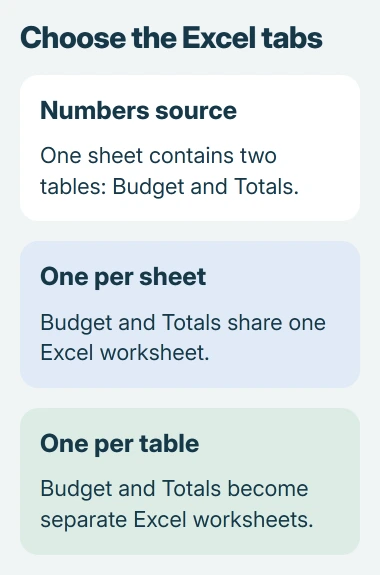
Choose whether to create a worksheet for each table or each sheet. A Numbers sheet can contain several tables, so the choice affects how many worksheet tabs the Excel file receives.
Status: Apple export instructions checked November 2, 2026. The destination is an Excel .xlsx copy. No Numbers document was converted or opened in Excel here.
For example, a Numbers sheet containing a budget table and a separate totals table can become one worksheet or two. With one worksheet per table, the export options also offer a summary worksheet containing links to the others.
Review any password option, then click Save. Enter a filename, choose its location and click Export. A password-protected Numbers document can carry protection into the Excel copy; retain, change or remove it deliberately.
There is also a sharing route. Apple says Share > Export and Send > Excel creates the converted copy, followed by Save on Mac. Use whichever of these documented export controls your Numbers version presents.
Save an Excel copy on iPhone or iPad
With the spreadsheet open in Numbers, tap Share, then Export and Send. Choose Excel, review the export options and select Save to Files. Pick a folder where the exported workbook will be easy to locate.
That is the mobile route in Apple's file-conversion instructions. To send the workbook immediately, choose Mail or another sharing destination instead of saving it first.
Send the exported .xlsx file, rather than sharing the original Numbers document or its collaboration link. The recipient should receive a file that Excel can open.
Use iCloud.com from a Windows PC
Sign in to iCloud.com using the Apple Account where the spreadsheet is saved, then open Numbers. For a .numbers file stored on the PC, use the document manager's Upload button to add it.
Open the file's More menu and choose Download a Copy, then Excel. The same command is available from the toolbar's More menu when the spreadsheet is open.
Apple states that the converted file goes to the browser's download location. Open that copy in Excel. For someone else's document, ask its owner to supply an .xlsx export rather than signing into their account.
Check the exported workbook before sending it
Compare worksheet tabs, important formulas, totals, charts and formatting with the original. This is a verification step, not a promise that every Numbers feature will have an identical Excel equivalent.
One owner reported that table background colors disappeared in a CSV export but survived an Excel export. That supports choosing the workbook format for this need; other documents still need their own checks.
If a CSV has already arrived as one column, use the Excel CSV import controls to separate its fields. Re-export from Numbers as Excel when the missing part is workbook formatting.
For a Google Sheets destination, first create the Excel copy, then follow the Excel-to-Sheets conversion steps. Each conversion deserves its own check before the original is removed.
If export fails or important content changes, retain the Numbers source and contact Apple Support with the document's warning and affected feature. Ask the recipient which Excel version they use before trying another format.
The Short Version
Export from Numbers as Excel, then open the .xlsx copy and compare it with the original. Mac and mobile Numbers provide export controls; iCloud.com provides Download a Copy for a Windows browser.

Isaac Smith is the founder and editor of PC Glance, a website that covers computers, laptops, and technology. He is a tech enthusiast and a computer geek who loves to share his insights and help his readers make smart choices when buying tech gadgets or laptops. He is always curious and updated about the latest tech trends.