Recording and monitoring tools can stop Detroit: Become Human from launching. Close them first if Steam returns to Play without an error. Driver warnings and unsupported graphics need a different fix.
Quantic Dream's PC support page separates a silent launch failure from driver errors and crashes after an AMD graphics-card change. Match that symptom before deleting shader files or downloading the game again.
In this guide
1. Close programs that hook into the game
Quit screen recorders, post-processing tools and performance monitors, including notification-area processes. They connect to the game to record video, change the picture or show hardware readings. Closing a window can leave them running.
Restart Windows, open Steam and launch Detroit before reopening those tools. Watch whether Steam changes from Play to running, then returns to Play. Also note whether the game opens a window or shows an error before closing.
If the game launches, reopen one program at a time, trying the game after each one. When one brings the fault back, leave it closed while playing. Check that program's updates or game compatibility guidance.
The developer's Detroit PC troubleshooting page identifies these tools as a common reason for a launch failure with no error. It isn't a reason to disable Windows security or every background service.
If the game still won't open, keep the extra tools closed for the file check. If an error appears this time, record it and use the graphics section that matches it. A newly visible message is more useful than another silent retry.
2. Repair the Steam installation
In Steam Library, right-click Detroit: Become Human and select Properties. Open Installed Files, then choose Verify integrity of game files. Let Steam finish before starting another game or launching Detroit again.
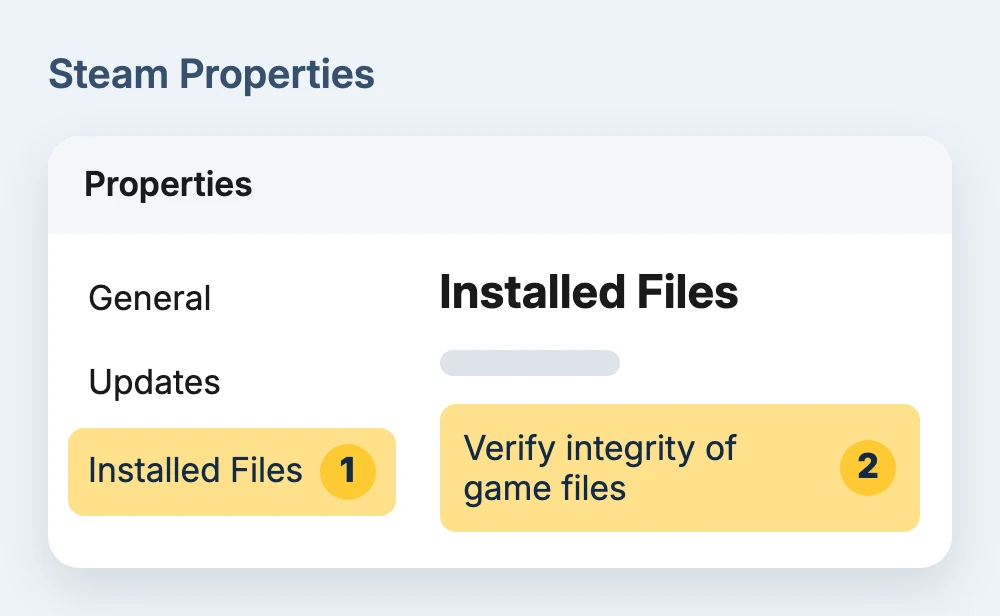
Verification checks installed files against Steam's expected copy and replaces damaged content. Use this route for a Steam copy, even though Detroit's older support page describes Epic verification. Repair through the store you used.
After replacement downloads finish, start Detroit through Library, then load your game. Some failed checks involve local configuration files kept by Steam.
A graphics driver can still stop the game working even when all its files are there. Try the hardware and driver checks instead of running verification repeatedly. Having all the files doesn't mean your graphics hardware can run the game.
To locate the folder used by your Steam copy, use the game-directory instructions. Open the folder from Steam rather than guessing among old downloads, shortcuts and a separate Epic installation.
3. Match the graphics card and driver to the game
The minimum graphics cards are NVIDIA GeForce GTX 780 or AMD Radeon HD 7950, with 3GB video memory and Vulkan 1.1 support. Vulkan is the graphics interface the game needs; changing DirectX settings doesn't replace it.
The same minimum requirements list 64-bit Windows 10, 8GB RAM and 55GB disk space. Listed processors include an Intel Core i5-2300, Ryzen 3 1200 or AMD FX-8350. Compare your PC with all of these requirements, not just the amount of RAM.
To identify the graphics hardware on Windows 10 or 11, right-click Start > Device Manager, then expand Display adapters. Note every adapter listed, including both integrated graphics and a laptop's separate graphics card (GPU).
The older PC support page states that Intel GPUs aren't supported. Don't confuse an Intel processor paired with a supported NVIDIA or AMD card with an Intel-only graphics system. The warning is about the graphics chip, not the processor.
If the error asks for newer drivers, get a supported package from NVIDIA, AMD or your laptop maker. Restart and retry. A driver update can add required support on compatible hardware, but it can't upgrade an unsupported chip.
For a laptop with two adapters, check which GPU the game is using before assuming it has detected your dedicated card. Give support both adapter names if the message doesn't match the hardware you expected it to use.
I'd settle the driver message before trying compatibility modes. It tells you which requirement needs attention. With several launch options changed together, you lose track of which one helped.
4. Clear the named cache only after an AMD card change
This step is for a narrow case: the game became unstable or slow after you replaced an AMD graphics card. The developer gives a specific cache reset for that hardware change, rather than a general instruction to delete every shader folder.
Close Detroit. In Steam, open the game's installation folder through Properties > Installed Files > Browse. Open ShaderCache, then locate VkPipelineCache.bak and VkPipelineCache.bin.
Delete those two named files, then launch the game again. Leave save folders and other files alone. These files hold graphics preparation from the earlier card. Removing them lets the game prepare those files again for your new hardware.
Allow that preparation to finish on the next launch. If the game returns to normal, test the same scene that previously failed. If the issue returns, include the old and new graphics-card models in your support request.
Skip this cache reset when the graphics card hasn't changed. For a Mac trying to run the Windows copy, use the Detroit streaming routes instead; Steam doesn't supply a native Mac edition.
5. Finish Windows updates, then report the exact failure
Let Windows finish its pending updates and restart. On Windows 11, open Settings > Windows Update. On Windows 10, use Settings > Update & Security > Windows Update. Select Check for updates, install available updates and restart when asked.
Microsoft's Windows update steps cover both settings routes. Reaching the update page isn't enough if an installation is still waiting for a restart.
The game's support page also suggests Run as administrator on its executable. Find the installed file through Steam for that test. Before approving Windows' permission prompt, check that it names this game.
If an unexpected-error message appears once, close it and try again. A recurring error after the checks needs a support report. The game's troubleshooting doesn't call for a full Windows reinstallation here.
Open Quantic Dream Support, select Detroit: Become Human, and report the PC Steam version. Include the exact error, Windows version, CPU, RAM, graphics adapters and driver version. Say whether Steam returns to Play without a game window.
Add the result of file verification, the closed recording or monitoring tools and any recent AMD card replacement. These results help support distinguish a blocked launch, an unsupported GPU and a crash at the same point.
The Short Version
For a silent failure, close recording and monitoring tools, then verify Steam files. Resolve GPU and driver errors directly. Use the two-file shader reset only after an AMD card replacement, then report any continuing failure.
Checked November 27, 2026.
 If you have any business, I can build it online