
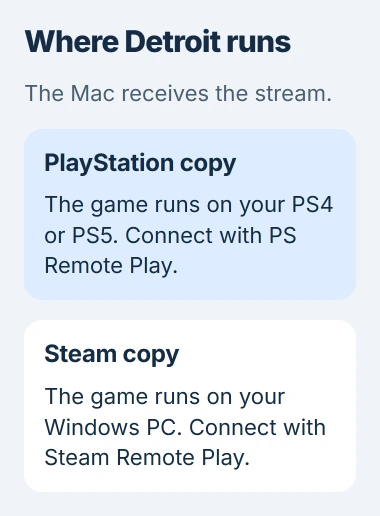
Yes, you can play Detroit: Become Human on a Mac by streaming from your PlayStation or Windows gaming PC. That machine runs the game while your Mac shows the picture and sends back your controls. Steam doesn't offer a native macOS edition.
Choose the method that matches your copy of the game. Use PS Remote Play for a PlayStation copy or Steam Remote Play for a Steam copy on a PC that can run it. Neither streaming app includes the game.
Choose the machine that will run your copy
For a PlayStation copy, start with a PS4 or a PS5 that can already launch Detroit. The PS4 game is also playable on PS5, although some PS4 features can differ.
For a Steam copy, start the game on your Windows computer before setting up streaming. That PC is the host, the machine running the game. If Detroit crashes there, streaming its picture to a Mac won't fix the crash.
The PC requirements include a graphics card that supports Vulkan 1.1, a graphics system the game uses. Your Windows PC needs to meet those requirements because it runs the game.
Signing in to Steam on your Mac won't give every game in your library a Mac installer. Check which platforms the game supports before downloading files or paying for software to run Windows games on the Mac itself.
I'd try a console or gaming PC you already have first. You can check that the game runs, then check the connection before spending money on another option.
Set up a PlayStation copy with PS Remote Play
Sony's Mac Remote Play instructions list the macOS versions and controllers you can use and explain how to install the app. Check your Mac's system version against that list first.
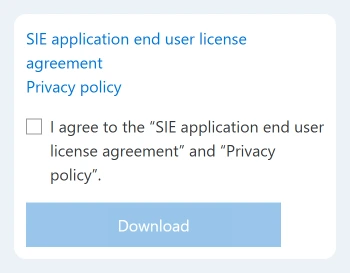
Open the official PS Remote Play Mac download. Read the agreement and privacy policy, select their checkbox, then choose Download and run the installer.
On a PS5, open Settings > System > Remote Play and turn on Enable Remote Play for your user. This lets the app connect to your console.
On a PS4, open Settings > Remote Play Connection Settings and turn on Enable Remote Play. Also check Settings > Account Management > Activate as Your Primary PS4 for the account you're using.
Leave the console on for the first connection. Rest-mode access needs additional power settings, so leave that setup until the first connection works.
Connect a supported controller to your Mac with a USB cable. Open PS Remote Play and select Sign In. Use your console's account, then choose PS5 or PS4 to match your console.
When the console's screen appears on your Mac, open Detroit from its game library. The console menu tells you the connection works. Reaching the game's menu tells you your console can launch that copy.
Pair the console manually if the Mac can't find it
Keep the Mac and console on the same network for manual pairing. On PS5, open Settings > System > Remote Play > Pair Device to display a pairing number.
On PS4, use Settings > Remote Play Connection Settings > Add Device. Enter the displayed number in the Mac app when it asks for manual registration.
If pairing works, try the game before changing anything else. I'd test it near the console before playing from another location, where a different network can cause its own connection problems.
To connect later while the PS5 is in rest mode, open System > Power Saving > Features Available in Rest Mode. Turn on Stay Connected to the Internet, then Enable Turning on PS5 from Network.
On a PS4, find the matching controls under Power Save Settings > Set Features Available in Rest Mode. Keeping network access on in rest mode is different from shutting the console down completely.
Stream a Steam copy from your Windows PC
Sign in to the same Steam account on your gaming PC and Mac. Keep Steam open on both, then find Detroit in the Mac's Library and select its streaming control.
The computer-to-computer Remote Play procedure streams the game installed on your PC. If the Mac app offers a choice of computers beside the game's launch control, choose that PC.
Start with both computers on the same home network. Keep the Windows PC available while you play. The Steam power-state guide explains why a dark display and a sleeping computer behave differently.
If you can't stream the game, check whether its PC installation has finished. If support needs its files, use the game-directory lookup to open the installation without guessing the drive or folder.
Use these steps for your Steam copy. A PlayStation purchase doesn't turn into a Steam license, and opening a Windows executable in Finder won't install a Mac version.
Improve the stream before changing the game installation
PS Remote Play needs at least 5 Mbps for both upload and download, with 15 Mbps recommended for better performance. Other devices sharing your connection can still affect play.
Try a wired connection for the console or gaming PC when possible, and pause large transfers. If the game looks smooth on the host's screen but breaks up on the Mac, work on streaming quality and the network first.
If the host's picture also stutters, lower its game settings and check that machine. A faster connection won't fix a game that's already running poorly before it's streamed.
If you still can't connect, contact PlayStation or Steam Support. Tell them your macOS version, which device runs the game, the exact message and whether Detroit plays normally on that device.
What about running the game directly on the Mac?
Apple's Boot Camp instructions are for supported Intel-based Macs. Installing Steam or downloading a Windows ISO, an installation image, won't make Boot Camp work on an M-series Mac.
Even with an Intel Mac, check its hardware against the game's graphics requirements before considering Windows. Windows can't make up for graphics hardware that isn't powerful enough for the game.
Software for running Windows games on a Mac can change which games work. Check its current Detroit instructions and trial results for your Mac before paying. General Windows game support doesn't mean your Mac meets Detroit's graphics needs.
For other titles, compare free Windows-game streaming on Mac and check the cloud catalog before choosing a service.
The Short Version
Stream your PlayStation copy through PS Remote Play, or your Steam copy from a Windows gaming PC. Get the game working on that host first. Installing Steam on your Mac doesn't give you a native Detroit download.
Checked November 5, 2026.

Isaac Smith is the founder and editor of PC Glance, a website that covers computers, laptops, and technology. He is a tech enthusiast and a computer geek who loves to share his insights and help his readers make smart choices when buying tech gadgets or laptops. He is always curious and updated about the latest tech trends.