
iPad overheating can pause charging, dim the screen or interrupt an app. Pause the demanding task and take the tablet out of sunlight. A temperature warning needs a stronger response: switch the iPad off until it has cooled.
Warmth during a game, setup or an update does not automatically mean a fault. The warning on the screen, the charging status and whether the heat settles afterward determine the next step.
Respond to a temperature warning first
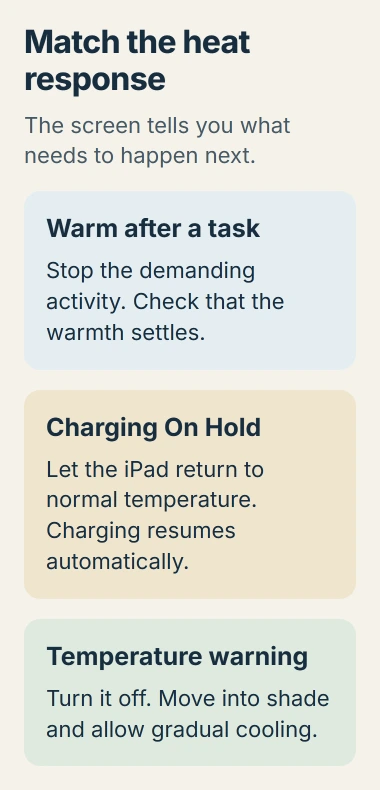
Apple says a temperature warning means the device has crossed its internal temperature limit. Its temperature guidance calls for switching off, moving somewhere cooler and allowing the device to cool.
Place the iPad somewhere shaded at ordinary room temperature. Pause gaming, filming and other demanding work. Do not try to finish a large update or restore manually while the warning prevents normal use.
Status: Apple's heat warnings and iPad charging protections checked November 2, 2026. No temperature was measured and no iPad repair was performed.
Apple's iPad handling instructions warn against dramatic changes in temperature or humidity. Let it cool gradually; avoid a freezer, ice or water.
After the warning clears, resume a light task and check whether normal screen brightness and responsiveness return. Repeated warnings during light indoor use need a service assessment, even if the case does not feel especially hot.
Let a heat-related charging pause finish
Charging On Hold means charging has paused because the device is too warm or too cold. The message alone cannot establish a cable or battery fault. On a warm iPad, stop using it while it cools.
Apple documents temperature-limited charging and says charging resumes automatically at a suitable temperature. Remove the case if the iPad tends to heat during charging.
The same guidance gives an ambient charging range of 32 to 95 degrees Fahrenheit (0 to 35 degrees Celsius). Those figures describe the surrounding air, not a target surface reading or a temperature displayed in Settings.
Check whether the battery percentage begins increasing once the tablet has cooled. The temperature protection operates automatically; there is no switch to disable it.
An unsupported-accessory warning points to a different connection check. Follow the message actually displayed rather than treating every charging interruption as overheating.
Why does the iPad warm up during normal use?
Initial setup, backup restoration, major software updates, video streaming and graphics-heavy apps can make the iPad warm. Apple states that warmth during these activities can be normal and should settle when the work ends.
For heat during a game, stop that game and compare with ordinary reading after the tablet cools. If the pattern returns with the same app, record its name and version for the developer. That comparison does not prove a damaged battery.
A restore that pauses because of heat should resume automatically after cooling. Repeatedly restarting the restore is unnecessary. Keep the iPad out of a parked car or prolonged direct sun, including when using it for navigation.
If the temperature settles but battery life remains poor, use the iPad battery-usage checks to examine activity. A battery percentage falling quickly and a thermal warning are different symptoms.
Arrange service when ordinary use triggers the warning
Contact Apple Support if heat warnings return during light indoor use, or charging remains paused after the iPad returns to normal temperature. Supply the model, iPadOS version, warning text and triggering activity.
Include whether the problem happens while charging, unplugged or both. A cool-feeling exterior cannot establish the internal temperature, so report a persistent warning rather than dismissing it or trying to defeat the protection.
The Short Version
Stop the heat-producing task and move into shade. Switch off for a temperature warning, allow gradual cooling and let a temperature-related charge pause clear. Heat that repeatedly interrupts light indoor use needs Apple's assessment.

Isaac Smith is the founder and editor of PC Glance, a website that covers computers, laptops, and technology. He is a tech enthusiast and a computer geek who loves to share his insights and help his readers make smart choices when buying tech gadgets or laptops. He is always curious and updated about the latest tech trends.