
You were mid-call, you went hunting for the record button you had read about, and there was nothing there. I have been on that particular hunt and it is a rotten thing to be doing while somebody is talking to you.
Before you blame the phone, there is one thing to check that settles it for an enormous number of people, and it has nothing to do with your settings.
Apple switches this feature off entirely in a long list of countries. Work down these six and the first one settles it for a great many people.
Fix 1: Check your country, because that is usually the whole answer
This is a country-by-country decision, and Apple states it plainly.
Apple, on recording and transcribing a call: "Call recording isn't currently available in Azerbaijan, Bahrain, Egypt, the European Union, Iran, Iraq, Jordan, Kuwait, Morocco, Nigeria, Oman, Pakistan, Qatar, Russia, Saudi Arabia, South Africa, Turkey, United Arab Emirates, and Yemen."
The European Union, as a whole. Twenty-seven countries in three words. That is why your button may be simply absent on an otherwise perfect phone.
Apple says the same thing more gently at the top of the page. Apple: "In some countries and regions, you can record a phone call when you're talking to one other person."
If you are in one of those places, stop troubleshooting. Nothing is broken and there is nothing to enable.
A correction to something I wrote here before, because owners have shown it was wrong: I previously listed changing your region under what does not work.
On MacRumors and Apple Community threads, owners report that changing the region to a supported one and setting the Siri language to match does make the button appear, and that it disappears again the moment they change back.
Region on its own is not enough, which is why it looked like it did not work. I am not recommending it, for two reasons. Changing region affects your App Store, your payment methods and your subscriptions.
Apple withholds this feature in those countries for legal reasons, so the law where you are still applies to recording a call whatever your phone lets you do.
If you go that way, that is your decision to make with the law in front of you, not a settings tip.
Fix 2: Count the people on the call, because two is the limit
Read that again. One other person.
Call recording works on a one-to-one call. A conference call, a merged call, anything with three people on it, and the option is not offered at all.
So if it worked yesterday and not today, ask whether today's call had more than two people on it. That single difference accounts for a great deal of the it-stopped-working reports.
If the trouble is that calls themselves keep failing rather than recording, our page on an iPhone that says Call Failed is the better read.
Fix 3: Look behind the More button during a connected call
You may well be in a supported country and still unable to find it. This is usually why.
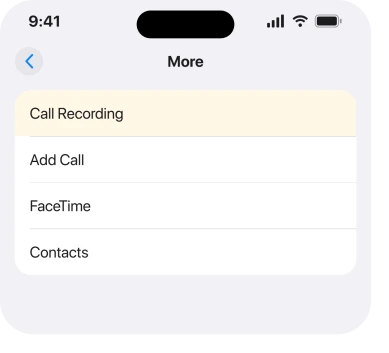
It is not on the main call screen. During your call, tap the More button, and Call Recording is in there.
Apple: "During the call, tap, then tap Call Recording."
Two things about the timing. The call has to be connected, so there is nothing to tap while it rings out. And it works on a phone call or a FaceTime audio call, not a video call.
Fix 4: Expect the announcement, because it cannot be switched off
This is the part that catches people out, and you want to know it before you press anything.
Apple: "Both call participants hear an audio notice that the call is being recorded." Both. Not just you. There is no setting to suppress it, and hearing it is the feature working correctly.
That is deliberate, and Apple tells you to sort the human side out first. Apple: "make sure the other call participant is willing to be recorded."
If you were hoping to record quietly, this is not the tool. I would rather say that now than let you find out mid-conversation.
Fix 5: Look in Notes, which is where recordings actually go
This one surprises everybody, and it is why plenty of recordings get reported as lost.
Apple: "iPhone automatically saves call recordings to a Call Recordings folder in the Notes app." Notes. Not Voice Memos. Not the Phone app, and not Files, which is where I looked first.
Open Notes, find the Call Recordings folder in the folder list, and your recordings are notes inside it. Apple also offers a shortcut straight after the call. Apple: "To see the call in the Notes app, tap View Saved Call."
If the folder is not showing, check you are looking at the account the note was saved to rather than only your On My iPhone notes.
Our page on notes that seem to have disappeared covers the folder list properly if that is where this has led you.
Fix 6: If the audio is there but no transcript, check model and language
These are two separate features. One can work perfectly while the other does not.
Apple: "If you don't see a transcript, your iPhone doesn't meet the minimum requirements or detect a supported language."
So a missing transcript points at your model or your language rather than at anything broken. The audio is still there and still plays.
Give it a minute too. Apple: the transcript "may not be available immediately", and you may see a message saying the transcription is in progress.
And one caution Apple prints that you should carry with you. Apple: "Verify the accuracy of a transcription before relying on it."
What does not work
- Hunting through Settings for a switch. The region block is not exposed as a setting, so there is nothing to turn on.
- Changing region alone. Owners report it takes region and Siri language together, and the option vanishes again the moment you revert. See the note under fix 1.
- Restarting or resetting. Neither changes availability or the announcement.
- Updating iOS. Do it anyway for other reasons, but it does not add the feature where Apple has not offered it.
- Looking in Voice Memos. The recordings go to Notes, and searching the wrong app is the commonest way people conclude one failed.
- A third-party recording app. It cannot capture the other side of a normal cellular call on iOS, whatever the listing says.
Status: iOS 26.6, checked 17 August 2026. Apple names nineteen countries and regions where call recording is unavailable, and the whole European Union is one of them.
Why is there no call recording option on my iPhone?
Most often because you are in a country where Apple does not offer it, and its list includes the whole European Union.
Otherwise, the option lives behind the More button during a connected call rather than on the main call screen, and it is not offered on a call with more than two people.
Can I record a call on iPhone without the other person knowing?
No. Apple states that both call participants hear an audio notice when recording starts, and there is no setting to disable it. Apple's own instructions also say to make sure the other person is willing to be recorded before you begin.
Where do iPhone call recordings get saved?
In a Call Recordings folder inside the Notes app, not in Voice Memos or the Phone app. Straight after the call you can also tap View Saved Call to jump there.
The Short Version
- Check your country first. Apple lists nineteen places where this is unavailable, including the whole EU.
- It works only on a call with one other person, so conference calls will not offer it.
- The button is behind the More option during a connected call, not on the main screen.
- Both people hear an announcement when recording starts and it cannot be switched off.
- Recordings save to a Call Recordings folder in Notes.
- A missing transcript means an unsupported model or language, and the audio still works.
- Apple asks you to check the transcript's accuracy before relying on it.
Where to Next
A feature that quietly does not exist where you live is worse than a broken one. Nothing to fix, and no message telling you so.
Check the country list first. Then the More button. Then whether the call had two people on it. Those three cover almost every case.
Where it is the screen rather than the call you were trying to record, that has its own set of blockers.
If you are in a supported country, on a two-person call, and the option still is not in the More menu, tell me which iPhone you have and I will help you narrow it down.

Isaac Smith is the founder and editor of PC Glance, a website that covers computers, laptops, and technology. He is a tech enthusiast and a computer geek who loves to share his insights and help his readers make smart choices when buying tech gadgets or laptops. He is always curious and updated about the latest tech trends.