
Your screen is flickering and your first thought is the display, which is the expensive thought. Try two free things with me before you go anywhere near a repair shop.
Pull the cable out. Then take the case and any screen protector off.
Those come first because they are Apple's own first moves, and a flickering screen is one of the few iPhone faults where the cause is often sitting in the wall socket rather than inside the phone.
Start with what is plugged in
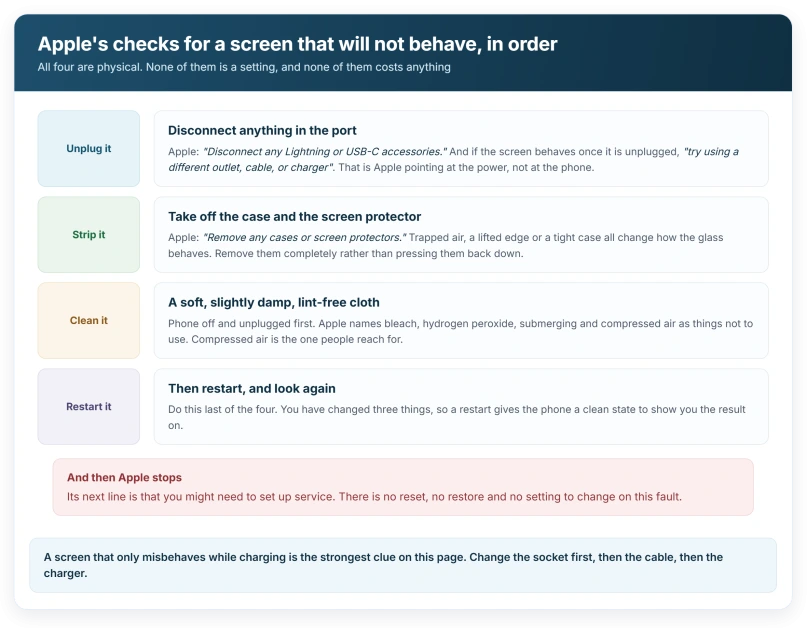
Apple's page on a screen that is not working puts this above every other step: "Disconnect any Lightning or USB-C accessories."
Then the part people skip. "If your screen works after removing an accessory, try using a different outlet, cable, or charger."
Read that again. Apple is not saying the accessory is broken. It is saying the power behind it might be.
A cheap or failing charger can put electrical noise onto the screen. The display flickers while charging and behaves the moment you unplug. Same phone, same screen, different socket.
So test it properly. Unplug and watch. Plug into a different socket in a different room and watch again. Swap the cable. Swap the brick.
Then the case and the protector
Apple's other opening move, from its display troubleshooting guidance: "Remove any cases or screen protectors."
This one gets treated as filler. It is not.
A protector with trapped air or a lifted edge changes how the glass reads your touch. A tight case puts pressure on the edges of the display. Both can produce something that looks like the screen misfiring.
Take them off completely. Do not press the protector down and try again.
Take them right off rather than easing them away from the edge. I would leave them off for the rest of these tests so you are only changing one thing at a time.
Clean it, and mind what you clean it with
Apple says to use "a soft, slightly damp, lint-free cloth".
The warning underneath matters more than the instruction. Unplug everything and turn the phone off first. No bleach. No hydrogen peroxide. Nothing that gets moisture into the openings, and no submerging it in any cleaning fluid.
And no compressed air. Apple names it directly as a thing not to use, and it is the first thing most people reach for.
Restart it, then look again
Apple lists a restart alongside the cleaning and the unplugging, not after them.
Worth doing at this point because you have now changed three things. A restart gives the phone a clean state to show you the result on.
If the flicker only appeared after an update, that is worth knowing but does not change the order. Work the cheap physical checks first. They cost nothing and they rule out the causes that are not the phone.
Flickering is not the same as dimming
These get confused constantly, and they are different faults with different answers.
A screen that fades smoothly, or sits darker than you set it, is doing something deliberate. Auto-brightness, heat, low battery. Our page on a screen that keeps dimming itself covers all of those, and none of them causes a flicker.
Flicker is fast and repeated. Dimming is slow and steady. If yours is the second one, you are on the wrong page.
Status: iOS 26.6, checked 16 August 2026. Apple's screen page lists four checks and puts disconnecting accessories among them. It does not name a software setting as a cause of flickering.
When it is time to book a repair
Once the cheap checks are done, Apple's own page is blunt about where you are: "If your screen still isn't working, you might need to set up service for your device."
There is no long software ladder here. No reset, no restore, no setting to change.
That is worth knowing before you spend an evening on forum advice. Apple goes from four physical checks straight to service, because on this fault there is very little in between.
If your screen is registering touches you never made rather than flickering, that is a separate list, and our page on what Apple calls ghost touch works through it.
Does a flickering iPhone screen mean it is dying?
Not on its own, and Apple does not treat it that way. Its first four checks are all external. What is plugged in, the case, the protector, and dirt on the glass. A charger putting noise onto the display is a real and documented cause, and it leaves the phone itself untouched. Rule those out before assuming hardware.
Can a charger really make the screen flicker?
Apple's instruction points straight at it. If the screen behaves after you remove an accessory, its advice is to try a different outlet, cable or charger, which is guidance about the power source rather than about the phone.
Why does my screen flicker only when charging?
That pattern is the strongest clue you can get, and it matches Apple's step exactly. Try a different socket first, then a different cable, then a different charger. Change one thing at a time or you will not know which one fixed it.
Will a restart fix a flickering screen?
Sometimes, and it is on Apple's list, so it is worth doing. But do it after unplugging and after removing the case, because if one of those is the cause the restart will look like it worked and the flicker will come straight back.
The Short Version
- Unplug everything first. Apple puts disconnecting accessories among its four checks.
- If it stops when unplugged, change the socket, then the cable, then the charger.
- Take the case and screen protector off completely rather than adjusting them.
- Clean with a soft, slightly damp, lint-free cloth, phone off and unplugged.
- Never use bleach, hydrogen peroxide, or compressed air.
- Restart after those, not before.
- Flickering and dimming are different faults with different causes.
- After the physical checks, Apple goes straight to service. There is no software ladder.
Where to Next
Unplug it before anything else, and change one thing at a time after that. The socket, then the cable, then the charger.
A screen that only misbehaves while charging is pointing at the power rather than at the phone, and that is the cheapest fault on this page to fix.
And if the display is fine but screen recording refuses to start, that is a permissions problem rather than a screen one.
Where the fault is a single line rather than a flicker, wipe it before you panic, because some of them come off.
If it flickers just as badly unplugged, with no case and no protector, then it is a service question and I would not spend more money on cables. Tell me what you find.

Isaac Smith is the founder and editor of PC Glance, a website that covers computers, laptops, and technology. He is a tech enthusiast and a computer geek who loves to share his insights and help his readers make smart choices when buying tech gadgets or laptops. He is always curious and updated about the latest tech trends.