
Microsoft Error Reporting on a Mac can follow an Office crash, but the window's name does not explain the cause. Identify the app in the report and install its available updates before removing Office files.
If the reporting window itself keeps returning, record that distinction too. A crash when opening one document needs different checks from a pop-up that appears while every Office app is closed.
Identify what failed before closing the report
Note the application name, version and action immediately before the error. Record whether it happens at launch, with one file, during mail synchronization, or while the app is idle. Keep a copy of any detailed report for support.
Microsoft documents an Outlook synchronization crash that displayed an error report in its Outlook for Mac issue notice. The report was a symptom of the Outlook fault.
Status: Microsoft update and crash guidance checked November 2, 2026. The Outlook example is a 2021 fix, not a diagnosis for unrelated crashes. No Mac app was tested.
That calendar-related fault was fixed in Outlook 16.47 and later. It shows why an app update can remove the report. A different crash on a current build still needs its own diagnosis.
If a frozen window prevents normal quitting, use the Mac app-closing controls. Forced exits can discard unsaved work, so save anything still accessible first.
Update through the source that installed Office
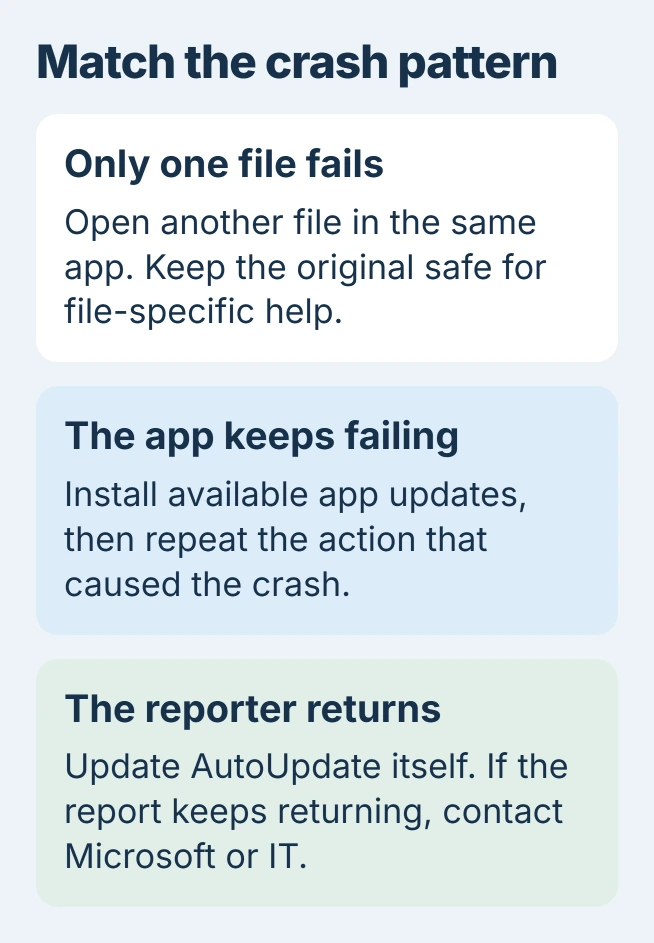
For Office downloaded from Microsoft, open a working Office app and choose Help > Check for Updates. In Microsoft AutoUpdate, install the available updates. Reopen the affected app and check the task that previously triggered the error.
For an App Store installation, open the App Store > Updates and update the affected Microsoft app there. Microsoft says the two installation sources use these different routes in its Mac update instructions.
When no Office app reaches its menu, the same support page links to the current AutoUpdate installer. On an employer-managed Mac, give IT the failing app and version if updating is restricted.
An AutoUpdate window announcing updates is a different symptom from a crash report. The repeated AutoUpdate-window guide covers that behavior.
Compare another document and restart the Mac
For Word or Excel, open a blank file or another known-good document after the update. If only the original file crashes, preserve it and work on a copy while seeking file-specific help.
Apple says to try another file when an app quits unexpectedly. A failure limited to one document does not justify deleting every Office preference.
If several files fail, save work in responsive apps and choose Apple menu > Restart. Test the same app again afterward. Apple also recommends checking compatibility and removing incompatible third-party plug-ins after updates.
Use the plug-in maker's removal instructions for an add-in installed just before the crashes began. Do not remove unfamiliar Library items by guessing from their names. Retest after that one change so its effect is clear.
Update AutoUpdate itself for a repeating reporter
One owner reported that force quitting Microsoft Error Reporting failed to stop its return after a Teams change. In their March 2024 follow-up, they confirmed that updating AutoUpdate itself stopped the repeating window.
They had observed one day without recurrence when posting that result. Another owner later had trouble removing the running updater, so start with its update rather than trying to delete it.
Install the current AutoUpdate package from Microsoft's update page if the updater cannot update itself. Check for another report afterward. The owner's result supports trying this repair, without promising the same outcome.
If the pop-up returns with Office apps closed, note its exact title and whether it names a Microsoft app or the reporting component. Give Microsoft Support or workplace IT that record for diagnosis.
Avoid treating complete Office removal as a harmless first check. Microsoft's uninstall instructions warn that removing specified Group Containers also removes Outlook data.
Before any support-directed reinstall, preserve local files and Outlook data and confirm that the replacement Office version supports the Mac and license. The report alone cannot prove that reinstalling is necessary.
The Short Version
Identify the crashing application, update it, then compare files and restart. For a reporter that repeatedly returns, update AutoUpdate itself. Preserve the report and local data before escalating to support or reinstalling Office.

Isaac Smith is the founder and editor of PC Glance, a website that covers computers, laptops, and technology. He is a tech enthusiast and a computer geek who loves to share his insights and help his readers make smart choices when buying tech gadgets or laptops. He is always curious and updated about the latest tech trends.