
You click a file once and it opens. You click a tab once and it closes. You drag something and it drops halfway, because the button let go and grabbed again in the time it took you to move your hand.
Everyone will tell you the mouse is worn out and you need a new one. That is often true. It is also the reason a lot of people buy a mouse that does not fix it, and I would rather you found out which you have before you spend anything.
So this page starts with the test, then splits in two.
The short answer, and the test that gives it to you
Plug in a different mouse. Any different mouse, borrowed, cheap, the one in the drawer. Use it for an hour of normal work. If it behaves, yours has worn out, and you can skip to the next section.
If the second mouse does the same thing, the mouse was never the problem. That is the half nobody writes about, and it is the rest of this page.
One thing before you do that: do not judge it in thirty seconds. This fault is intermittent by nature, so a minute of clicking around proves nothing either way.
If a second mouse fixes it, this is what died
Reported by advisers on Microsoft's own Q&A, and by two of them independently.
A Microsoft moderator put it as a hardware issue, "as double-click is common with traditional switch mice", and recommended either replacing the switch or moving to a mouse with optical or magnetic switches, which have no contacts to wear.
An Independent Advisor said the same thing in a separate thread: double-clicking problems are common on heavily used mice because the internal switch mechanism wears.
That is what is physically happening under your finger. The switch beneath the button is a tiny metal leaf that snaps across a contact.
After a few million presses it stops snapping cleanly and bounces. The bounce reads as a second click.
Nobody in either thread confirmed a repair. Both advisers pointed at hardware and the threads ended there.
Ours, and marked as ours: the wear is in the button you use most, so it is almost always the left one.
If the right button is fine after years of the same treatment, that is consistent with wear rather than a fault in the mouse's electronics.
If a second mouse does the same, start here
Two people have posted a confirmed fix for this, and neither one is a mouse.
The antivirus one, and it was tested properly
Confirmed by an owner on Microsoft Q&A in December 2023, after a month of trying.
He had already fitted a brand new optical mouse, reinstalled Windows 11, swapped monitors and cables, changed the double-click speed and run malware scans. None of it worked.
Then he disabled his startup apps one at a time. That is the step worth borrowing here. In his words:
> "I disabled all of the Startup Apps except one, ecmds.exe because I was not allowed to - ecmds.exe is associated with my antivirus program ESET. So I went ahead an uninstalled ESET to remove it from my Startup list. After rebooting my computer, the double-clicking issue went away!"
What makes this worth printing is what he did next. He put ESET back, and the double-clicking came back. He removed it again, and it stopped again.
That is a controlled test rather than a coincidence, and it is rarer than it should be in a support thread.
His own conclusion was cautious: "it looks as if ESET has a compatibility issue with Windows or the Chrome Brower." Whatever you run, the method is what matters here, not the brand.
To try this yourself, open Task Manager with Ctrl + Shift + Esc, go to Startup apps, and disable everything you do not need at boot. Restart and use the machine normally.
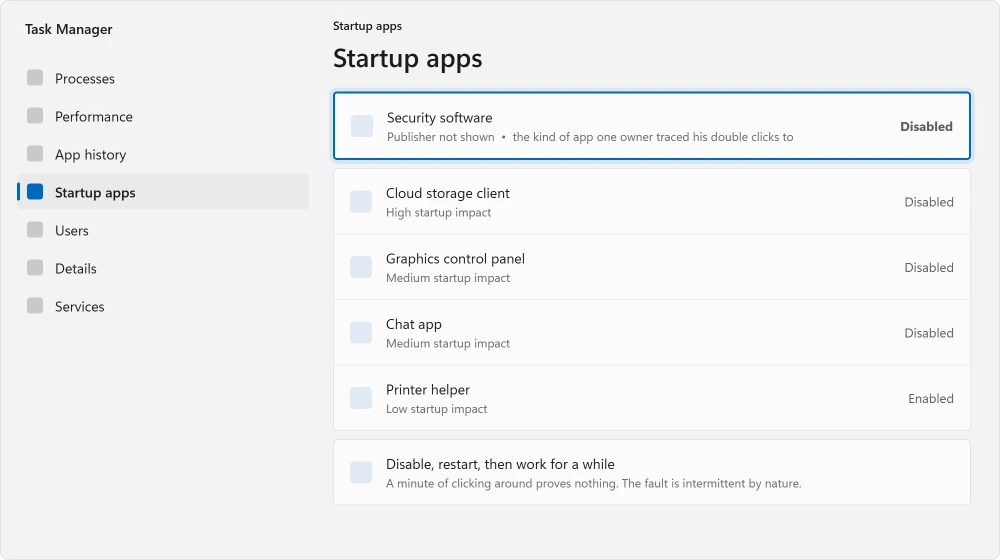
This is the same method that finds a PC slowed down by its own startup list, and it is worth knowing for both.
Ours, and marked as ours: disable, restart, then work for a while before you decide. Turning six things off and clicking around for a minute will tell you nothing, for the same reason the mouse test needs an hour.
The second monitor one
An owner confirmed this fix in December 2022, on a thread where a single click kept breaking a drag and minimizing whatever he was holding. He had already tried a new mouse.
His fix, in his own words: "problem solved, I must turn off the multiple display option on display setting only."
That answer was accepted by the person who asked and marked helpful by more than twenty other people, which is unusual for a thread that specific.
I cannot tell you why this works, and I am not going to invent a mechanism for it. Nobody on the thread explained it either. What I can tell you is that it is worth thirty seconds if you run two screens, because it costs nothing to try.
Open Settings, then System, then Display, and change how the second screen is being used. If your clicks settle down, you have found yours.
While you are in there, a second screen behaving oddly can also show up as a trail behind moving windows, which is a separate thing worth ruling out.
The setting everybody suggests, and what it really does
You will be sent to the double-click speed slider on nearly every page about this. It is worth understanding what it does before you move it.
That slider sets how close together two clicks have to be for Windows to treat them as one double click. Slower means Windows counts a wider gap as a double click, which makes phantom double clicks more likely rather than less.
So if you are going to touch it, drag it toward Fast, not slow. Press Windows + R, type main.cpl, and it is on the first tab.
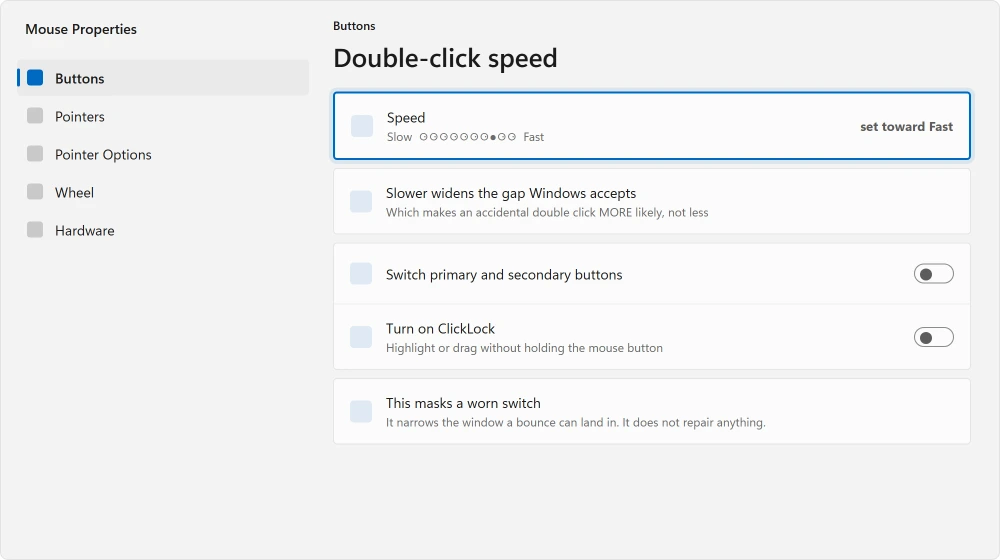
This is a workaround and a poor one. A faster setting hides a bouncing switch by narrowing the window it can bounce into, at the cost of making a deliberate double click harder to land. It does not repair anything.
And if the cursor changed size or color by itself rather than misclicking, start elsewhere. That one points at an update rather than the mouse.
If the pointer only vanishes over classic Outlook, the Outlook pointer page has Microsoft's known issue and the owners' fix.
What did not work for the people who tried it
This list is not padding. Every item here was tried by somebody in one of the threads and reported as no help.
New mouse, on a machine where the cause turned out to be software. New mouse pad. Different USB ports, both 2.0 and 3.0. Reinstalling the mouse driver. Reinstalling Windows entirely. Disabling Snap Windows. Malware scans.
Ours, and marked as ours: the pattern in the failures is that everybody attacked the mouse. If your second mouse does the same thing, stop working on the mouse.
Status: written 21 August 2026. Two owners posted confirmed fixes and neither was hardware, though two Microsoft advisers separately name a worn switch as the usual cause.
Why does my mouse double click when I click once?
Most often the microswitch under the button has worn out and bounces, which Windows reads as two clicks. Test it by using a different mouse for an hour.
If the second mouse is fine, yours has worn. If it does the same thing, the cause is on the computer rather than in your hand.
Can software cause a mouse to double click?
Yes, and it is confirmed. One owner traced it to ESET antivirus and proved it by removing and reinstalling the software twice, with the fault following it both times.
Another traced it to a multiple display setting. Both had already fitted a brand new mouse.
Does changing the double click speed fix it?
Not really. That slider only changes how wide a gap Windows accepts between two clicks.
Setting it slower makes accidental double clicks more likely, so if you move it at all, move it toward Fast. It masks a worn switch rather than repairing one.
How long should a mouse last before it double clicks?
There is no published number, and anyone quoting one is guessing. What advisers on Microsoft's boards do say is that the fault is common on heavily used mice, and it appears in the button you press most, which is almost always the left one.
Is it worth repairing a mouse that double clicks?
A Microsoft moderator suggested two routes: have the switch replaced, or move to a mouse using optical or magnetic switches, which have no contacts to wear out.
Neither was confirmed by anyone on the thread. On a cheap mouse the repair costs more than the mouse.
The Short Version
- A different mouse for an hour splits this into two completely different problems.
- If the second mouse is fine, the switch in yours has worn out and bounces.
- Two Microsoft advisers name worn switches as the usual cause, and neither thread reached a repair.
- If the second mouse does the same, one owner found ESET antivirus was the cause and proved it twice.
- Another owner fixed it by changing a multiple display setting, with no explanation offered.
- The double-click speed slider makes accidental double clicks worse when set slower, not better.
Where to Next
Replacing the mouse means setting up a new one, and there are two kinds of wireless mouse whose instructions are opposites.
If you have not run the two-mouse test yet, do that before anything else on this page. It is the only step that tells you which half of the problem you are in, and everything else is guesswork until you have it.
While you are looking at input problems, a keyboard that lags behind your typing has a cause almost nobody expects, and a touchpad that stopped responding is a different fault again.
If taps on the screen itself are the problem rather than clicks, a touchscreen has a different test entirely.
A wheel that jumps back up the page has two tests of its own before you buy another mouse.
On a laptop, the equivalent controls sit under the touchpad, and they are worth setting once rather than tolerating.
And if you find a third cause I have not covered here, tell me in the comments. I would rather add yours than leave somebody else buying a mouse they do not need.

Isaac Smith is the founder and editor of PC Glance, a website that covers computers, laptops, and technology. He is a tech enthusiast and a computer geek who loves to share his insights and help his readers make smart choices when buying tech gadgets or laptops. He is always curious and updated about the latest tech trends.