Opening the line on a Motorola phone means removing its carrier network lock so another carrier's SIM can work. The original carrier has to approve that unlock; a factory reset or a new screen-lock PIN won't remove it.
A request for a SIM network unlock PIN or subsidy password points to the carrier lock. A request for a SIM PIN, PUK, screen PIN or Google Account needs a different answer, so read the exact message before entering anything.
In this guide
1. Identify which lock the phone is showing
Insert an active SIM from a different carrier, following the phone's SIM-tray instructions. Start the phone and read the full message.
If the phone asks for a carrier unlock code, keep the message visible while you check the original carrier's instructions.
A normal SIM PIN protects the SIM card itself. It isn't an open-line code. A PUK is the recovery key for a SIM disabled after incorrect PIN attempts; the company that supplied that SIM provides it.
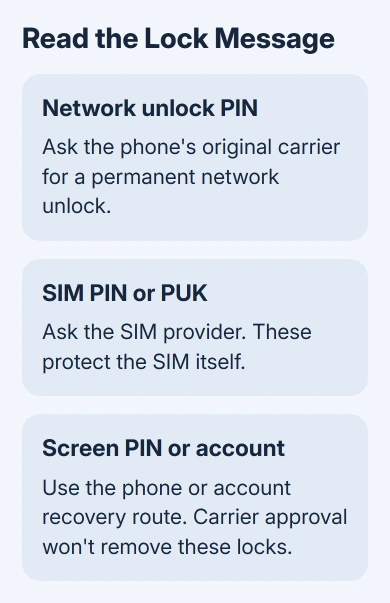
Don't guess codes. Repeated wrong SIM PIN entries can disable the SIM, and a network-unlock prompt can have its own attempt limit. Ask for the code that matches the message instead of trying a default number found online.
A phone stuck at its usual screen lock needs its screen lock sorted out before you can check another carrier's SIM.
The Motorola reset guide explains the erase procedure and account preparation when a reset is actually needed.
A Google Account request during setup is also separate. Google's device-protection explanation describes account verification after a reset.
Getting the carrier unlock approved won't remove that account check.
2. Find the original carrier and the phone's IMEI
Check the purchase receipt, original account, startup branding and seller's listing for the carrier that sold the phone. The provider of your new SIM normally can't remove another company's lock.
In the Phone app, dial \*#06# to display the IMEI, the device's identifying number. It may also appear in Settings > About phone. A dual-SIM handset may list two IMEIs, so give the carrier the one it requests.
Keep that number private and share it only in an official carrier support conversation or unlock application. It lets the carrier check the specific phone, rather than guessing from the Moto G, Edge or Razr family name.
Motorola's carrier-unlock guidance says the original carrier handles unlocking.
If the carrier is unknown, its support team can also check whether the IMEI is registered to a particular network.
For a used phone, get its original carrier and unlock eligibility from the seller. I'd settle that before paying an unlock service. A code offer that looks legitimate won't clear unpaid financing or a lost-device report.
3. Ask the carrier to check unlock eligibility
Request a permanent network unlock for the exact IMEI. Give support the full on-screen message, model and account details they request. Ask whether the phone is eligible now and whether it will unlock remotely or need a code or app.
Eligibility rules differ by carrier, prepaid or postpaid plan, purchase date and account status. A paid-off phone can still have another requirement to meet.
Check that carrier's current policy. A waiting period you've seen for another network might not apply.
For an AT&T phone, start at its official device-unlock page, select the device brand and follow the route shown. It separates ordinary device requests, noncustomer requests and prepaid instructions.
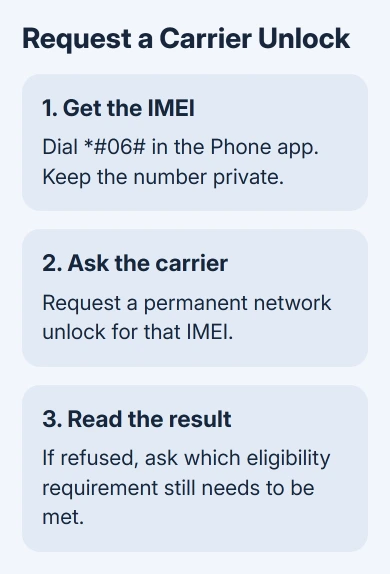
If the request is refused, read the reason before submitting it again. Ask what remains unpaid, which eligibility condition is missing, or whether an account owner needs to make the request.
Keep the request number for the next conversation.
With a used phone, the seller may have to resolve the original account problem. A shop can't promise a software fix for every carrier restriction, and changing the phone's software isn't a substitute for approval.
4. Complete the unlock method for that Motorola
Some phones unlock remotely once eligible; others use a carrier app, a settings control or a supplied code. Follow the instructions for your exact carrier-branded model. The same Motorola family can have different software across networks.
For T-Mobile, check the device's unlock status in the account or supported app.
Its device-unlock instructions explain automatic unlocking for eligible devices that support remote unlock.
On a supported T-Mobile Motorola, connect to the carrier network or Wi-Fi, then open Settings > About Phone > Device Unlock. Choose Permanent Unlock, wait for completion and restart.
Older supported phones can have a preinstalled Device Unlock app instead. Open it, select Continue, choose Permanent Unlock, wait for the result and restart.
These menus apply to supported phones from that carrier. They aren't on every Motorola.
If the menu is missing, ask the carrier for your model's unlock procedure. Skip unrelated unlock apps.
If the carrier gives a code, match it to the IMEI and the specific network-unlock prompt. Enter it exactly as instructed. If the code is rejected, stop and give support the error message and any remaining-attempt count.
When the phone reports that it's unlocked, the carrier restriction is gone. It doesn't tell you whether a new plan is active or whether that Motorola supports every network feature offered by your next provider.
5. Test service with the new carrier
Install the new carrier's active SIM or complete its eSIM activation, if that exact model supports it. Restart as instructed, then make an outgoing call, receive an incoming call, send a text and test cellular data with Wi-Fi off.
Check each service separately. Working data doesn't mean voice calls are set up correctly, and a signal indicator doesn't mean activation is complete. Ask the new carrier to verify the IMEI's compatibility if any service fails.
If the network-unlock request is gone but No service remains, tell the new provider that the unlock completed. Ask them to check activation, coverage and support for that model before returning to the original carrier for another code.
For a phone that won't start at all, the Motorola power and charging checks come first. Carrier unlocking can't repair a phone that isn't reaching its startup or SIM screen.
If the original carrier can't approve the unlock, ask why in writing. For a recently bought used phone sold as unlocked, take that result to the seller and ask for the unlocked device you were promised or a return under the seller's policy.
The Short Version
Read the lock message, find the original carrier and IMEI, and request its permanent network unlock. Follow the model's approved code, app or remote method. Then test calls, texts and data with the new carrier's active SIM.
Checked November 10, 2026.