
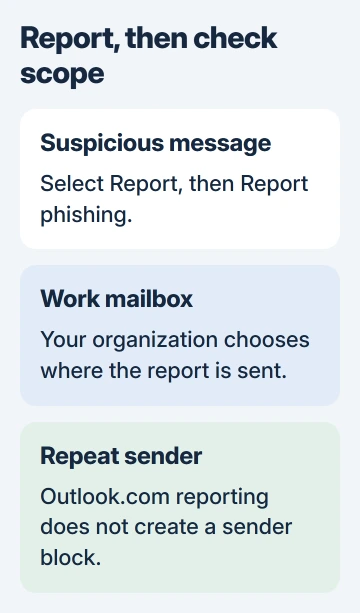
To report phishing in Outlook, select the suspicious message and choose Report > Report phishing. Use it for deceptive requests for passwords, payments or private information. Avoid following the message's links to check whether it is real.
For a work mailbox, the report can go to the organization's security team, Microsoft or both. Reporting is also separate from blocking a sender, so another message arriving later does not by itself prove the report failed.
Select the message and send the report
In Outlook.com, select the suspicious email. Open Report in the toolbar and choose Report phishing. Microsoft documents this command for both ribbon layouts in its Outlook phishing instructions.
For a supported Microsoft 365 work or school mailbox, the built-in Report button uses that selection and menu sequence too. It is available in new Outlook, the web client and supported editions of classic Outlook.
Status: Outlook.com and Microsoft 365 reporting documentation checked November 3, 2026. Work-account controls depend on client support and administrator settings. No email was submitted.
Read any confirmation shown by your organization and complete the report. There is no need to reply to the sender or open an attachment. If unsure whether the message is a scam, review the phishing warning signs.
Know what happens to a work-account report
Microsoft's built-in reporting guide says administrators choose a reporting mailbox, Microsoft or both. Do not assume every work report goes directly to Microsoft.
For this work-account workflow, Microsoft says messages reported as phishing are deleted. That action does not mean the sender has been identified, the entire campaign stopped or every recipient protected immediately.
Deletion alone is not proof of submission from a shared mailbox. Microsoft's guide says delegates need Send As permission in supported clients; without it, the message can leave the folder without reaching the reporting mailbox.
Ask the mail administrator to check that permission if reporting from a shared mailbox. Keep the subject and received time available for the team's review, without forwarding the suspicious content through an unapproved route.
Find the right control when Report is missing
On a managed work account, the built-in button requires a supported Outlook version and enabled user-reporting settings. The organization can choose a different reporting add-in, so its approved button may have another name.
Ask IT which command to use and whether the account is supported. For a personal Outlook.com mailbox, sign in through Outlook.com and use its reporting menu if the desktop layout is unclear.
Microsoft states that the older Report Message and Report Phishing add-ins are in maintenance mode in its transition guidance. It recommends the built-in control.
Avoid installing an old add-in just because an older instruction names it. An administrator can confirm whether the current client or the organization's configuration needs changing.
Block repeat senders separately
Microsoft explicitly says Outlook.com phishing reports do not block future messages from that address. Use the Outlook sender-blocking controls when a separate block is needed.
A block applies to the chosen sender or domain, so a campaign using new addresses can continue. Reporting provides the suspicious message for review; blocking controls how matching incoming mail is handled.
Ordinary unwanted advertising is a different case from a credential-stealing message. Use Report junk for unwanted mail and the provider's subscription controls for a legitimate newsletter that was deliberately joined.
Act on exposed account details as well
If a password was entered on the linked site, submitting the email does not secure the account. Go directly to the real service, change the exposed password and enable multifactor authentication where available.
Microsoft includes account protection and contacting IT after a suspected attack in its phishing protection guidance. For a work account, notify the security team promptly.
If the reporting command itself fails, note its error and the Outlook version. Give those details to the mail administrator or Microsoft Support instead of repeatedly reopening the suspicious attachment or link.
The Short Version
Submit suspicious mail with Report phishing. Work-account routing depends on the organization, and shared mailboxes need the right permission. Blocking a sender and securing exposed credentials remain separate actions.

Isaac Smith is the founder and editor of PC Glance, a website that covers computers, laptops, and technology. He is a tech enthusiast and a computer geek who loves to share his insights and help his readers make smart choices when buying tech gadgets or laptops. He is always curious and updated about the latest tech trends.