
Searching for text on an iPhone webpage uses Safari's page-search control. Open the page, tap Page Menu, then choose Search Document and enter a word. Safari searches that page, saving a manual scan through a long article.
Typing into Safari's address field instead starts a web search or opens an address. The page-search control is the useful choice when the website is already correct and only a particular passage is missing.
Find a word inside the open Safari page
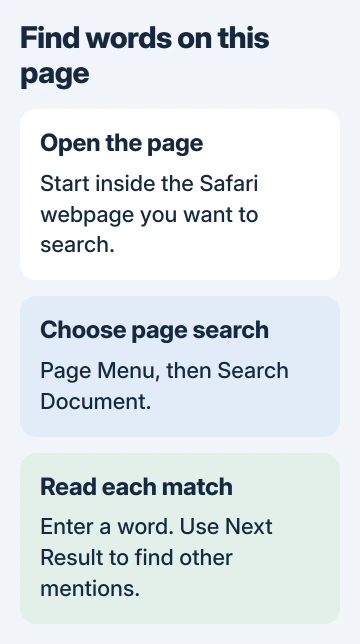
Open the full webpage in Safari first. Tap Page Menu, beside the address field, then the Search Document button. Apple's guide identifies these controls by their icons; the search button depicts a document with a magnifying glass.
Apple documents page searching in its Safari instructions. Type a distinctive word or short phrase, then use Next Result to move through its occurrences.
Status: Safari page-search controls checked against Apple's current iPhone guide on November 3, 2026. Button names were verified in the saved page's image descriptions.
Read the sentence around each match before deciding it is the passage needed. A product name can appear in a navigation menu, an advertisement and the article itself, each with a different purpose.
For a page opened from a message, make sure the full website is now in Safari. An app's built-in browser can have different controls. The steps here apply to Apple's browser.
Bring back a toolbar that was hidden
After using Hide Toolbar, tap the screen's bottom edge to restore the controls. Apple says this brings the toolbar back in its Safari customization guide.
Open Page Menu again and look for the document-search control. Its position is separate from the website's own search box, which might search a whole store or publication instead of the current page.
If the page has been lost among tabs, reopen it from a saved bookmark. The Safari Favorites instructions explain how to keep a frequently used page available.
Check the search scope when nothing matches
Try one word that is visibly present in the page's text. Our check is to begin with a short, distinctive term, then add more words only when too many matches appear. That avoids a remembered phrase excluding the passage.
A webpage search does not search every tab or the rest of the website. Open the relevant page before repeating the search. Text on a separate page needs a separate search there.
Apple states that pulling down from a webpage's top refreshes it in the Safari browsing guide. Try that for incomplete loading, but protect unfinished forms with unsaved entries.
An SMS or iMessage conversation needs Messages' own search and filters. Safari cannot search that conversation, even when it contains a link to the webpage.
If a visible word fails to match across several ordinary webpages, report the page addresses, iOS release and search term to Apple Support. When only one site is affected, its support team also needs an example.
The Short Version
Open the intended webpage, use Page Menu and Search Document, then move between matches. Keep the search inside the correct page; Safari's address field and Messages search perform different jobs.

Isaac Smith is the founder and editor of PC Glance, a website that covers computers, laptops, and technology. He is a tech enthusiast and a computer geek who loves to share his insights and help his readers make smart choices when buying tech gadgets or laptops. He is always curious and updated about the latest tech trends.