
No, an iMessage removed with Undo Send can't be reopened to read its original text. Messages leaves an unsent notice, but removes the original text on devices with compatible software.
An edited message is different: you can still open its earlier versions. A conversation you deleted yourself can also have a recovery option. Check which of those happened before looking for a way to bring the words back.
Read the notice before trying a recovery method
Open the conversation in Messages and look where the missing bubble was. An unsent notice tells you what the sender did. It isn't a collapsed bubble containing the original text.
Apple's Undo Send explanation says unsending removes the message from the recipient's device. Both people still see the notice in their conversation history.
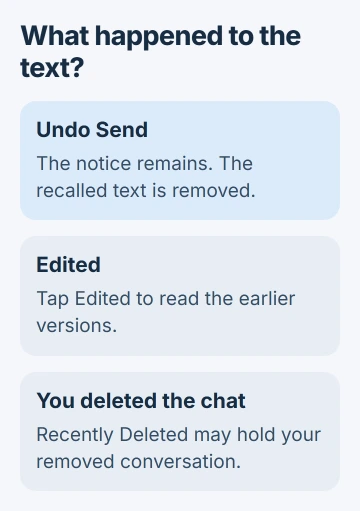
Tapping that notice won't reveal the recalled wording. Ask the sender to send the information again. Once the original bubble is gone, that's the direct way to get the wording back.
To recall something you sent, follow the iPhone Undo Send procedure for its controls and deadline. These steps cover what you can read after a message has been unsent.
Keep the app in mind too. These rules apply to Apple's Messages app and iMessage. A recalled message in another chat app follows that app's rules, even though it's running on the same iPhone.
Tap Edited if the bubble is still there
If the message still appears with Edited attached, tap that label. Messages shows the earlier versions so you can read what changed. This works for the recipient as well as the sender.
Look at the wording beside the bubble carefully. Edited and an unsent notice describe different actions. A changed appointment time can leave a readable earlier time; an unsent appointment message can leave only its removal notice.
The sender can edit an eligible iMessage up to five times during the first 15 minutes after sending. You can read the history without switching on another setting. It's part of the feature, not a recovery trick.
If tapping the label opens the earlier wording, read it in context with the latest version. The latest bubble is the correction, so an earlier address or time may be the part the sender intended to replace.
If both the bubble and Edited label are gone, you can't use this option. Check whether you deleted the conversation yourself or the sender recalled the individual message.
Use Recently Deleted only for your own deletions
A chat you removed from your own list is different from an iMessage someone unsent. For your own recent deletion, open the conversation list, tap Filters, then Recently Deleted on current iOS.
Select the conversation, tap Recover, and confirm the recovery. On iOS 18, the route starts with Edit in the conversation list. The old-message retrieval guide covers that process in detail.
The message recovery guide gives up to 30 days for your own deletions. It also says that messages removed using Undo Send are permanently deleted.
Your conversation can come back without the recalled bubble. Recovering a chat you deleted doesn't reverse the sender's recall, so the missing bubble doesn't mean a recovery setting has failed.
Check Recently Deleted when you remember deleting the chat. Don't erase and restore your iPhone just because a recalled message isn't in that folder. Recently Deleted doesn't store a history of unsent messages.
Understand why an older device may still show the original
Undo Send needs compatible software on both devices: iOS 16, iPadOS 16.1, macOS Ventura or later. On an older receiving device, the original can stay in the conversation instead of being removed.
The sender can receive a warning that the original is still visible. That's a limit of the older software. It doesn't give you a way to view recalled text on a current iPhone.
If the original is still on a device running that older software, you can read that copy. Downgrading a current iPhone doesn't recreate text that was already removed.
I'd ask the sender for the wording before changing devices or account settings. A surviving old copy is a special case; it isn't a reason to change your normal Messages setup.
For an edited message sent to older software, the correction can arrive as a follow-up message. Read the surrounding conversation too, since the first bubble and its correction may appear separately.
A green text or an unsent draft needs a different explanation
SMS, MMS and RCS messages don't support the same Undo Send action. Don't assume a missing green message means the sender recalled it through iMessage.
Check whether you're in the right conversation, whether you deleted anything on your phone, and which messaging app you're using. If a received SMS is missing without an unsent notice, describe that separately when asking for help.
Unsent can also mean words you typed but never sent. In that case, reopen the same conversation and look at its compose field. There was no delivered bubble for another person to recall.
In Mail, unsent can mean an email still waiting in Outbox. That email uses Mail's storage and recovery options, so a Messages recovery setting won't find it.
Check what a backup could contain
A backup isn't a record of every message that briefly appeared on your screen. It holds only the information saved in it, with no separate folder of recalled text.
With Messages in iCloud enabled, messages sync separately from the daily device backup. Restoring that backup won't give you an unsent-message log.
If the removal notice looks wrong, tell Apple Support your iOS version and the message type. Keep private text out of public reports. Ask the sender for the missing wording.
The Short Version
An unsent iMessage leaves a notice, not readable hidden text. Tap Edited for revision history or use Recently Deleted for your own deletions. Request a fresh copy from the sender when Undo Send removed information you need.
Checked November 5, 2026.

Isaac Smith is the founder and editor of PC Glance, a website that covers computers, laptops, and technology. He is a tech enthusiast and a computer geek who loves to share his insights and help his readers make smart choices when buying tech gadgets or laptops. He is always curious and updated about the latest tech trends.