

Press Down on the keyboard to cycle through your equipped items in Elden Ring, then press R to drink the selected flask. Switching the highlighted item doesn't use it, so check the flask icon before pressing the use key.
Those are the default PC keys. If you've customized the controls, use your chosen keys for switching and using items. A flask stored only in Inventory also needs an equipment or pouch slot before these shortcuts can reach it.
Put both flasks in your usable item slots
Open the menu with Esc, then choose Equipment. Select a quick item slot and assign your Flask of Crimson Tears. Put the Flask of Cerulean Tears in another quick item slot.
Crimson Tears restores health, shown by the red HP bar. Cerulean Tears restores the FP you spend on skills and spells; watch the blue bar for that. Choose the flask for the bar you need to refill; they don't both restore health.
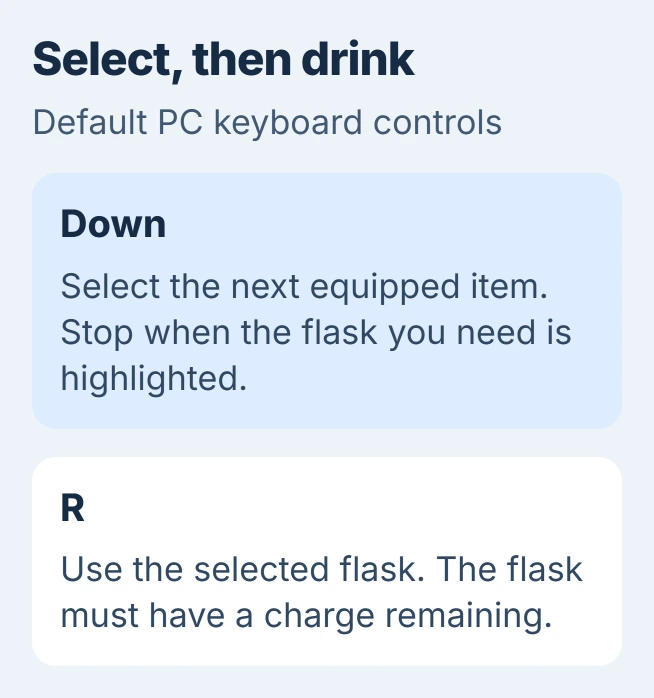
Status: checked November 3, 2026. FromSoftware's PC manual lists Down for switching items and R for using them. Custom key assignments can change both.
Equipment controls which items you can cycle through. Inventory holds everything your character owns. A flask can be in Inventory without being assigned to a quick item slot.
After assigning both flasks, close the menu and watch the item display near the bottom-left corner. Their icons should appear as you cycle. If one doesn't, return to Equipment and check the slot you changed.
I'd keep the red flask at the start of the item list and put the blue one next to it. That makes the usual choice easier to spot while you're still learning the controls.
Select the flask, then drink it
- Close Equipment so you're controlling your character again. The same keys can have different jobs while a menu is open.
- Tap Down until the item display shows the flask you need. You'll also cycle through any other usable items you've equipped.
- Press R once to use that flask. Watch your health or FP bar and the number of flask uses left.
- To use the other flask, cycle to its icon first and then use it. Repeatedly pressing R uses the selected item; it doesn't alternate between red and blue.
These default keys come from the PC control table documented by the vendor. A controller uses different buttons, even when you're playing on a computer.
A flask with no charges left can't restore health or FP. If you've selected the right icon but have no uses left, go to the section about splitting red and blue charges. Changing the use key won't refill it.
Practice somewhere safe and watch the icon change without drinking. This helps you tell whether a failed heal came from selecting the wrong item or having no flask uses left.
Return to your first item without cycling through everything
Hold the item-switch control to jump back to the first item slot. With the default keyboard layout, that's Down. FromSoftware distinguishes holding the key from tapping it to move through the list.
This helps when several items sit between your current selection and the healing flask. It only returns to the first slot, so put the item you need to reach quickly in that position.
Remove items you rarely use from the quick item slots if they make the list awkward to cycle through. They'll stay in Inventory, so you won't lose them.
Try a tap and a hold separately, watching where each lands. If both seem to select the wrong item, check the ordering in Equipment before changing keyboard settings.
Use the pouch for a separate flask shortcut
The pouch gives you another way to reach items you use often. Open the main menu and select a pouch slot on the right. Use the displayed Switch command to assign a flask to one of its four directional shortcut slots.
FromSoftware's menu instructions show four pouch slots with directional shortcuts. The other two slots don't have them, so choose one of those four for quick access.
Close the menu, hold E, and press the direction assigned to that pouch item. This uses the pouch item directly. It isn't the same action as cycling your Equipment items and pressing R afterward.
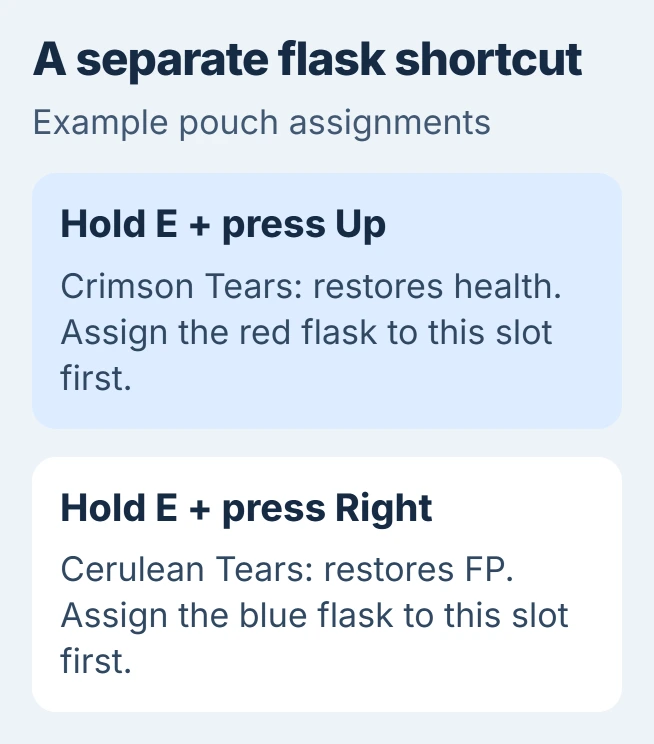
For example, you could assign Crimson Tears to the upper shortcut and Cerulean Tears to the right-hand shortcut. That arrangement is your choice; the game doesn't automatically put those flasks in those positions.
Release E before returning to ordinary item cycling. If pressing a direction unexpectedly uses a pouch item, check whether you're still holding E.
Change the red and blue charge split at a Site of Grace
Selecting a flask chooses which one you'll drink. Allocating flask charges sets how many drinks you get from each color. To change that split, rest at a Site of Grace.
Open Flasks and choose Allocate flask charges. Move the split toward Crimson for more health recovery or Cerulean for more FP recovery, then confirm your choice.
This splits the charges you already have. Getting more total uses and restoring more health or FP per drink require separate flask upgrades. Bandai Namco's starter guide explains the difference.
Resting also refills your flasks. If you've assigned every charge to red, an equipped blue flask still won't restore FP until you move some charges to it.
When the default keys don't respond
Open System and check Keyboard/Mouse Settings. Look at the keys assigned to switching items and using items. Use the keys saved there if they differ from Down and R.
If the keyboard also fails outside Elden Ring, use the Windows keyboard checks. Microsoft says to reconnect a USB device and try another port in its input-device troubleshooting.
Microsoft documents testing the device on another PC too. Try that if the same key fails in other apps as well. A key that works elsewhere but does the wrong thing in Elden Ring needs a different check.
If you're using a controller, try its Windows input test. If the button works there but Elden Ring ignores it, tell Bandai Namco Support which button you've assigned and which action fails.
The Short Version
Equip the flasks, select one with Down, and use it with R on the default keyboard layout. Pouch shortcuts use E plus an assigned direction. Change the red/blue supply at a Site of Grace when the problem is empty charges.

Isaac Smith is the founder and editor of PC Glance, a website that covers computers, laptops, and technology. He is a tech enthusiast and a computer geek who loves to share his insights and help his readers make smart choices when buying tech gadgets or laptops. He is always curious and updated about the latest tech trends.