A USPS.com page saying you don't have permission means the site's firewall has refused the internet address you're connecting from. It isn't about your USPS account or password, and owners keep tracing it to a VPN.
Turn the VPN off and reload, and check for Edge's own built-in VPN too. If you don't use a VPN at all, USPS is refusing your own connection's address, and another network, such as your phone's cellular data, is the way in for now.
In this guide
What the message means
Along with the permission line, the page adds "If you have found this page in error, please contact support", followed by a reference number.
It shows up in place of the page itself, so your username and password don't come into it at all.
The block follows your address, not your browser. One owner who tried many VPN addresses found that most worked and a few were refused, while another cleared cookies, removed extensions and tried other browsers with no change.
1. Turn off your VPN and reload
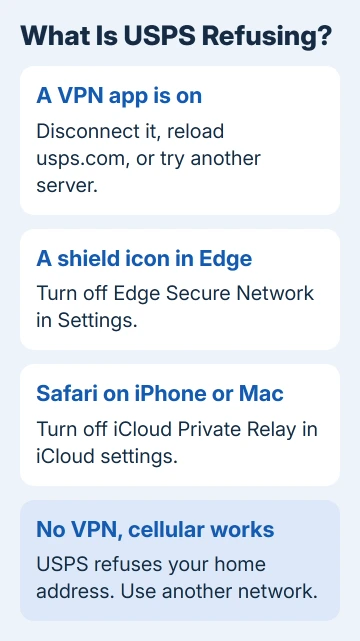
Disconnect in your VPN app. I'd open the app even if you think it's off, because an auto-connect setting can switch it back on at startup.
In Windows 11 you can also select the network, volume and battery icons in the taskbar's corner, open the VPN tile and choose Disconnect.
A VPN you added yourself with the built-in VPN in Windows also disconnects from Settings > Network & internet > VPN.
Then reload usps.com. Owners who did this saw the page load straight away, and one had spent two hours on it before working out that the VPN was the cause.
To be sure the VPN is really off, search Bing for what is my IP before and after you disconnect. The number should change. If it stays the same, something else on the PC is still rerouting your traffic.
If you'd rather keep the VPN on, switch to another of its servers. Only some addresses get refused, so a different server location often gets through. One owner simply turns the VPN off for each USPS visit.
2. Check Edge's own VPN shield
Edge has a free VPN called Edge Secure Network, and while it's on, a shield icon shows in the toolbar's top-right corner. It swaps your real internet address for a virtual one, the sort of address a strict firewall turns away.
- Select Settings and more (the three dots) > Settings.
- Open Privacy, search, and services.
- Turn off Use Microsoft Edge Secure Network, then reload usps.com.
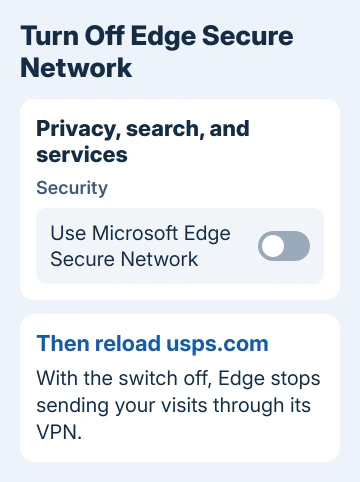
Watch where you are when the error shows. In its recommended Optimized mode, Edge Secure Network routes your traffic through the VPN on public Wi-Fi, so USPS can fail at a coffee shop and work fine at home.
Also check the shield's menu: if Always use VPN for this site is picked for usps.com, the VPN stays on for USPS wherever you are.
3. On an iPhone or Mac, check iCloud Private Relay
Safari's iCloud Private Relay sends your browsing through two relays and shows websites a temporary address, not your real one. Apple warns that some sites may then need extra steps, and a USPS refusal is an extreme case.
- On an iPhone or iPad, go to Settings > [your name] > iCloud > Private Relay and turn it off, then reload USPS in Safari.
- On a Mac, choose Apple menu > System Settings, click your name, then iCloud > Private Relay, and turn it off.
A VPN app on your iPhone can cause the same block. If yours keeps reconnecting after you switch it off, the iPhone VPN turns itself back on guide covers the settings that restart it.
4. No VPN at all? Try a different connection
Turn off Wi-Fi on your phone and load usps.com over cellular data. If it opens there but not at home, USPS is refusing your home connection's address.
The first owner in the Microsoft thread found a lot of New York addresses blocked this way.
No setting on your side lifts that block. Use the other connection for what you need today, such as printing a label or checking tracking, and switch back later to see whether the address has been cleared.
The error page asks you to contact support, so copy down its reference number. Don't expect a quick fix, though: that same owner spent hours calling USPS, and they said they couldn't fix it.
Things that won't help
Clearing cookies, switching off extensions or moving to Chrome or Firefox won't change the result, because the firewall is looking at your address, not your browser.
Reinstalling or resetting Edge won't help for the same reason. If the Edge cache needs clearing for another site, go ahead, but don't expect it to fix USPS.
Still blocked?
If USPS refuses you even on cellular data with every VPN and relay off, the block isn't tied to one connection, and only USPS can see why. Send them the reference number and the time the error appeared.
For anything urgent in the meantime, a Post Office counter can sell postage and look up tracking for you.
The Short Version
USPS's permission message means its firewall refused your internet address. Turn off your VPN, Edge Secure Network or iCloud Private Relay, then reload. With no VPN, use cellular data or another network and report the reference number.
Checked November 19, 2026.
 If you have any business, I can build it online