Samsung phones are made in several countries, including Vietnam, India, South Korea, and Brazil. Samsung is a South Korean company, but that doesn't mean your Galaxy was assembled there.
To check a particular phone, start with the country-of-origin label on its matching retail box, then compare the box's identifiers with Settings > About phone.
In this guide
Start with the country on your own phone's packaging
Samsung's home country and the place your phone was assembled are two different things. A Galaxy sold in one country can have been manufactured somewhere else.
Buying it locally doesn't tell you where it was assembled.
For a Google handset, Pixel country-label checks explain why a California company address can appear beside an Asian manufacturing origin.
Look for a country-of-origin or manufacturing statement on the retail packaging. Read the wording as printed. An importer or distributor's address doesn't tell you where the phone was assembled, even when that address is in your country.
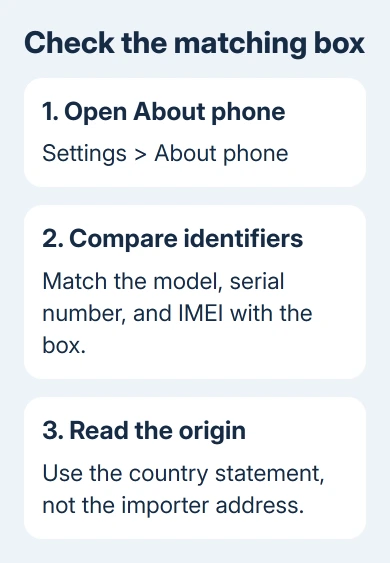
Next, check that the packaging actually belongs to the phone. That matters with used devices, store display stock, and boxes supplied by a reseller. A label on the wrong box tells you about a different handset.
- Open Settings on the Galaxy phone.
- Tap About phone.
- Compare the Model number, Serial number, and IMEI with the identifiers printed on the packaging.
- Read the country statement once you've confirmed that those details match.
Samsung's instructions for finding these identifiers cover the Settings route and other places to look. Available labels and screens vary by phone, carrier, and software version.
A model number identifies a version of the product. A serial number identifies the individual unit, and an IMEI identifies mobile equipment on a cellular network. These identifiers don't replace an origin statement.
The main manufacturing countries aren't all the same thing
Samsung's 2025 Business Report names South Korea, Vietnam, India, and Brazil as major smartphone production locations. These are major production sites, but the list doesn't tell you where every Galaxy model sold in every market was made.
Vietnam: A major location in the phone production network. An authentic Samsung phone can have a Vietnamese origin label. The Korean brand name doesn't require a Korean assembly label.
India: Another major smartphone production location. The Noida factory is part of Samsung's production network. It isn't a separate company making a different brand of Galaxy phones.
South Korea: Phone production also takes place in the company's home country, including Gumi. A Korean label is one possible origin, but it isn't the only acceptable one when you're checking a handset.
Brazil: The business report also includes Brazil among the major smartphone production sites. Don't dismiss a Brazilian origin label simply because a country list you've seen only mentions Asian factories.
Those locations answer the general question. They don't identify the factory that produced the phone in your hand. For that, check its own label and confirm that the device details match.
I'd use the matching package before any online country decoder. It's tied to the item you're checking, while an unsupported decoder can turn a few digits into a claim it hasn't explained.
Assembly country doesn't describe every component
A phone contains a display, battery, cameras, storage, chips, and many smaller parts. The place where the finished device is assembled isn't automatically the place where every one of those components was made.
That distinction matters when two descriptions seem to disagree. A product can belong to a Korean company, contain parts from several suppliers, and have a final assembly statement naming India or Vietnam.
Those descriptions can all fit the same device.
For a customs form or purchase record, use the phone's own country-of-origin paperwork.
For a replacement battery or display, check the part and phone model, rather than choosing by the phone's assembly country.
Don't infer a component's source from a repair listing that only names a compatible Galaxy model. Compatibility describes what it fits. It doesn't tell you who manufactured that particular replacement part.
What to do when the box is missing
Open Settings > About phone and save the model, serial number, and IMEI privately. The seller or support team can use these details to identify your phone even without its packaging.
The IMEI or serial number may also appear on the back of the device, its purchase paperwork, or your carrier account. In Samsung Members, open Support and tap the device name to view its identifying details.
The dialer code \*#06# can display identifying numbers when your carrier supports it. If it doesn't respond, use Settings instead. If the code doesn't work, that doesn't tell you which country the handset came from.
For an older model with a removable battery, identifying information may be underneath it. Don't pry open a sealed Galaxy to search for a label. The Settings route is available without opening the phone.
If you're checking an inherited phone before setting it up, our guide to restoring a Samsung Cloud backup explains the separate job of getting the previous data back.
A country label can't settle authenticity or warranty
A familiar manufacturing country doesn't make a questionable sale safe. Check the whole purchase: matching identifiers, the exact model advertised, the seller's paperwork, and the warranty terms for the country where you'll use the phone.
An unfamiliar country label doesn't call for a factory reset, either. A reset erases settings and data; it doesn't identify the factory or change the hardware's sales region.
For a used purchase, ask for the exact model number before paying. A phone's assembly country doesn't by itself answer questions about supported networks, carrier locks, or whether local warranty service covers an imported unit.
If the handset has a connection problem, treat that as a separate fault.
Our Samsung cellular data checks follow the SIM, carrier, and cellular settings rather than guessing from the country label.
Ask for confirmation when the identifiers don't agree
If the phone and box show different identifiers, ask the seller to explain the mismatch and provide the correct paperwork. Don't accept a general statement that all phones from a particular country are genuine or covered locally.
If you still need help confirming the origin or warranty, contact Samsung support in the country where you bought the device.
Give them the model, serial number, purchase receipt, and a photo of the label, and ask about that specific unit.
The Short Version
Samsung manufactures phones in several countries. Read your Galaxy's country label, confirm that the box matches the handset in About phone, and use its exact identifiers for any support or warranty question.
Checked November 12, 2026.
 If you have any business, I can build it online