
The sound comes out of the television again. No error, no alert, nothing in the Home app saying anything went wrong.
The Apple TV is not reporting a failure because, from its side, nothing failed. It asked for a speaker, did not get one, and carried on with the one it already has.
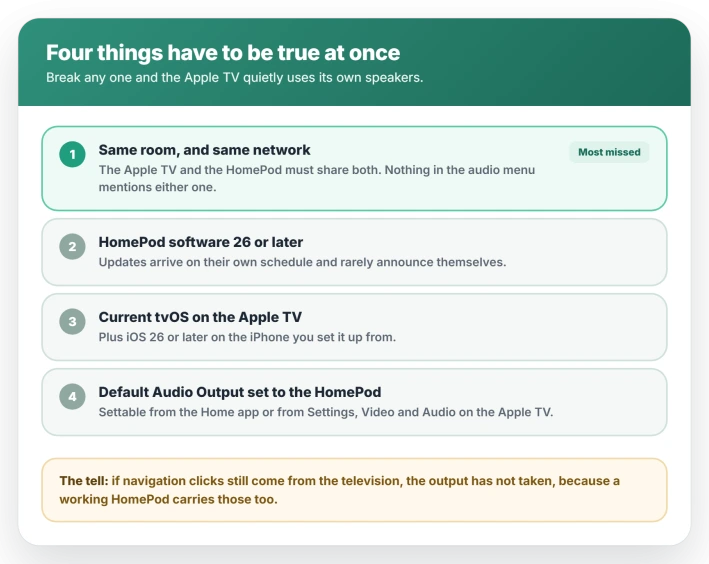
On tvOS 26 the condition that most often breaks that link is not in the audio menu at all. Apple requires the Apple TV and the HomePod to share a room in the Home app.
Never appears in the list? Check the room, then the software version. Appears but will not stick? Check the update section.
The Apple TV and HomePod must be in the same Home app room
Apple documents all of this as an Apple TV 4K feature, so an older Apple TV HD sits outside what Apple describes.
Your Apple TV and your HomePod have to be assigned to the same room, and be on the same network.
Apple documents both as prerequisites rather than suggestions, so a HomePod in a different room does not qualify as an output no matter what the audio menu offers.
Apple documents this as an Apple TV 4K feature throughout, so an older Apple TV HD is outside what Apple describes.
Nothing on the audio screen mentions the room rule either, which is the whole problem. The rule is printed on a HomePod support page that the Apple TV's own audio settings never point to.
Renaming a room, adding a second Apple TV, or moving a HomePod between rooms all break it silently. Open the Home app, check which room each device sits in, and move them together if they have drifted apart.
One step people stop short of: moving them does not re-select the speaker. Go back to Default Audio Output and pick the HomePod again afterward.
Check the software versions, and how to see them
Apple sets a floor here, and an out-of-date HomePod does not qualify.
- HomePod software 26 or later. This goes stale quietly, because HomePods update on their own schedule and rarely announce it.
- The latest tvOS on the Apple TV, and iOS 26 or later on the iPhone you set it up from.
To see the HomePod's version, open the Home app, press and hold the HomePod tile, scroll down and open its settings, then look for Software Version.
The same screen carries the automatic update toggle, which is worth leaving on.
If the HomePod does not appear as a choice anywhere, this and the room assignment are the two things to rule out before anything else.
Where Default Audio Output lives, in two places
The setting exists in two places and either one works. Changing it in one changes it in both.
From the Home app, open Home, tap your Apple TV, tap the settings button, then choose Default Audio Output and pick your HomePod or stereo pair.
From the Apple TV itself, go to Settings, then Video and Audio, then Audio Output, then Default Audio Output.
Apple's wording is specific: this routes all sound from the Apple TV to your HomePod, navigation clicks included. If clicks are still coming from the television, the setting has not taken.
If you are using a stereo pair
A pair adds its own failure mode, because the two speakers have to be working as one before the Apple TV will take them.
Test that first, separately from the television. Play something to the pair from the Home app or from your iPhone.
If it will not play as a single speaker there, fix the pair before you touch the Apple TV's settings, because the Apple TV is only ever offered the pair as a unit.
Placement is a sound-quality matter rather than a qualifying one, but Apple publishes exact figures and they are easy to get wrong.
A stereo pair wants roughly four feet, or 1.2 meters, between the speakers, positioned on either side of the television.
A single HomePod wants to be within about ten inches, or 25 centimeters, of the wall behind it and centered on the screen.
What tvOS 26 changed, and what still does not carry
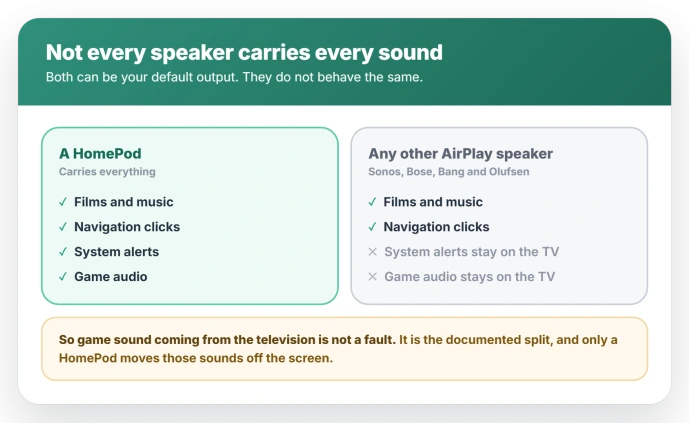
tvOS 26 opened default audio output to any AirPlay speaker, so a Sonos, Bose, or Bang & Olufsen speaker can now be the permanent output rather than a temporary one.
The two speaker types do not carry the same audio. A HomePod carries everything, including system sounds and game audio.
A non-HomePod AirPlay speaker carries almost everything, but system alerts and game sounds stay on the television speakers.
So if your music and movies come from the speaker while game audio stubbornly comes from the TV, that is the documented split rather than a fault, and choosing a HomePod is the only way to move those sounds.
If it stopped working after the 26.5 update
One MacRumors thread from 29 May 2026 collects reports of the link breaking after the May update. The accounts in it match each other closely, but it is one thread, and nothing comparable has appeared elsewhere.
The signature they describe: the Apple TV and HomePods show a network issue in the Home app while both are otherwise online and reachable, the Apple TV will not connect to a stereo pair at all, and one owner found audio missing even after switching back to the television speakers.
Apple has not acknowledged it. The tvOS and HomePod 26.5 release notes mention only performance and stability improvements, and no fix has been announced.
There is no confirmed cure, so treat the standard sequence as worth trying rather than as a solution: restart the Apple TV and the HomePods, check both are on current software, and re-pick the output in the Home app.
One owner reported a router change helping, which is a single account and not a reason to reorganize your network.
tvOS and HomePod 26.6 are due at the end of July 2026. Install it when it reaches you and re-test before working through anything else here.
What does not fix it
- Unpairing and re-pairing the stereo pair. It rebuilds the speaker grouping, which is rarely what broke. Worth doing only if the pair itself has stopped behaving as one speaker.
- Resetting the Apple TV to factory settings. A large cost for a routing problem, and one owner who reset the Apple TVs, HomePods and router during the 26.5 trouble still had a room that failed afterward.
- Switching the output to the TV speakers and back. It looks like a reset and is not one. If the room or software conditions are wrong, re-picking lands in the same place.
- Turning AirPlay off and on. That toggle governs whether other devices can stream to the Apple TV. It has nothing to do with where the Apple TV sends its own sound, so cycling it cannot touch your default output.
- Moving the HomePod closer to the Apple TV. Placement affects sound quality and stereo imaging, not whether the device qualifies as an output. The room it is assigned to in software is what counts, not the distance across your living room.
Status: HomePod as the Apple TV output needs both devices in the same Home app room, HomePod software 26 or later, and current tvOS. A 26.5 regression is reported but unacknowledged and unfixed.
When it is a different problem
- Everything in the Home app says No Response. That is a HomeKit connectivity problem rather than an audio routing one, and it has its own fix tree starting with the home hub.
- Audio drops out mid-playback rather than never starting. Owners traced short bitstream and format-switching dropouts on tvOS 26.3 to a separate issue. Do not assume a newer release cleared it: the reporters found it surviving 26.4 with HomePods attached, and it is a different symptom from the output refusing to stick.
- HomePods playing on their own. A bug that arrived with HomePod software 26 has speakers waking and playing unprompted, sometimes at night. Owners report it continuing through 26.5, and it is unrelated to output selection.
- AirPlay not finding the speaker at all. If the HomePod is missing from every AirPlay list rather than only the Apple TV one, start with AirPlay not finding devices.
- Continue watching lists out of step. That is Up Next syncing, which is unrelated to audio.
Does the HomePod have to be in the same room as the Apple TV?
Yes. Apple requires both devices to be assigned to the same room in the Home app, and to be on the same network. A HomePod in another room does not qualify as the Apple TV's default output.
It is the most commonly missed condition because nothing in the Apple TV's audio settings mentions rooms at all.
Why will my HomePod not show as an audio option on Apple TV?
Most often the room assignment. After that, check the HomePod is on software 26 or later, since an out-of-date speaker does not meet Apple's stated floor.
Why does game sound still come from the television?
Because your default output is an AirPlay speaker that is not a HomePod. System alerts and game audio stay on the television in that case, by design. A HomePod carries them.
Does using a HomePod for Apple TV audio need a stereo pair?
No. A single HomePod works on its own. A pair gives you left and right channels, with the television between the two speakers.
The Short Version
- The Apple TV and HomePod must be in the same room in the Home app. This is the most commonly missed requirement, and nothing in the audio menu mentions it.
- The HomePod needs software 26 or later, and the Apple TV needs current tvOS. Check the HomePod version by holding its tile in the Home app.
- Default Audio Output can be set from the Home app or from Settings, Video and Audio on the Apple TV. Either works.
- A HomePod carries all audio including system and game sounds. Other AirPlay speakers leave those on the television.
- A stereo pair wants roughly four feet apart, on either side of the screen.
- One thread reports this breaking after 26.5, with no acknowledgment and no confirmed fix. Try 26.6 when it arrives.
Where to Next
- The speaker missing from every AirPlay list: AirPlay can't find devices on iOS 26
- Continue watching not lining up: Apple TV Up Next not syncing
- Sound problems on the phone itself: no sound on iPhone calls

Isaac Smith is the founder and editor of PC Glance, a website that covers computers, laptops, and technology. He is a tech enthusiast and a computer geek who loves to share his insights and help his readers make smart choices when buying tech gadgets or laptops. He is always curious and updated about the latest tech trends.