
You can downgrade from the iOS 27 beta, and unlike a normal iOS update there is a real route back. It needs a computer, a cable, and a backup you made before you installed the beta.
Staying on the beta is an inconvenience. Leaving it badly is the part that can cost you access to your own iCloud data, and the guides that rank for this do not mention the setting involved.
So: the two things people mean by getting off the beta, three checks to run first, then the steps.
The short answer
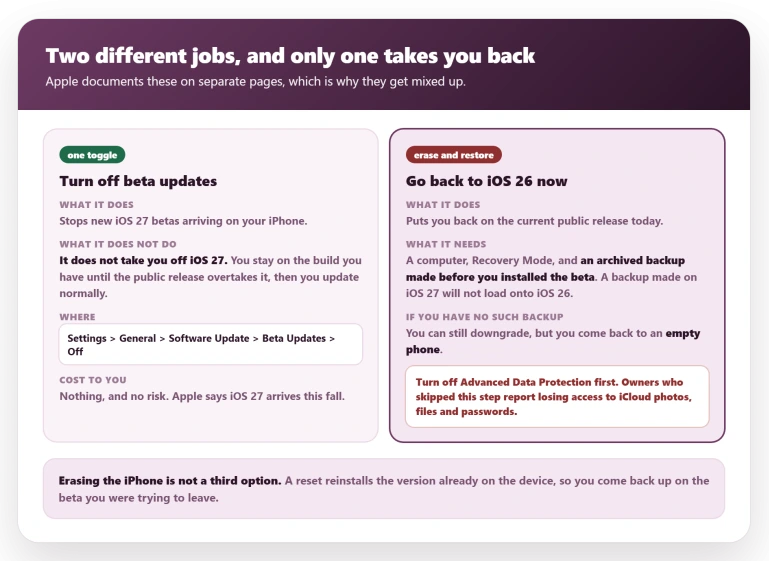
Decide which of two jobs you want, because they are not the same and Apple documents them on separate pages.
If you can wait, turn off beta updates and stop there. You stay on iOS 27 until the public release overtakes it, then update normally. Apple says iOS 27 is coming this fall.
Nothing you are missing on iOS 26.6 makes that wait painful, since it brings nothing user-facing beyond security fixes.
If you want off now, you need a computer to restore the iPhone. The rest of this page is about doing that without losing anything.
One thing to settle, because we have twice written the opposite. A normal iOS update cannot be undone, and that stands.
A beta is the exception, mechanically: Apple installs only a version it is currently signing, and while you sit on a beta the signed public release is behind you. Restoring to it is a step back.
That window shuts when iOS 27 ships.
Turning off beta updates does not take you back
Start here, because this misunderstanding costs people an afternoon.
Go to Settings, General, Software Update, Beta Updates, and tap Off. That is Apple's own instruction and it works.
But read what Apple says happens next, on its unenroll page: "When the next commercial version of iOS is released, you can install it from Software Update."
That is the whole effect. You stop receiving new betas. You stay on the beta you already have.
Nor does wiping the phone help. Erase All Content and Settings reinstalls the build already on the device, so you come back up on iOS 27 with nothing on it.
That is the worst outcome here, and it is one Settings screen away from anyone who has not been told.
The five biggest guides I could open all skip the toggle and send you straight to a wipe. MacRumors' page does not contain the words "Beta Updates" or "unenroll" anywhere.
Smaller sites do carry it, Macworld and Technobezz among them. For anyone who would have been happy to wait a few weeks, that is a restore they never needed.
Settle three things before you erase anything
Each is easier to check now than to repair later, and the first two may tell you not to downgrade at all.
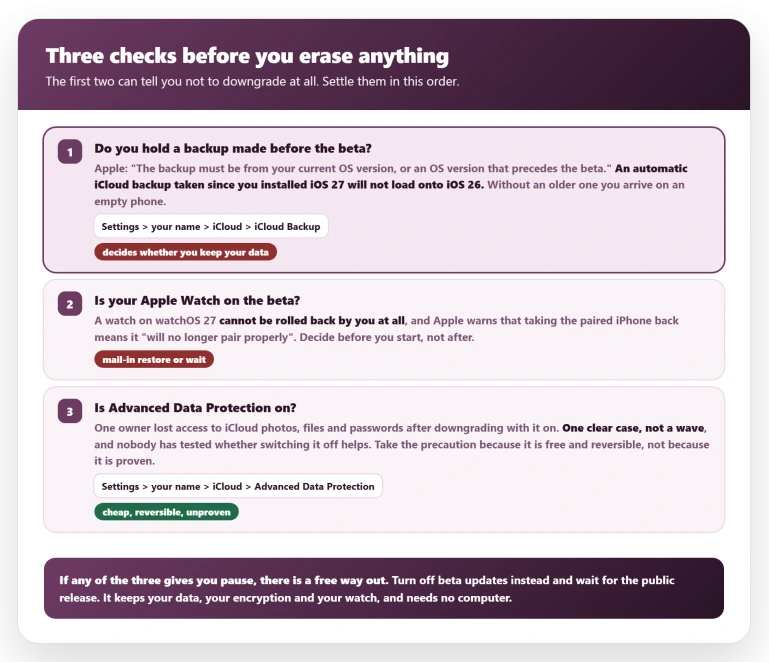
Do you have a backup that predates the beta? Everything turns on one sentence in Apple's restore instructions: "The backup must be from your current OS version, or an OS version that precedes the beta."
A backup made on iOS 27 will not load onto iOS 26. If the only recent one you hold is the automatic iCloud backup running since you installed the beta, it cannot carry your data back.
Check its date under Settings, your name, iCloud, iCloud Backup, then check your computer for anything older.
An archived backup is one taken in Finder or the Apple Devices app and marked so later backups do not overwrite it. Without one you can still downgrade, but you arrive on an empty phone.
Is your Apple Watch on the beta? Settle this before you start rather than after.
Apple states the rule in its beta program FAQ, inside a dropdown: "Apple Watch cannot be restored to previously-released OS versions once the beta is installed." You cannot do it yourself at all, and Apple's restore page adds that with a watch on the beta, taking the paired iPhone back "is not recommended as it will no longer pair properly".
The downgrade you are planning can leave you with two devices that no longer talk to each other.
Is Advanced Data Protection on? Check under Settings, your name, iCloud, and look for Advanced Data Protection.
It is off unless you turned it on yourself, and if it is off the next section does not apply to you.
The Advanced Data Protection question
Advanced Data Protection end-to-end encrypts almost everything in your iCloud account, so not even Apple holds the keys. One owner on MacRumors in July, quoted in full:
> "It doesn't seem to be widespread, but it happened to me and a couple other users on Reddit. If you have advanced data protection on and you downgrade, there's a chance that your account can lose the ability to sync most of the iCloud data that you have, including photos, files, passwords. Not even accessing iCloud on web works anymore. Some users have been able to get it to work again by upgrading back to the iOS beta, others, myself included, unfortunately haven't been so lucky. So if you have ADP enabled, I'd advise against downgrading."
Now the part other pages would leave out. A second owner in that thread reported losing "passwords all of them and photos plus notes data missing" and answered "Yes" when asked whether the setting was on.
Three posts later he wrote that he had double-checked and it was off, and that Apple support had blamed Passwords and Keychain rather than encryption.
So this rests on one clean first-hand case and one that came apart, plus that owner's own tally of five, largely from Reddit by his own account.
Apple has confirmed no mechanism, and whether turning the setting off prevents any of it is untested. The thread goes quiet after 21 July with the first owner unresolved, so treat that as where the evidence ends.
Take the precaution anyway, not because the danger is proven but because it is cheap.
Switching the setting off takes seconds, Apple says you can reverse it whenever you like, and none of the fifteen how-to pages I checked mentions it at all.
There is one good case for ignoring that advice.
Turning the feature off returns your iCloud Backup, Photos and Notes to standard protection, where Apple holds the keys and can be compelled to produce them.
If you switched it on deliberately, that is the whole point of it, and that owner reached the stricter conclusion: do not downgrade at all. Waiting for the release keeps both.
If you do go ahead: Settings, your name, iCloud, tap Advanced Data Protection, then Turn Off Advanced Data Protection. It is a row you tap into, not a switch on the iCloud screen.
Switch it back on afterwards.
One correction, either way. If iCloud.com stops working, that is not damage.
Apple's Advanced Data Protection page says that with the feature on, "access to your iCloud data on the web at iCloud.com is disabled".
People read that documented behavior as a fault.
You can also have both: Apple's web access page explains you can switch iCloud.com back on while keeping the encryption, under Settings, your name, iCloud, iCloud.com, then Allow Data Access.
How to actually downgrade
Checked on 6 August 2026, iOS 26.6 is the only build Apple is still signing on every model I tested. That decides two things: the route works today, and 26.6 is where you land.
You do not get to pick an earlier iOS 26.
Apple's steps, from its restore page:
- Plug the iPhone into a computer. On a Mac that means Finder; on Windows, the Apple Devices app.
- Put it into Recovery Mode. Apple's wording for an iPhone 8 or later: "Press and quickly release the Volume Up button. Press and quickly release the Volume Down button. Then, press and hold the Side button until you see the recovery-mode screen." Keep holding past the Apple logo.
- Your computer offers Restore or Update. Choose Restore. Apple is explicit that this "will erase your device". Update would leave the beta in place.
- Activate the iPhone by signing in when prompted.
- When Setup Assistant offers a backup, pick the one made before you installed the beta.
Our page on restoring an iPhone from Recovery Mode walks the same route in more detail.
Status: iOS 27 is in public beta and Apple says it ships this fall. As of 6 August 2026, iOS 26.6 is the only signed build, so this route is open. It closes when iOS 27 is released.
What does not help
- Erase All Content and Settings. It reinstalls the build already on the phone, so you land back on the beta with an empty device.
- Choosing Update instead of Restore in Finder. Update keeps the beta.
- Turning up at an Apple Store with a watch on the beta. The only route on record is a mail-in restore, and advice appears to vary by location, so phone Apple before you travel.
- Contacting AppleCare while still on the beta. Apple's FAQ says "you must restore to previously-released software prior to contacting AppleCare", so that call goes nowhere until you are back on a release build.
If you already went back and iCloud is broken
This group has the fewest options, so take these three points as the state of it.
Your data is probably not gone. The owner quoted earlier reported after speaking to Apple: "Based on my own communications with support the data is still there it's just accessing it that doesn't work." Treat it as a lockout rather than a deletion.
Do not judge it by iCloud.com. With Advanced Data Protection on, web access is off by design, and you can turn it back on separately without disabling the encryption.
Going back up to the beta is not a reliable cure. It restored access for some owners early on, but the owner quoted here wrote on 21 July that returning to iOS 27 "hasn't done anything for me, nothing is syncing", with his case escalated to engineers.
If only saved passwords are missing, our page on iCloud Keychain refusing to stay on covers a separate cause to rule out first.
Otherwise this needs an open case with Apple, not another erase.
Do I need a computer to downgrade from the iOS 27 beta?
Yes, and there is no way round it. You need a Mac or a Windows PC, a cable, and Recovery Mode. Anything you can do in Settings alone will either stop future betas or wipe the phone while leaving iOS 27 on it.
Will I lose my photos if I downgrade from the beta?
Only those that exist nowhere but the phone and in backups made during the beta. Anything already in iCloud Photos returns when you sign in again.
Anything created since your last pre-beta backup, and synced nowhere, does not survive.
Which version of iOS 26 will I end up on?
iOS 26.6, and you get no choice. Apple installs only a version it is currently signing, and as of 6 August 2026 that is 26.6 alone. Every older iOS 26 build is closed.
The Short Version
- Two different jobs. Turning off beta updates leaves you on iOS 27. Going back now needs a computer.
- Erase All Content and Settings is not a downgrade. It reinstalls the beta onto an empty phone.
- Your backup must predate the beta. One made on iOS 27 will not load onto iOS 26.
- An Apple Watch on the beta cannot be rolled back by you, and downgrading the paired iPhone can stop the two pairing.
- Turn off Advanced Data Protection first. The evidence is one clear case, not a wave, but the precaution is free and reversible.
- If you value that encryption more, wait for the release instead. That was the affected owner's own conclusion.
- iCloud.com not working is normal with that feature on, and web access can be re-enabled without giving up the encryption.
- In Finder, choose Restore, not Update.
- You will land on iOS 26.6, the only signed build as of 6 August 2026.
Where to Next
These are two different jobs and it is worth being clear which one you actually want. Turning off beta updates leaves you exactly where you are.
Going back properly needs a computer and time, and it is not something to start in a hurry.
If you are unsure which of the two you need, describe what you are trying to get away from and I will tell you which one it is.

Isaac Smith is the founder and editor of PC Glance, a website that covers computers, laptops, and technology. He is a tech enthusiast and a computer geek who loves to share his insights and help his readers make smart choices when buying tech gadgets or laptops. He is always curious and updated about the latest tech trends.