
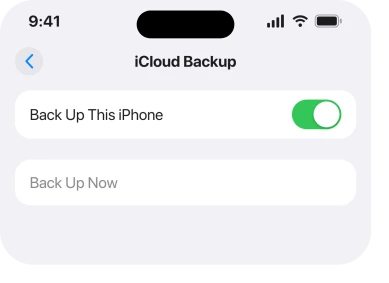
Back Up Now is grey, your last backup is months old, and tapping it does absolutely nothing. That is an unpleasant thing to discover, usually on the day you actually need the backup, and I am sorry it landed on you like that.
Something worth saying at the top. Apple documents exactly two causes for this, and the internet lists about eight.
I have put Apple's two first, then four that are widely reported, and I have labelled which is which all the way down.
1. Check whether a restore is still running
Apple's first documented cause. It is also the one nobody expects.
Apple, in If you can't back up to iCloud, under a heading about the option being greyed out: "Check if a restore is still in progress. Open the Settings app, tap your name, tap iCloud, then tap iCloud Backup. If your device is still being restored, you see 'This [device] is currently being restored and will automatically back up when it is done.'"
Then the reassuring half: "You can create a new backup after your device finishes restoring."
So go and read that screen rather than tapping the grey button again. Is that sentence there? Then nothing is wrong. Your phone is finishing a job, and it will back up by itself afterwards.
This one catches people on a brand new iPhone. A large restore can run quietly for a very long time.
2. Look for a profile that restricts backup
Apple's second documented cause, and the commonest one on a work or school phone.
Apple: "Check whether you installed a profile that restricts iCloud Backup. Open the Settings app, tap General, then tap VPN & Device Management to see a list of installed profiles."
Open that screen. Anything listed there? Then an organisation has set rules on this phone, and backup may be one of them.
You cannot lift that yourself. Whoever manages the device has to change the policy. Asking them the specific question is far faster than trying settings.
⚠️ That screen is worth checking even on a personal phone. Old profiles arrive from VPN apps, school Wi-Fi setups and configuration links people tapped years ago, and they sit there quietly afterwards.
3. Check Screen Time restrictions, which owners report and Apple does not list here
Now the first of the widely reported ones. I want to be straight with you. It is not on Apple's greyed-out list.
Open Settings > Screen Time > Content & Privacy Restrictions. If restrictions are on, look through the account and changes settings, because a restriction that blocks account changes can take controls away rather than dim them.
This turns up constantly in owner accounts. Often from people who set a Screen Time passcode years ago and forgot. It fits the mechanism too, because restrictions remove settings elsewhere in iOS in exactly this way.
But Apple's own page names two causes, and this is not one of them. So I am reporting it rather than documenting it. Try it, and do not be surprised if it changes nothing for you.
4. Free up iCloud storage, and read the alert properly
Widely reported. Apple does address storage on the same page, for the neighbouring failure.
Apple, on a backup that will not complete: "Check to make sure that you have enough iCloud storage for the backup." And in its instructions for backing up: "If you get an alert that you don't have enough iCloud storage space to complete the backup, follow the onscreen steps to buy more iCloud storage."
Go to Settings. Tap your name, then iCloud, and look at the storage bar.
⚠️ Do not buy more storage on reflex. A full iCloud account is very often full of things you would never choose to keep, and our page on iPhone storage full when iCloud has space covers how to tell which of the two you are actually short of.
5. Get on Wi-Fi, because the whole feature depends on it
Simple. It is a condition rather than a fault.
Apple's instruction for a manual backup: "Tap Back Up Now. Stay connected to your Wi-Fi network until the process ends."
And its first troubleshooting step when a backup will not complete: "Open the Settings app, then tap Wi-Fi to make sure that you're connected to Wi-Fi."
A phone on cellular only cannot back up. Nor can one on a captive network you never signed into. Apple also suggests trying a different Wi-Fi network, which is worth doing on a work or hotel connection that may be filtering.
While you are there, Apple adds one more: install any pending update at Settings > General > Software Update.
6. Check whether a computer took ownership of the backup
The narrowest of the reported causes. It explains a phone that has never backed up to iCloud at all.
When an iPhone is set to back up to a computer rather than to iCloud, owners report the iCloud option going unavailable. Connect yours to the computer you sync with. Then check whether the backup destination is set to that computer rather than to iCloud.
Same honesty as rung 3: this is an owner-reported pattern, not something Apple lists among its two causes.
⛔ And a plain ending. On an Apple Community thread about exactly this, a Level 10 member with 211,601 points gave the two documented checks, the owner replied "Thanks for responding but those were not resolutions", and the thread closed with no fix. If you get to the bottom of this page still stuck, you are in that position and an Apple Support appointment is the next real step. If the problem is that your backups are missing rather than that the button is grey, No Backups Available is a different page.
What does not help
- Signing out of iCloud and back in. It risks your synced data and no owner in the threads read reported it clearing a grey button.
- Resetting all settings. Neither of Apple's two documented causes lives in your settings.
- Buying storage before you look. The alert about storage is a different message from a greyed-out button.
- Tapping it repeatedly. If a restore is running, the button is grey on purpose until it finishes.
Status: iOS 26.6.1, checked 19 August 2026. Apple documents two causes for a greyed-out backup. The other four here are owner-reported and labelled as such in the body.
Why is iCloud Backup greyed out on my iPhone?
Apple names two causes: a restore that is still running, and a configuration profile that restricts backup. Owners also report Screen Time restrictions, a full iCloud account and a phone set to back up to a computer instead.
How do I know if a restore is still in progress?
Open Settings, tap your name, tap iCloud, then tap iCloud Backup and read the screen. Apple says you will see a line stating the device is currently being restored and will back up automatically when it finishes.
Does iCloud Backup need Wi-Fi?
Yes. Apple tells you to stay connected to Wi-Fi until the backup ends, and its first troubleshooting step for a failed backup is to check you are on Wi-Fi at all.
Can a work profile stop my iPhone backing up?
It can. Apple tells you to check Settings, General, VPN and Device Management for a profile that restricts iCloud Backup, and only whoever manages the device can lift that.
The Short Version
- Apple documents two causes, and everything else you read is owner-reported.
- A restore still running greys the button on purpose and clears itself.
- A configuration profile can restrict backup and only its owner can lift it.
- Screen Time restrictions are widely reported and are not on Apple's list.
- Check iCloud storage before you buy any, because the shortage may be elsewhere.
- Wi-Fi is a requirement rather than a suggestion.
- A phone set to back up to a computer is reported to lose the iCloud option.
Where to Next
This page is laid out by evidence rather than by popularity, because the popular list is mostly unsourced. Eight causes get repeated everywhere, Apple names two, and a reader has no way of telling which is which.
Now you can. Do Apple's two properly. They are cheap, and they are the only ones with a documented mechanism. Then work through the reported four knowing exactly what they are.
One of the four reported causes turning out to be yours is genuinely useful news. Tell me which one, because a confirmed case moves it from repeated to reported, and I could say so on this page.

Isaac Smith is the founder and editor of PC Glance, a website that covers computers, laptops, and technology. He is a tech enthusiast and a computer geek who loves to share his insights and help his readers make smart choices when buying tech gadgets or laptops. He is always curious and updated about the latest tech trends.