

Your Magic Mouse says Connected, with its battery level showing. The pointer will not move, click or scroll.
Frustrating, when the trackpad and every other mouse still work. Your mouse is very likely not dead, though.
This is a new macOS 27 fault with no Apple fix yet. I cover how to confirm it, what owners tried, and the one workaround that worked.
Status: macOS 27.0, checked 24 September 2026. Not fixed by Apple, and Apple has said nothing about it. Re-pairing, the cable and Safe Mode did not help anyone in the main forum thread. A community tool brought the mouse back for the owners who tried it. This page gets updated when Apple ships a fix.
Is it this fault, or something else?
Check three things before you do anything else.
First, the mouse shows as Connected, with a battery level, in System Settings, Bluetooth. Second, it does nothing at all: no pointer movement, no clicks, no scrolling, no gestures.
Third, your trackpad, a USB mouse or a non-Apple Bluetooth mouse still works normally. One owner also noticed the Mouse settings pane had gone empty.
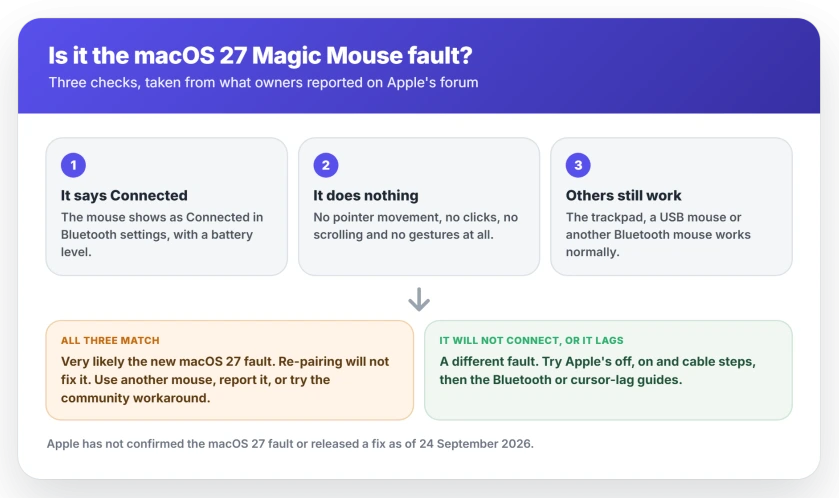
If all three match, this page is about your fault. A mouse that never connects is a pairing problem, and the Bluetooth guide for Macs fits it better. One that moves but jerks and freezes is closer to frozen cursor and mouse lag.
Which Magic Mouse models are affected
Reports cover both the older Lightning Magic Mouse and the newer USB-C one.
Owners on Apple's forum name firmware 1.9.2 on the Lightning model. Others hit it with firmware 3.1.4, which one owner identified as the USB-C model, on MacBook Pro and MacBook Neo machines.
It is not every mouse, so yours may never hit it. An experienced member of the forum runs two Magic Mice on two Macs with macOS 27 and says both "work flawlessly".
Another owner found the original Magic Mouse 1 worked on the same Macs where a Magic Mouse 2 did not.
It is not only the Mac either. Owners tested the same mice on iPads. On iPadOS 27 the pointer was just as dead. On an iPad still running iPadOS 26, it worked.
1. Try Apple's reconnect steps once
Do this once, because it rules out an ordinary connection fault that looks similar.
Apple's steps for Magic accessories are short. Slide the switch on the bottom of the mouse off until no green shows, then on again.
Then connect the mouse to your Mac with its cable, wait one minute, and disconnect it. Apple says this "pairs the accessory with your Mac and charges the built-in battery."
If the pointer moves after that, you had a normal pairing glitch, and you are done.
If it still sits there, stop repeating it. The owner who studied this fault most closely tried re-pairing, pairing by cable, clearing the device list and resetting Bluetooth. None of it lasted.
2. Use the trackpad or another mouse for now
The practical step, while you decide what to do about the Magic Mouse.
Owners on the thread confirm the built-in trackpad, the Magic Keyboard and non-Apple Bluetooth mice keep working on macOS 27. A wired USB mouse is another option.
It matters more than you might think. If the only way you can move the pointer is the Magic Mouse, keep a spare within reach before you install or remove anything.
3. Take third-party mouse tools out of the picture
A forum adviser suggested ruling these out first, and it is sensible housekeeping.
Quit or remove any mouse utility such as Logitech Options+, SteerMouse, BetterMouse or Mac Mouse Fix, and switch off any other Bluetooth mouse. Then restart and test the Magic Mouse on its own.
Do not expect much from it, though. One owner with no other mouse and no mouse utility at all had exactly the same dead Magic Mouse. So this rules out a separate cause, and it is not the fix.
4. Tell Apple, with details that help
Nobody outside Apple can ship a real fix. Reports are how this gets priority.
Use Apple's Magic Mouse feedback page. Include your Mac model, the macOS build from About This Mac, whether your mouse is the Lightning or USB-C model, and the exact symptom.
One owner posted a model report in the thread: the mouse pairs and shows a battery level "but sends no input at all". Put that sentence in your own report, because it is what Apple's engineers need.
Mention that re-pairing and Safe Mode did not help you. It saves them asking.
5. The community workaround, if you cannot wait
Developers found what the Mac seems to skip, and wrote tools that do it by hand.
In the words of the owner who found it: "On macOS 26 the mouse receives a feature report that switches it out of boot-mouse mode into multi-touch mode. On 27 that report is never sent".
Sending those four bytes brings the mouse back. Should you want to try it, the simplest version is an app called MagicMouseFix, which its developer publishes on GitHub.
Its page says the app is signed and notarized by Apple, runs a small login agent, and needs Input Monitoring permission under Privacy & Security. It also says the app "only writes one 4-byte message to the mouse".
Owners who tried it report it working straight away. One with the USB-C mouse wrote: "After installing MagicMouseFix and allowing Input Monitoring, all functions started working immediately."
Another, on an M4 MacBook Air: "MagicMouseFix … solved the issue. I'll keep it in my mac until an official fix is released."
A developer in the thread ran the other tool, a short program with a background service, and got the same result. You would need Terminal and an administrator password for that one.
It means typing commands with sudo. Unless you are comfortable doing that, the app is the easier route.
My view, which is ours and not a report: this is third-party software, not Apple's, and I have not run it. Read its page before installing.
Uninstall it once Apple fixes macOS. Its developer publishes an uninstall command for exactly that.
6. Or wait for Apple's update
If the trackpad covers you, waiting is a reasonable choice.
As of 24 September 2026 Apple has not released a macOS 27 update, and its Magic Mouse support page has not changed since December 2025. Check System Settings, General, Software Update on your Mac every few days.
One owner suggested going back to macOS 26. That means erasing your Mac and restoring from a backup, which is a lot of work and risk to get a mouse back. I would not do it for this alone.
It is not the only macOS 27 fault still open, either. Mission Control has one where clicking the Desktop does nothing, with its own workarounds.
What does not help
The most thorough owner listed everything that failed: re-pairing, pairing by cable, pairing from a cleared device list, resetting Bluetooth, several restarts, Safe Mode, and resetting two mouse preference files.
Their explanation for why none of it sticks: "None survive a reconnect, because the flag is recomputed each time."
A replacement mouse is no guarantee either. Owners report the same fault on the newer USB-C Magic Mouse, so the new one you buy may behave exactly like your old one.
And an adviser on the thread warned against the deeper tricks: "I would not yet delete Bluetooth files or use Terminal commands to reset Bluetooth." If those were next on your list, that advice holds.
Why is my Magic Mouse connected but not working on macOS 27?
Owners who investigated found the Mac never switches your mouse into its multi-touch mode after connecting. So it pairs and reports its battery but sends no movement. Apple has not confirmed the cause, and the same mouse works on a Mac or iPad still running version 26.
Is there a fix for Magic Mouse on macOS 27?
Not from Apple yet. A community app called MagicMouseFix sends the missing message and restored the mouse for the owners who tried it. Otherwise, use your trackpad or another mouse, report the fault to Apple, and install the next macOS 27 update when it arrives.
Does the USB-C Magic Mouse have the same problem?
Owners report it does. The fault appears on the Lightning Magic Mouse with firmware 1.9.2 and on the USB-C model with firmware 3.1.4. It does not hit every mouse, so yours may be fine, and one forum member runs two Magic Mice on macOS 27 with no trouble.
Is MagicMouseFix safe to use?
Its developer says it is signed and notarized by Apple, only writes one 4-byte message to your mouse, and can be uninstalled with one command. It is still third-party software, not Apple's. Read its page, keep a spare mouse handy, and remove it once Apple ships a fix.
Should I buy a new Magic Mouse?
Not for this. The fault follows macOS 27, not the mouse, and owners with the newer USB-C model report the same dead pointer. Test your mouse on another device first. If it works there, the mouse is fine.
The Short Version
- Connected, battery showing, but no movement: this is a new macOS 27 fault with no Apple fix yet.
- Try Apple's off, on and cable step once. If that fails, stop repeating it.
- Use the trackpad or another mouse meanwhile, and keep one handy.
- Report it on Apple's Magic Mouse feedback page with your Mac model and macOS build.
- MagicMouseFix, a community app, restored the mouse for owners who tried it. Remove it once Apple fixes this.
- A new mouse may not help. The USB-C model has the same fault.
Where to Next
A mouse that connects and does nothing looks broken. On macOS 27 it is almost certainly the Mac, and the mouse will come back when Apple fixes the missing step.
Tried something that worked, or something that did not? Leave a comment with your Mac, your Magic Mouse model and what you tried. Every model we can add makes this page better for the next person.
If it is your keyboard that dropped off Bluetooth instead, the Bluetooth keyboard guide goes through that side.
And if you are picking a replacement mouse anyway, connecting a wireless mouse explains the two kinds and why their setup differs.

Isaac Smith is the founder and editor of PC Glance, a website that covers computers, laptops, and technology. He is a tech enthusiast and a computer geek who loves to share his insights and help his readers make smart choices when buying tech gadgets or laptops. He is always curious and updated about the latest tech trends.